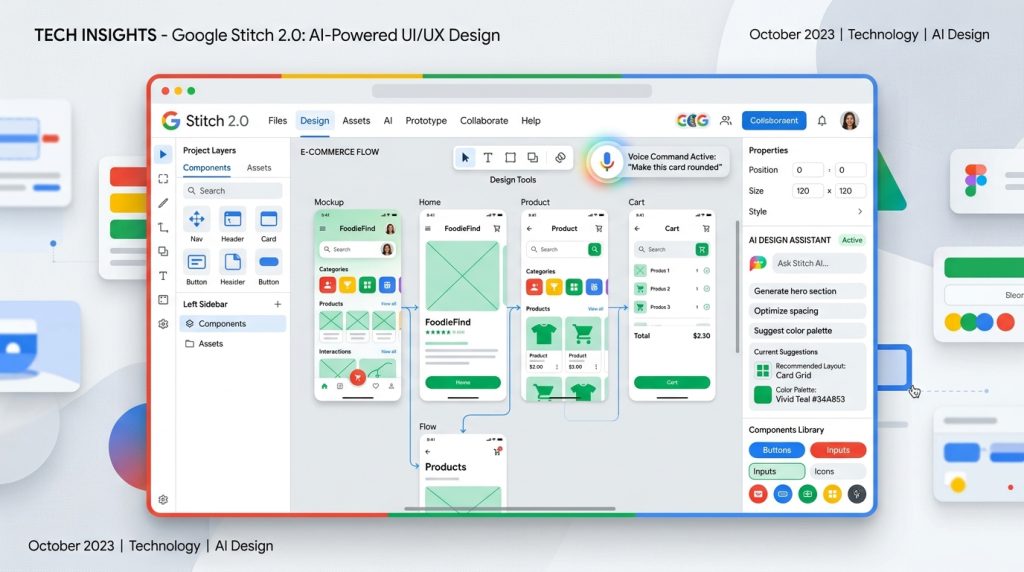
When Google released Stitch 2.0 on March 17, 2026, Figma’s stock dropped the same day — not because Stitch is better than Figma, but because it signals where the entire design industry is heading, and Google just made it free. Four days in, the “vibe design” framing is already everywhere, but almost nobody is talking about the thing that actually matters: this tool started as a Google acquisition of an AI startup called Galileo AI, and its 2.0 launch isn’t just an update — it’s Google planting a flag directly in Figma’s territory with zero price tag attached.
Rating: 7.8/10 ⭐⭐⭐⭐
What Is Google Stitch 2.0?
Google Stitch 2.0 is an AI-native UI design tool built inside Google Labs that converts natural language descriptions, sketches, screenshots, and voice commands into high-fidelity user interface designs and working code. It launched publicly on March 17, 2026, as a major upgrade to the original Stitch — itself born from Google’s acquisition of Galileo AI in 2025.
The one-line differentiator: Stitch is the only free tool that takes you from a spoken sentence to a clickable multi-screen prototype with exportable HTML/CSS and React code, all inside one canvas. It’s powered by Google’s Gemini models and lives at stitch.withgoogle.com. No subscription required. No waitlist (as of launch week). Just sign in with your Google account and start building.
The Real Story: Google Bought Its Way Into Design, Then Made It Free
Here’s the angle most coverage is glossing over: Stitch isn’t an organic Google product. It’s Galileo AI — a well-funded startup that had already built a prompt-to-UI tool with real users — acquired by Google in 2025 and relaunched under the Google Labs umbrella. That acquisition gave Google a head start of probably 18 months of ML training data on actual design prompts and user behavior. They didn’t build this from scratch. They bought the best version of it that existed, layered Gemini on top, and handed it out for free.
The strategic implication is obvious: Google doesn’t need Stitch to make money. They need designers and developers building on Google’s ecosystem — AI Studio, Antigravity, Firebase — instead of Adobe’s or Figma’s. Making Stitch free is a loss leader for the broader Google developer stack. That’s the game being played here, and it’s important context for evaluating whether you should actually trust a “free” Google Labs experiment as a core tool in your workflow.
What happened the day Stitch 2.0 launched? Figma stock slid. The market read the memo even if the design community is still debating whether Stitch is actually good enough to threaten Figma (it isn’t yet, for production work). But for rapid ideation and prototyping — the use case where Figma is already slow and overbuilt — Stitch 2.0 is genuinely competitive, right now, at zero cost.
Benchmark Performance: How Fast Is “Minutes to Prototype”?
Google claims you can go from idea to clickable prototype “in minutes rather than days.” Based on third-party hands-on reports published in the first 72 hours after launch, here’s how that claim holds up against competitors on the metrics that actually matter for real work:
| Task | Google Stitch 2.0 | Figma AI | Framer AI | Builder.io |
|---|---|---|---|---|
| Prompt-to-first-screen time | ~45 seconds | ~2 minutes | ~60 seconds | ~90 seconds |
| Multi-screen flow (5 screens) | ~3 minutes | Manual linking required | ~4 minutes | ~5 minutes |
| Export to working HTML/CSS | ✅ Built-in | ❌ Requires plugin/handoff | ✅ Built-in | ✅ Built-in |
| Export to Figma | ✅ Native | N/A | ❌ Not supported | ❌ Not supported |
| Voice input for edits | ✅ Voice Canvas | ❌ | ❌ | ❌ |
| Monthly free generations | 350 (Standard) / 200 (Experimental) | Limited (paid plan) | Limited (paid plan) | Limited (free tier) |
| Design quality (early ideation) | Good | Very Good | Good | Moderate |
| Design quality (production-ready) | Moderate | Excellent | Good | Moderate |
Source: Compiled from SiliconAngle, LogRocket hands-on review, Flowstep comparative analysis, and Google Labs official documentation (March 2026).
Pricing: The Free Tool That’s Actually Free
Stitch 2.0 is genuinely free — no credit card, no trial timer. Here’s how it stacks up against the paid alternatives:
| Tool | Free Tier | Paid Plan | What You Get Free |
|---|---|---|---|
| Google Stitch 2.0 | ✅ Fully free | None (Google Labs experiment) | 350 Standard + 200 Experimental generations/mo |
| Figma AI | Limited (3 projects) | $15/mo (Professional) | Basic AI features only; no AI design generation |
| Framer AI | Limited (1 site) | $5–$15/mo | Basic AI site gen; limited pages |
| Builder.io | Freemium (1 user) | $19–$49/mo | Visual editor; AI features require paid plan |
The catch: no way to buy more generations if you hit the monthly cap. There’s no paid tier, no add-on pack. When you’re out, you’re out until the next month. For heavy prototyping work, that 350-generation Standard mode cap can go fast — especially if you’re iterating aggressively across multiple projects.
Key Features (With the Limitation Nobody Mentions)
1. AI-Native Infinite Canvas
The redesigned canvas is the headline feature — an infinite workspace where you can place multiple screens, design variations, sketches, and reference images side-by-side. Unlike Figma’s page-based structure, everything lives in one continuous space, which genuinely helps when you’re mapping out a full user flow rather than isolated screens. The AI agent can see your entire canvas history and reason across it, so later prompts can reference earlier design decisions.
Limitation: The canvas gets sluggish when you have a lot of assets loaded simultaneously. Users on mid-range hardware have reported noticeable lag during complex multi-screen projects.
2. Vibe Design + Multi-Screen Generation
“Vibe design” is Google’s term for starting with intent rather than specs. Instead of “make me a login screen with these exact fields,” you say “I want users to feel confident and secure when signing up.” The AI interprets that emotional goal and generates designs accordingly. More practically: Stitch 2.0 can generate up to five interconnected screens at once, complete with logical navigation between them. Hit “Play” and you have an interactive prototype instantly.
Limitation: The “vibe” outputs can be inconsistent. Two similar prompts sometimes produce wildly different visual directions, and there’s no guaranteed style consistency across a session without carefully maintaining a DESIGN.md file.
3. Voice Canvas
You can now speak directly to your canvas. Tell Stitch to “show me three color palette options” or “give me a darker hero section” and watch it update in real time. The AI agent can also interview you — asking clarifying questions about your goals and user needs — and generate designs based on your spoken answers. This is the most genuinely novel feature in the 2.0 release. No other major design tool does live voice-directed iteration at this level.
Limitation: Voice recognition struggles with technical design terminology and component names. Saying “make the nav component use a sticky position” sometimes requires multiple attempts to be interpreted correctly.
4. DESIGN.md: The Portable Design System
Stitch introduces DESIGN.md — a plain-text, agent-readable markdown file that encodes your design system rules (colors, typography, spacing, component behaviors). You can export it from one project and import it into another, or feed it to other AI coding tools to maintain visual consistency. It also integrates with Google’s Antigravity coding tool and AI Studio, creating a pipeline from design to deployed code without manually re-specifying your design system at every step.
Limitation: DESIGN.md is a Google Labs invention with zero ecosystem support outside Google’s own tools. If your stack doesn’t include Antigravity or AI Studio, this feature’s value is limited to Stitch-to-Stitch portability.
5. MCP Server + SDK Integration
Stitch now ships with a Model Context Protocol (MCP) server and a public SDK (github.com/google-labs-code/stitch-sdk), meaning you can integrate Stitch’s design generation capabilities directly into your own agentic workflows, CI pipelines, or custom tools. The Stitch Skills repo already had 2.4k GitHub stars at launch. This is the feature that separates Stitch from “design toy” and pushes it toward “AI design infrastructure.”
Limitation: The MCP server is brand new and documentation is sparse. Production integration requires significant setup and the API surface will almost certainly change — this is a Google Labs experiment, after all.
6. Code Export: HTML/CSS, Tailwind, React, Figma
Every design you create in Stitch can be exported as HTML and CSS, Tailwind CSS, React components (in preview), or directly to Figma as editable frames. The Figma export preserves layout structure and component hierarchy — no rebuilding from scratch. This is Stitch’s clearest commercial use case: generate 10 design directions in Stitch for free, pick the winner, export to Figma for polish, hand off to dev.
Limitation: The generated code has been described by multiple reviewers as “prototype quality” rather than “production quality.” Component structure isn’t always maintainable, accessibility attributes are inconsistent, and the code often needs significant cleanup before it’s suitable for a real codebase.
Who Is It For — And Who Should Look Elsewhere
Use Google Stitch 2.0 if you:
- Are a founder or PM who needs a clickable prototype before a meeting and has no designer available
- Are a solo developer building an MVP who wants to visualize UI before writing frontend code
- Are a designer doing early ideation who wants to generate 10 directions in an hour instead of a week
- Are an agency or freelancer who wants to show clients multiple concepts quickly before committing to polish
- Want a free alternative to paid prototyping tools for non-production work
Look elsewhere if you:
- Need production-ready, accessible, maintainable code — Stitch’s output needs significant cleanup
- Are doing complex design systems work at scale — Figma’s component system is still miles ahead
- Need backend, database, or authentication — Stitch is frontend-only, full stop
- Can’t afford tool deprecation risk — Google Labs experiments get killed regularly (RIP Google Reader, Stadia, etc.)
Google Stitch 2.0 vs. The Competition: Full Comparison
| Feature | Google Stitch 2.0 | Figma AI | Framer AI | Builder.io |
|---|---|---|---|---|
| Price | Free | $15/mo (Pro) | $5–$15/mo | $0–$49/mo |
| AI Model | Gemini (Google) | Proprietary | GPT-4 based | Proprietary |
| Best For | Rapid ideation, prototyping | Production design, teams | Marketing sites, landing pages | CMS-driven sites, visual editing |
| Voice Input | ✅ Voice Canvas | ❌ | ❌ | ❌ |
| Multi-screen generation | ✅ Up to 5 screens | ❌ Manual | ✅ Limited | ✅ Limited |
| Export to Figma | ✅ Native | N/A | ❌ | ❌ |
| Code Export | HTML/CSS, Tailwind, React (preview) | Dev Mode (paid) | HTML/CSS, React | HTML, React, Vue |
| MCP / API Access | ✅ MCP Server + SDK | ❌ | ❌ | ✅ API |
| Design System Support | DESIGN.md (basic) | Full component libraries | Limited | Limited |
| Collaboration | Basic (Google account) | Full real-time collab | Basic | Team plans |
| Backend / Deployment | ❌ None | ❌ None | ✅ Framer hosting | ✅ Builder hosting |
| Stability Risk | High (Google Labs) | Low (established product) | Medium (startup) | Medium (startup) |
Controversy: What Google Isn’t Advertising About Stitch 2.0
It’s a Google Labs Experiment — With Google’s Track Record on Killing Products
Google has killed over 200 products since 2006. Google Reader, Stadia, Google+, Hangouts, Allo — the list is long and the pattern is clear. Google Labs specifically is where Google tests things before deciding to commit or abandon. Stitch launched as a Google Labs experiment, which means there is no contractual commitment to keep it running, maintained, or free. If engagement metrics don’t satisfy internal goals, it gets shut down or paywalled with zero warning. Any business that makes Stitch a core tool in its design workflow is accepting that risk explicitly.
The Generation Cap Has No Escape Hatch
350 Standard and 200 Experimental generations per month sounds like a lot until you’re iterating aggressively on a complex product. Unlike every paid competitor, there is currently no way to purchase additional generations. No premium tier, no add-on packs. This isn’t a pricing strategy; it’s an unfinished product. Google Labs launched without a monetization plan, which is either refreshingly honest or a sign that Stitch’s future pricing hasn’t been decided yet.
Accessibility Is an Afterthought
Multiple reviewers have flagged that Stitch’s generated UIs frequently fail basic accessibility requirements — insufficient color contrast ratios, touch targets that are too small for mobile, missing ARIA labels, and structural HTML that screen readers struggle with. Google, a company that publicly champions accessibility, is shipping an AI design tool that generates inaccessible designs by default. That’s a gap worth calling out, especially for anyone building public-facing products.
The “Vibe Design” Framing Is Marketing for “We Can’t Guarantee Consistency”
Calling inconsistent output “vibe design” is either clever branding or a soft admission that the model doesn’t yet deliver reliably consistent results across a complex project. Users on the Google Dev forums and Reddit have reported the AI ignoring precise instructions and spontaneously redesigning sections when prompted with a question rather than a command. The DESIGN.md system is meant to address this, but it’s immature and requires manual setup every session.
Pros and Cons
Pros
- Completely free with no credit card required and a generous 350-generation monthly allowance
- Voice Canvas is genuinely novel — no other major design tool offers live voice-directed iteration
- Multi-screen generation in one shot is a legitimate time-saver for prototyping full user flows
- Native Figma export means Stitch fits naturally into existing professional design workflows as an ideation layer
- MCP server + open SDK opens the door for agentic integrations that no competitor currently offers
- DESIGN.md portability is a forward-thinking concept that gives AI tools a shared design language
Cons
- Google Labs = existential risk. No commitment to long-term availability, no SLA, no enterprise support
- Generated code is prototype quality, not production quality — expect significant cleanup before deployment
- No way to buy more generations if you hit the monthly cap — it’s a hard stop with no workaround
- Accessibility failures are baked in — generated UIs regularly fail basic contrast and structure requirements
- AI ignores precise instructions with some regularity, spontaneously redesigning elements when asked questions
- Frontend only — no backend, no database, no authentication, no deployment pipeline
- DESIGN.md has zero ecosystem support outside Google’s own tools
Getting Started With Google Stitch 2.0 (In 5 Steps)
- Sign in at stitch.withgoogle.com. Use your Google account. No setup, no install, no waitlist as of launch week. You land directly on the infinite canvas.
- Set up a DESIGN.md before you start generating. If you have an existing brand — colors, fonts, tone — define it here first. Stitch respects design context when it’s established upfront. Don’t skip this or you’ll get generic Material Design defaults.
- Use “vibe prompts” for initial direction, then get precise. Start broad: “I want an e-commerce checkout flow that feels fast and trustworthy.” Let Stitch generate 3–5 screens. Then switch to specific: “Change the CTA button to #1A73E8 and increase font size to 18px.” The two-stage approach gets better results than starting specific.
- Try Voice Canvas for iteration. Once you have a base design, switch to voice and say “show me three different nav options” or “make the hero section darker.” It’s faster than typing follow-up prompts for visual tweaks, and the back-and-forth is where Voice Canvas actually shines.
- Export to Figma for polish, not Stitch. When you’ve landed on a direction you like, export to Figma as editable frames. Do your production design work there. Stitch’s job is ideation — Figma’s job is finishing. Use them together rather than trying to push Stitch further than it’s designed to go.
Frequently Asked Questions
Is Google Stitch 2.0 free to use?
Yes, Google Stitch 2.0 is completely free through Google Labs — no credit card, no waitlist. You get 350 Standard mode generations and 200 Experimental mode generations per month at zero cost. There is currently no paid plan and no way to purchase additional generations if you hit the cap.
What is “vibe design” in Google Stitch?
Vibe design is Google’s term for intent-driven design — starting by describing what you want users to feel or the business goal you’re trying to achieve, rather than specifying exact components. Stitch interprets that intent and generates design directions, enabling rapid exploration before committing to specifics.
How does Google Stitch compare to Figma?
Stitch is for ideation. Figma is for production. Use Stitch to generate 5–10 design directions quickly, pick the best one, export it to Figma as editable frames, then do your real design work there. Stitch is not a Figma replacement — it’s a fast ideation layer that feeds into Figma, not a competitor to it at the production stage.
Can Google Stitch export to code?
Yes — HTML/CSS, Tailwind, and React (preview). But the generated code is prototype quality. It typically needs cleanup for accessibility, component structure, and maintainability before it’s suitable for a production codebase. Treat it as a starting point, not a final deliverable.
What is Voice Canvas in Google Stitch?
Voice Canvas lets you speak directly to your design canvas for real-time edits and critiques. Say “show me three color options” and watch Stitch update live. The AI can also interview you about your goals and generate designs from your spoken answers. It’s Stitch 2.0’s most genuinely novel feature and currently unique among major AI design tools.
Is Google Stitch good for beginners?
Yes — plain English prompts produce real, clickable multi-screen prototypes without any coding or design background required. Getting good results still benefits from some UX intuition, but the entry bar is genuinely low. It’s probably the most accessible prototyping tool currently available at any price point.
What is DESIGN.md?
DESIGN.md is a plain-text markdown file that encodes your design system rules — colors, fonts, spacing, component behavior. Export it from one Stitch project, import it into another, or feed it to Google’s Antigravity and AI Studio tools for cross-tool design consistency. It’s a smart concept but currently only works within Google’s ecosystem.
Does Google Stitch support backend development?
No. Stitch 2.0 is frontend-only. It generates UI and frontend code but has no backend, database, authentication, or deployment capabilities. You’ll need separate tools for the full stack — Stitch handles the visual layer only.
How many screens can Stitch generate at once?
Up to five interconnected screens in a single generation. The screens include logical navigation between them, and clicking “Play” turns them into an interactive prototype immediately. Stitch can also automatically suggest logical next screens based on user interactions within the flow.
Is Google Stitch safe to rely on long-term?
Treat it as a useful but unreliable tool. Google Labs has no commitment to keeping Stitch running, free, or feature-stable. Google’s historical track record on discontinuing products is well-documented. Use Stitch as an ideation layer within a workflow that doesn’t depend on it — not as the foundation of a production pipeline you can’t migrate away from quickly.
Final Verdict
Google Stitch 2.0 is the best free prototyping tool that exists right now, and it’s not particularly close. The Voice Canvas is genuinely novel. Multi-screen generation in one shot is a real productivity gain. The Figma export is clean. The MCP server opens up agentic workflows no competitor is offering. At zero cost, it earns its place in the toolkit of any founder, PM, or developer who needs to go from idea to clickable prototype without a design budget.
But the rating is 7.8, not 9, for real reasons. The generated code needs cleanup. The AI ignores precise instructions too often. Accessibility is genuinely bad out of the box. And most importantly: it’s a Google Labs experiment. Google has killed better products than this one. If you start depending on Stitch as a core tool and it gets deprecated in 18 months — or paywalled at $20/mo with 72 hours notice — that’s on you for ignoring the signal.
The play: Use Stitch now, aggressively, as a free ideation and rapid prototyping layer. Export to Figma for anything that matters. Don’t bet your workflow on its continued existence. And if Google ever announces a paid tier with enterprise SLAs — that’s when you evaluate it as a real long-term tool.
Try Google Stitch 2.0 free at stitch.withgoogle.com →


