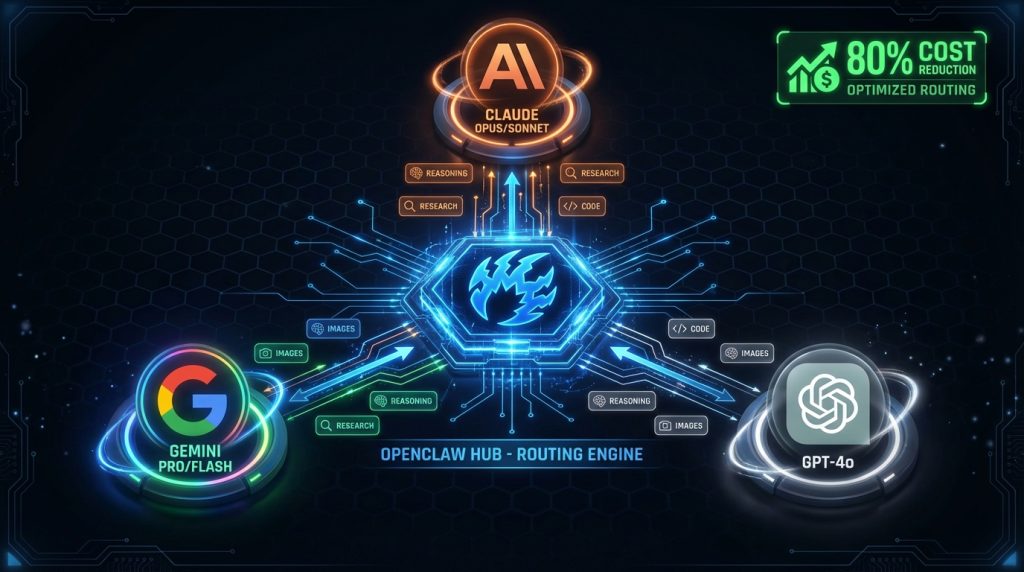
Your AI assistant is probably wasting money. Every time you ask it a simple question — “what’s today’s date,” “reformat this JSON,” “what’s 15% of 340” — it’s burning tokens on a model that’s dramatically overpowered for the job. It’s like hiring a brain surgeon to change a lightbulb. He’ll get it done. But you’re paying surgeon rates.
OpenClaw fixes this with multi-model routing: the ability to run different AI models for different tasks, automatically, without you switching anything. Claude Opus for deep reasoning. Gemini Flash for image analysis. A cheap fast model for quick lookups. The right tool for each job, on every request.
We’ve been running this setup for months on computertech.co’s entire AI operation. Here’s exactly how it works, how we configured it, and where it saves real money.
What Is Multi-Model Routing in OpenClaw?
OpenClaw is built around a model-agnostic architecture. The platform doesn’t care which AI you use — it speaks to providers through a unified interface and lets you mix and match freely. You can have one session using Claude Sonnet, another using Gemini Pro, and a background cron job running on a cheap fast model, all simultaneously.
Multi-model routing means you’re not locked into one provider per conversation or per session. You can:
- Set a default model for your main chat sessions
- Override the model for specific sub-agents or cron jobs
- Route research tasks to Gemini (better grounding) while coding tasks go to Claude or Codex
- Run parallel sub-agents on different models and compare outputs
- Override mid-session without restarting anything
Think of it like a power tool arsenal. You don’t use a sledgehammer to drive a finishing nail. Multi-model routing is OpenClaw’s way of handing you the right hammer automatically.
Supported Models and Providers
OpenClaw connects to all major AI providers through a standardized adapter layer. The full list in our current build includes:
Anthropic (Claude)
- claude-opus-4-6 — Flagship. Best reasoning, highest cost. Use for complex strategy, architecture decisions, long-context analysis.
- claude-sonnet-4-6 — Best balance. Fast, capable, half the cost of Opus. Default for most of our sessions.
- claude-haiku-3-5 — Lightweight. Good for simple Q&A, classification, quick rewrites.
Google (Gemini)
- google/gemini-2.5-pro — Long context king. Excellent for document analysis, research, image understanding.
- google/gemini-2.5-flash — Fastest in the lineup. Cheap, snappy, handles multimodal inputs well.
- google/gemini-3-pro-image-preview — Image generation. We use this as our default for all AI image creation.
OpenAI
- openai/gpt-4o — Strong all-rounder, particularly good for tool use and structured outputs.
- openai/o3 — Reasoning model. Slower, more deliberate. Good for math-heavy or logic-intensive tasks.
ACP / Coding Agents
- Codex CLI — OpenAI’s coding agent. We route complex multi-file builds here.
- Claude Code — Anthropic’s coding agent. Integrated via ACP harness.
You configure which ones you have access to via API keys in OpenClaw’s gateway config. More on that shortly.
How We Have It Configured (Our Actual Setup)
Here’s the honest version of what we run — not a hypothetical config, our actual production setup.
Default Model: Claude Sonnet
Our main session default is anthropic/claude-sonnet-4-6. It handles roughly 80% of our daily interactions: drafting articles, analyzing data, making decisions, answering questions about our stack. Fast enough that responses feel instant, capable enough that we rarely need to escalate.
In gateway.config.json:
{
  "agents": {
    "defaults": {
      "model": "anthropic/claude-sonnet-4-6"
    }
  }
}
Escalation Model: Claude Opus
When a task actually needs Opus — orchestrating complex multi-step research, reviewing architecture decisions, anything where we want the highest-quality reasoning — we use /model anthropic/claude-opus-4-6 mid-session to switch. Takes two seconds. No restart.
We also hardcode Opus in AGENTS.md for orchestration tasks:
## Models
Opus = complex reasoning/orchestration. Sonnet/Codex = parallelizable builds.
Sub-agents MUST use Sonnet.
That last line is key. Sub-agents inherit Sonnet by default to keep costs controlled. If an orchestrator running Opus spawns 5 parallel research sub-agents and each one runs Opus, your bill multiplies fast. Sonnet on sub-agents is a deliberate cost-control decision.
Research: Gemini
Our deep-research skill routes to Gemini via CLI. Google’s grounding is genuinely better for web research — it pulls live sources, cites them accurately, and handles long documents without losing the thread. When we need to research a new AI tool launch, competitor analysis, or keyword landscape, Gemini gets the call.
The research skill spawns an isolated sub-agent with:
sessions_spawn(
  task: "research prompt here",
  model: "google/gemini-2.5-pro",
  runtime: "subagent"
)
Image Generation: Gemini Image Preview
Every article on computertech.co gets a featured image generated by google/gemini-3-pro-image-preview. We set this explicitly in TOOLS.md:
## Critical Reminders
- Image gen: Gemini `gemini-3-pro-image-preview` unless told otherwise
We tried GPT-image-1 for a while. Gemini’s image model produces better photorealistic results for tech product hero shots, which is 90% of what we generate.
Coding: Codex + Claude Code via ACP
Heavy builds go to the ACP coding layer. When we need to build a WordPress plugin, write a multi-file Next.js component, or debug a complex script, we use the build workflow:
- Pass 1: Claude Opus generates a detailed spec via SPEC_GENERATOR_PREPROMPT
- Pass 2: Fresh Codex or Claude Code session builds from the spec
This keeps the expensive reasoning model focused on thinking, and the coding agent focused on execution. We never combine them.
Setting Up Multi-Model Routing: Step by Step
Step 1: Add Your API Keys
Open your OpenClaw gateway config. API keys are stored in the providers section:
{
  "providers": {
    "anthropic": {
      "apiKey": "sk-ant-..."
    },
    "google": {
      "apiKey": "AIza..."
    },
    "openai": {
      "apiKey": "sk-proj-..."
    }
  }
}
You can add as many providers as you have API keys for. OpenClaw only calls the ones you actually use — unused providers don’t generate any cost.
Step 2: Set Your Default Model
Under agents.defaults.model, set the model you want for everyday sessions. Our recommendation: start with anthropic/claude-sonnet-4-6 or google/gemini-2.5-flash depending on which provider you have credits with. Both are capable and fast.
{
  "agents": {
    "defaults": {
      "model": "anthropic/claude-sonnet-4-6",
      "imageGenerationModel": {
        "primary": "google/gemini-3-pro-image-preview"
      }
    }
  }
}
The imageGenerationModel.primary setting tells the image_generate tool which model to use without you specifying it every time.
Step 3: Override Per Session Mid-Conversation
You don’t need to restart anything to switch models. In any active session, type:
/model anthropic/claude-opus-4-6That session now runs Opus for the rest of the conversation. Switch back with:
/model defaultThis is useful when you start a session on Sonnet for quick tasks and hit something that deserves Opus-level reasoning. No friction.
Step 4: Set Model in Sub-Agent Spawns
When spawning sub-agents via sessions_spawn, pass the model parameter explicitly:
sessions_spawn({
  task: "Analyze the competitive landscape for AI writing tools",
  model: "google/gemini-2.5-pro",
  runtime: "subagent"
})
If you don’t specify a model, the sub-agent inherits the system default. Explicit is better for cost control — you know exactly what’s running and why.
Step 5: Model Routing in Cron Jobs
Our OpenClaw cron jobs use the cheapest capable model by default. For a morning briefing job that pulls BTC price, checks calendar, and formats a summary, Sonnet is overkill. Haiku handles it fine at a fraction of the cost.
In a cron job payload:
{
  "kind": "agentTurn",
  "message": "Generate today's morning briefing...",
  "model": "anthropic/claude-haiku-3-5"
}
The job runs on Haiku. If it hits something complex mid-run (it rarely does), the model flag doesn’t prevent the agent from thinking — it just constrains the model used.
Real Cost Comparison: What This Actually Saves
Here’s where multi-model routing goes from a cool feature to an actual business decision.
Anthropic’s pricing (approximate, check their site for current rates):
| Model | Input (per 1M tokens) | Output (per 1M tokens) |
|---|---|---|
| Claude Opus 4 | ~$15 | ~$75 |
| Claude Sonnet 4 | ~$3 | ~$15 |
| Claude Haiku 3.5 | ~$0.80 | ~$4 |
Run everything on Opus and a heavy automation day might cost you $15-30 in API fees. Run the same workload with smart routing — Opus only where necessary, Sonnet for most tasks, Haiku for cron jobs and simple lookups — and the same output costs $2-5.
That’s not a marginal improvement. That’s an 80% reduction for the same work output. Over a year of running computertech.co’s content engine, that difference is hundreds of dollars.
Here’s what other model-routing guides don’t tell you: the quality gap between Sonnet and Opus is smaller than you think for 90% of tasks. Sonnet writes good articles. Sonnet generates good code. Sonnet answers good questions. Opus is meaningfully better for multi-step reasoning chains, complex architectural decisions, and tasks where nuance matters a lot. Knowing that boundary is worth more than any routing configuration.
Advanced: The LLM Council Pattern
One of OpenClaw’s most powerful multi-model patterns is running different models in parallel on the same problem and comparing outputs. We do this for big decisions using the llm-council skill.
The pattern:
- Spawn 3 isolated sub-agents: one on Claude, one on Gemini, one on GPT-4o
- Give each the same planning prompt
- Anonymize the outputs (randomize order, strip model signatures)
- Judge the outputs with a fresh session to pick the best plan
This removes model-specific bias from important decisions. You’re not getting “what Claude thinks” — you’re getting a synthesis of three different reasoning architectures under the same prompt.
We used this when restructuring our content pipeline. Three models gave genuinely different approaches. The final plan we used was a synthesis that none of them produced independently.
Model Selection Decision Framework
After months of running this, here’s the mental model we use:
Use Opus When:
- You need multi-step reasoning across many variables
- Architecture decisions with downstream consequences
- Long-context document synthesis (legal, technical, strategic)
- Orchestrating complex multi-agent workflows
- The cost of a wrong decision exceeds the cost of the better model
Use Sonnet When:
- Writing, editing, content creation
- Standard coding tasks under 500 lines
- Research synthesis and summarization
- Most conversational sessions
- Anything that isn’t obviously Opus or Haiku territory
Use Haiku / Flash When:
- Scheduled cron jobs with predictable, simple tasks
- Classification and routing tasks
- Quick lookups, date/time queries, simple reformatting
- High-volume sub-tasks where quality floor is low
Use Gemini When:
- Real-time web research with citations
- Long document analysis (Gemini’s context window is enormous)
- Image analysis and visual understanding
- Image generation
Use Codex/Claude Code When:
- Full application builds with multiple files
- Iterative coding sessions that need filesystem access
- Anything the AGENTS.md build workflow applies to
Troubleshooting Common Model Routing Issues
Sub-agent ignoring model parameter
If a spawned sub-agent isn’t using the model you specified, check that the model string matches exactly — provider prefix included. claude-sonnet-4-6 won’t work; anthropic/claude-sonnet-4-6 will. OpenClaw requires the full qualified name unless the model is set as a default alias.
API key for provider not recognized
Run openclaw gateway status to check which providers are active. If a provider shows inactive despite a configured key, check for leading/trailing whitespace in the key value — it’s a common copy-paste issue that’s harder to spot than it should be.
Cron job running wrong model
Cron jobs that don’t specify a model inherit the system default. If your default is Opus and you want cron jobs on Haiku, you need to explicitly set the model in each job payload. The default is not automatically the cheapest — it’s whatever you set in your config.
Image generation using wrong model
The image_generate tool has its own model setting separate from the conversation model. If images aren’t generating with your preferred provider, check agents.defaults.imageGenerationModel.primary in your gateway config rather than the main model setting.
Integrating Multi-Model Routing Into Your Workflow
The best multi-model setup is one you don’t have to think about. You set the defaults well, you train yourself on the decision framework above, and you only consciously switch when the task clearly demands it.
Our setup from AGENTS.md captures this in plain language that the AI reads every session:
## Models
Opus = complex reasoning/orchestration. Sonnet/Codex = parallelizable builds.
Gemini = research/images. Sub-agents MUST use Sonnet.
Four lines. The AI knows exactly which model to use for which job without asking. That’s the goal — bake the routing logic into your AGENTS.md workspace file so the system routes correctly by default.
If you’re running OpenClaw as a solopreneur AI stack, the routing config is probably the highest-leverage optimization you can make after the initial setup. Everything else is features. This is cost and quality simultaneously improving.
Comparing OpenClaw’s Model Routing to Alternatives
Most AI platforms don’t offer this level of flexibility. ChatGPT locks you into OpenAI models. Claude.ai is Anthropic only. Even n8n and Zapier’s AI features are typically single-provider per workflow node.
OpenClaw’s architecture is fundamentally different because it’s not built by a model provider. It’s infrastructure for using any model. That design decision shows up most clearly in multi-model routing — it’s a first-class feature because the whole platform is model-agnostic from the ground up.
The closest comparison is something like LangChain or a custom LLM router, but those require you to write code. OpenClaw does it through config and natural language instructions in workspace files. No coding required.
Frequently Asked Questions
Can I use OpenClaw with only one AI provider?
Yes. You can run OpenClaw with just an Anthropic key, just a Google key, or just an OpenAI key. Multi-model routing is an option, not a requirement. Most people start with one provider and add others as they find specific use cases that benefit from alternatives.
Does switching models mid-session lose context?
No. The conversation history stays in the session. When you switch models with /model, the new model gets the full conversation context. It’s not a clean slate — it picks up exactly where the previous model left off.
Which model is best for OpenClaw beginners?
Claude Sonnet is the safest starting point. It’s capable enough for almost everything, fast enough that it doesn’t feel like a compromise, and priced reasonably. Start there, run it for a couple weeks, and you’ll develop a feel for when you actually need Opus versus when Sonnet is handling things fine.
Can sub-agents communicate with each other across model boundaries?
Not directly in real-time. Sub-agents run independently and report back to the parent session. But a parent session running Claude Opus can orchestrate sub-agents on Gemini, wait for their results, synthesize them, and continue. The model boundary is per-session, not per-conversation.
Does OpenClaw support local models like Ollama or LM Studio?
OpenClaw’s architecture is designed to be extensible, and local model support is something the community has discussed actively on the GitHub repo. Check the current documentation at docs.openclaw.ai for the latest on local provider integrations — this is a fast-moving area.
How do I know which model is currently active in a session?
Run /status in any OpenClaw session. It shows the current model, usage stats, and any active overrides. This is also how we monitor cost in real-time — if a session is showing higher-than-expected token usage, /status tells you if something is accidentally running on Opus when it should be on Sonnet.
Is there a way to set model routing rules automatically based on task type?
Not through a formal routing rule engine currently. The practical approach — and what we use — is writing clear routing instructions in AGENTS.md. The AI reads this file every session and makes routing decisions based on those instructions. It works surprisingly well because the model understands its own cost/capability tradeoffs and can apply your rules correctly.


