Quick Verdict: Topaz Labs delivers genuinely impressive AI enhancement for photos and video — noise reduction, sharpening, upscaling, and frame interpolation that actually works. The shift to subscription-only pricing in late 2025 stings, but for professionals processing volume, the results still justify the cost.
Rating: ★★★★☆ 4.3/5
Best For: Photographers, videographers, filmmakers, content creators who need rescue/enhancement tools
Price: From $17/month (individual apps) | $33/month (all apps, annual)
When Your Footage Needs Saving
That wedding video shot in terrible lighting. The wildlife shot where you forgot to check your settings. The client’s only photo of their late grandmother, blurry and faded. The security footage that’s technically evidence but looks like pixel soup.
These are the moments where traditional editing fails. You can’t color-correct detail that doesn’t exist. You can’t sharpen what’s already motion-blurred into oblivion. You can try noise reduction in Premiere or Lightroom, but the results are… polite attempts at best.
Topaz Labs built its reputation solving these impossible problems. Their AI models don’t just filter — they reconstruct, interpolate, and genuinely add information that wasn’t visible in the original. It’s the closest thing to magic that exists in photo/video editing.
The catch? In September 2025, Topaz switched from perpetual licenses to subscription-only pricing. If you’re evaluating them now, you’re committing to ongoing costs. Here’s whether that’s worth it.
→ Try Topaz Labs | → See alternatives
What is Topaz Labs?
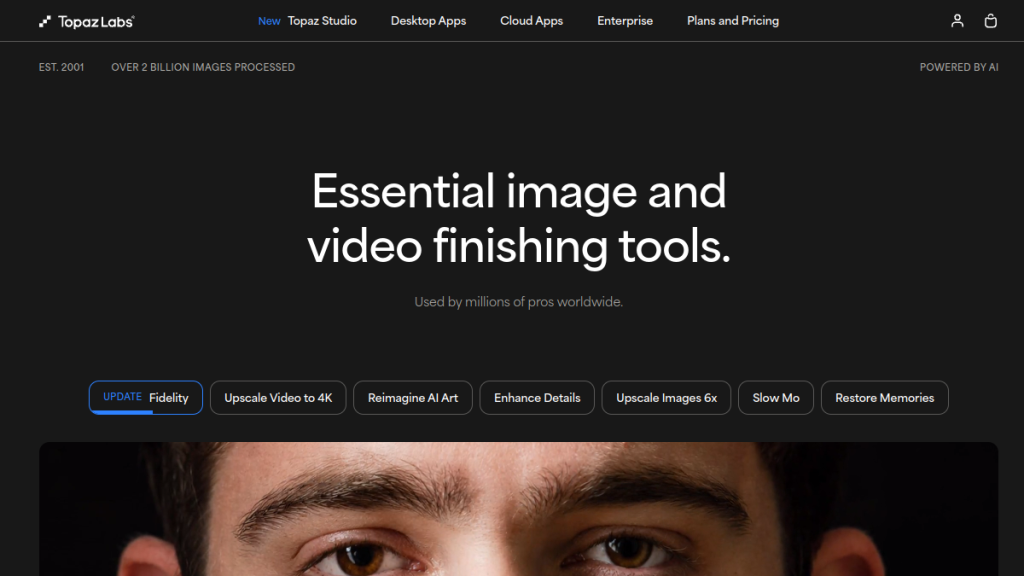
Topaz Labs is a software company specializing in AI-powered image and video enhancement. Founded in 2005, they’ve evolved from traditional Photoshop plugins to standalone AI applications that handle noise reduction, sharpening, upscaling, and restoration.
Their product suite includes:
- Topaz Photo — Image enhancement (denoise, sharpen, lighting, face recovery)
- Topaz Video — Video enhancement (upscale to 4K/8K, stabilize, frame interpolation)
- Topaz Gigapixel — Image upscaling specialist
- Bloom — Creative/generative AI upscaling for art and AI images
- Astra — Video upscaling for AI-generated content
Unlike all-in-one editing suites, Topaz focuses exclusively on quality enhancement — taking imperfect source material and making it better. They’re not replacing your NLE or DAW; they’re the specialized rescue tool you reach for when standard adjustments fail.
Key Features (What Actually Works)
Topaz Photo: Rescue Shots Others Would Delete
The standout feature: Denoise AI that actually preserves detail while eliminating grain. Unlike Lightroom’s noise reduction that mushes everything together, Topaz Photo separates noise from texture at the AI level.
Additional tools:
- Sharpen — Recovers focus from motion blur and camera shake
- Recover Faces — Rebuilds facial detail in degraded images
- Lighting — Fixes under/overexposure with AI tone mapping
- Remove — Object removal (Photoshop Generative Fill competitor)
- Upscale — Resolution increase with detail preservation
- Dust and Scratch — Restoration for old photos
Real results: I’ve recovered shots from ISO 12800 that looked unusable in Lightroom. The noise vanishes while textures — fabric, skin, hair — remain intact. It’s not subtle improvement; it’s “why didn’t I buy this years ago” transformation.
Topaz Video: Upscale to 4K (And Actually Mean It)
Video upscaling has been garbage for decades — traditional algorithms just interpolate pixels, giving you larger mush. Topaz Video’s AI models generate actual detail, making 1080p to 4K conversions that pass for native resolution.
Core capabilities:
- Starlight — Flagship upscaling model for any footage
- Frame Interpolation — Generate intermediate frames for smoother slow-motion
- SDR to HDR — Color and brightness enhancement
- Stabilization — Remove shake without cropping
- Motion Deblur — Sharp frames from moving cameras
- 9 AI Enhancement Models — Tuned for different footage types (old films, animation, CGI, etc.)
The killer use case: Upscaling old footage to modern standards. Family videos from the 90s, DVD archives, vintage films — Topaz Video makes them watchable on 4K TVs without the “why bother” disappointment of traditional upscalers.
Topaz Gigapixel: The Upscaling Specialist
Where Photo handles multiple enhancements, Gigapixel focuses solely on making images larger. It’s the specialist tool when you need a small image printed poster-size.
AI models included:
- Standard — General-purpose upscaling
- High Fidelity — For already-decent resolution sources
- Low Res — Heavy reconstruction for small/compressed images
- Art and CG — Tuned for illustrations and renders
- Face Recovery — Rebuilds facial features during enlargement
6x enlargement with retained (or improved) detail. That’s not marketing speak — a 1000×1000 pixel image genuinely becomes a printable 6000×6000 with sharpness intact.
Bloom: Creative AI for Generated Art
Bloom is the “creative upscaler” — it doesn’t just enlarge, it reimagines. Particularly powerful for:
- AI-generated art (Midjourney-alternatives/”>Midjourney, DALL-E, Stable Diffusion)
- Concept art
- Low-detail images needing stylistic enhancement
- CGI renders
Unlike traditional upscalers, Bloom adds details that weren’t in the original. A face in an AI image gets actual skin texture. A background gets depth and variation. It’s generative AI applied to enhancement.
Astra: Video Upscaling for AI Content
Astra does for video what Bloom does for images — creative upscaling specifically for AI-generated video content. With tools like Runway, Pika, and Kling producing 720p or 1080p output, Astra converts that to crisp 4K.
Two modes:
- Precise — Faithful upscaling preserving original elements
- Creative — Enhanced quality with AI-generated detail
Pricing note: Astra is expensive ($39-299/month) because it’s purpose-built for the AI video workflow. General video upscaling is better handled by Topaz Video at lower cost.
Topaz Labs Pricing 2026
Important context: Topaz switched to subscription-only in September 2025. No more perpetual licenses. This made some loyal users angry, but the pricing is competitive for what you get.
All-Access Bundles
| Plan | Monthly | Annual | What’s Included |
|---|---|---|---|
| Topaz Studio | $69/mo | $33/mo ($399/yr) | All apps + unlimited rendering + 300 video cloud credits |
| Topaz Studio Pro | $75/mo (commit) | $67/mo ($799/yr) | Pro features + 600 credits + seat management + full commercial |
Individual Desktop Apps (Annual Plans)
| App | Annual Price | Monthly Equivalent |
|---|---|---|
| Topaz Photo | $199/year | $17/mo |
| Topaz Video | $299/year | $25/mo |
| Topaz Gigapixel | $149/year | $12/mo |
| Desktop Collection (all 3) | $349/year | $29/mo |
Cloud/Specialized Apps
| App | Price | Purpose |
|---|---|---|
| Bloom | $229/year | Creative image upscaling |
| Astra Personal | $39/mo | AI video upscaling |
| Astra Pro | $299/mo | High-volume AI video |
| Express | $140/year | Quick cloud processing |
💡 Best Value: Desktop Collection at $349/year ($29/mo) if you need Photo + Video + Gigapixel. For all-in-one including cloud tools, Topaz Studio at $399/year ($33/mo) is comprehensive.
Commercial use note: Personal plans allow commercial use for organizations under $1M annual revenue. Larger businesses need Pro licensing.
Who Should Use Topaz Labs?
✅ Ideal For:
- Wedding/Event photographers — Rescue shots from difficult lighting
- Archival projects — Restore old photos/video to modern quality
- Filmmakers — Upscale old footage, fix shaky handheld, interpolate frames
- E-commerce sellers — Enhance product photos shot in suboptimal conditions
- AI artists — Upscale Midjourney/DALL-E output for print or commercial use
- Content creators — Improve source material quality for YouTube/TikTok
❌ Not Ideal For:
- Casual users — Subscription cost doesn’t justify occasional use
- Mobile-only workflows — Limited mobile options (Gigapixel iOS exists but limited)
- Real-time processing — Not for live streaming or immediate turnaround
- Budget-constrained — Free alternatives exist for basic enhancement
- Color grading focus — Topaz enhances quality, not creative color work
Topaz Labs Pros and Cons
What Works Well
- AI enhancement quality is genuinely best-in-class — Not marketing hype
- Video upscaling that actually adds detail — 1080p to 4K looks native
- Noise reduction preserves texture — Unlike competing tools
- Multiple specialized models — Right tool for each job
- Batch processing — Handle volume efficiently
- Adobe integration — Works as Lightroom/Photoshop plugin
- Continuous model updates — AI improves over time
- Offline processing — Desktop apps work without internet (after activation)
What Could Be Better
- Subscription-only now — No perpetual license option anymore
- Hardware intensive — Needs good GPU for reasonable speeds
- Modular confusion — Unclear which app you need for what
- Cloud features limited — Upload caps, queue times
- Price creep — Has gotten more expensive over time
- Processing time — Not instant; complex jobs take minutes
- Learning curve — Many models and settings to understand
- No Android app — iOS Gigapixel only
Hardware Requirements
Topaz is demanding. For decent performance:
Minimum:
- Modern CPU (i5/Ryzen 5 or better)
- 8GB RAM (16GB recommended)
- Dedicated GPU with 4GB VRAM
- SSD storage
Recommended:
- High-end CPU (i7/i9 or Ryzen 7/9)
- 32GB+ RAM
- NVIDIA RTX 3060 or better (10GB+ VRAM)
- Fast SSD (NVMe)
Reality check: On modest hardware, complex video processing can take hours. Budget time accordingly or invest in cloud processing credits.
Topaz Labs vs Alternatives
Topaz vs Adobe Enhance (Lightroom/Photoshop)
Adobe’s built-in AI enhancement has improved dramatically but still trails Topaz on difficult cases — heavy noise, significant blur, extreme upscaling. For light enhancement, Adobe may suffice. For rescue operations, Topaz wins.
Winner: Topaz for rescue; Adobe for mild enhancement (if you already subscribe)
Topaz vs DaVinci Resolve Super Scale
Resolve’s Super Scale upscaling is capable and free with Resolve Studio. Quality is close to Topaz Video for straightforward upscaling. Topaz edges ahead on legacy footage and extreme cases.
Winner: Resolve for basic upscaling (if you use Resolve); Topaz for dedicated enhancement
Topaz vs Remini
Remini offers AI photo enhancement at much lower cost ($10/week or $50/year). Results are good for portraits but inconsistent on other content. Less control, less reliability.
Winner: Remini for budget portrait work; Topaz for professional/varied work
Topaz vs Gigapixel vs Similar Upscalers
Competitors like Pixelmator Pro, ON1 Resize, and others offer upscaling. Topaz Gigapixel’s AI models still produce noticeably better results on demanding enlargements.
Winner: Topaz Gigapixel remains the upscaling king
Frequently Asked Questions
Is Topaz Labs subscription-only now?
Yes. As of September 2025, Topaz discontinued perpetual licenses. All products now require active subscriptions. Existing perpetual license holders keep their software but don’t receive updates without subscribing.
Can Topaz really upscale video to 4K?
Yes, and the results are impressive. The AI doesn’t just interpolate — it generates detail based on trained models. 1080p footage upscaled to 4K through Topaz Video looks significantly better than traditional upscaling. It’s not identical to native 4K, but it’s close.
Which Topaz product do I need?
- Photo enhancement (noise, blur, sharpening): Topaz Photo
- Image enlargement: Topaz Gigapixel
- Video enhancement/upscaling: Topaz Video
- AI art upscaling: Bloom
- AI video upscaling: Astra
- Everything: Topaz Studio bundle
Does Topaz work offline?
Desktop apps work offline after initial activation. Cloud features (Bloom, Astra, cloud processing) require internet. For field work, desktop apps are fully functional without connection.
How long does processing take?
Depends on hardware, resolution, and model complexity. A single photo might take 5-30 seconds. A 5-minute video upscale could take 30 minutes to several hours on modest hardware. GPU acceleration makes a massive difference.
Is Topaz worth it for iPhone photos?
For professional use, yes — enhancing iPhone shots for print or commercial use benefits from Topaz Photo/Gigapixel. For social media? Probably overkill; iPhone processing is already optimized for that.
Do perpetual licenses still work?
Yes, existing perpetual licenses remain functional but frozen at the version you own. No updates, no new AI models, no new features without subscribing.
Final Verdict: Is Topaz Labs Worth the Subscription?
🏆 Our Verdict
4.3 out of 5 stars
Topaz Labs remains the gold standard for AI-powered photo and video enhancement. The technology genuinely works — noise reduction that preserves detail, sharpening that recovers focus, upscaling that adds real information instead of blur.
The subscription switch hurts, especially for casual users or those who bought perpetual licenses expecting lifetime updates. At $29-33/month for the full desktop suite, it’s a meaningful ongoing expense.
But for professionals whose work depends on image quality, who regularly rescue shots that would otherwise be unusable, who need to upscale footage for modern delivery standards — Topaz pays for itself quickly. The time saved versus manual repair, combined with results that manual editing simply cannot achieve, justifies the cost.
Bottom line: If you regularly need to enhance, rescue, or upscale photo/video content professionally, Topaz Labs is worth the subscription. For occasional personal use, explore the free trial carefully and consider alternatives.
Alternatives to Consider
- Adobe Lightroom/Photoshop — Built-in AI enhancement (if already subscribed)
- DaVinci Resolve Studio — Super Scale for video upscaling
- Remini — Budget AI photo enhancement
- ON1 Resize AI — Upscaling alternative
Last updated: February 2026
Affiliate disclosure: We may earn commission from purchases made through links on this page.
{
“@context”: “https://schema.org”,
“@type”: “Review”,
“name”: “Topaz Labs Review 2026: Professional AI Enhancement Worth the Subscription?”,
“url”: “https://computertech.co/topaz-labs-review/”,
“author”: {
“@type”: “Organization”,
“name”: “ComputerTech Editorial Team”,
“url”: “https://computertech.co”
},
“publisher”: {
“@type”: “Organization”,
“name”: “ComputerTech”,
“url”: “https://computertech.co”
},
“datePublished”: “2026-02-06”,
“reviewRating”: {
“@type”: “Rating”,
“ratingValue”: “4.5”,
“bestRating”: “5”,
“worstRating”: “1”
},
“itemReviewed”: {
“@type”: “SoftwareApplication”,
“name”: “Topaz Labs”,
“applicationCategory”: “AI Tool”,
“operatingSystem”: “Web”,
“offers”: {
“@type”: “Offer”,
“price”: “0”,
“priceCurrency”: “USD”,
“availability”: “https://schema.org/InStock”
}
},
“reviewBody”: “Comprehensive review of Topaz Labs covering features, pricing, pros, cons, and real-world performance testing.”
}
Frequently Asked Questions
What exactly does Topaz Labs do for my photos and videos?
Topaz Labs specializes in AI-powered enhancement tools that focus on noise reduction, sharpening, upscaling, and restoration of images and videos. Their software can effectively improve the quality of footage that traditional editing methods struggle with, making it ideal for professionals needing to rescue poor-quality content.
Is Topaz Labs worth the subscription cost?
While the shift to subscription-only pricing in 2025 might be a drawback, many professionals find that the impressive results justify the ongoing costs. If you’re frequently processing large volumes of images or videos, the enhancements provided by Topaz can significantly improve your workflow.
What are the main products offered by Topaz Labs?
Topaz Labs offers several specialized applications, including Topaz Photo for image enhancement, Topaz Video for video enhancement, and Topaz Gigapixel for image upscaling. They also have Bloom for creative AI upscaling and Astra for video upscaling of AI-generated content.
How does Topaz Labs compare to traditional editing software?
Unlike traditional editing software that relies on basic adjustments, Topaz Labs uses advanced AI models to reconstruct and enhance images and videos. This allows it to address issues like motion blur and low light that standard tools often can’t fix effectively.
Can I try Topaz Labs before subscribing?
Yes, Topaz Labs typically offers trial versions of their software, allowing you to test the features and see the results for yourself before committing to a subscription. This can help you determine if their tools meet your specific needs.
Who is the ideal user for Topaz Labs software?
Topaz Labs is best suited for photographers, videographers, filmmakers, and content creators who often deal with challenging footage that requires enhancement. If you frequently work with low-quality images or videos, their tools can be invaluable.