You’re staring at a codebase that would take weeks to understand, let alone refactor, and your deadline is tomorrow. OpenAI just dropped GPT-5.3-Codex, an AI coding agent that doesn’t just write code — it literally helped train itself and now sets new benchmarks on the hardest programming challenges. Here’s our hands-on review of the AI coding tool that’s making senior developers question their job security.
What Is the OpenAI Codex App?
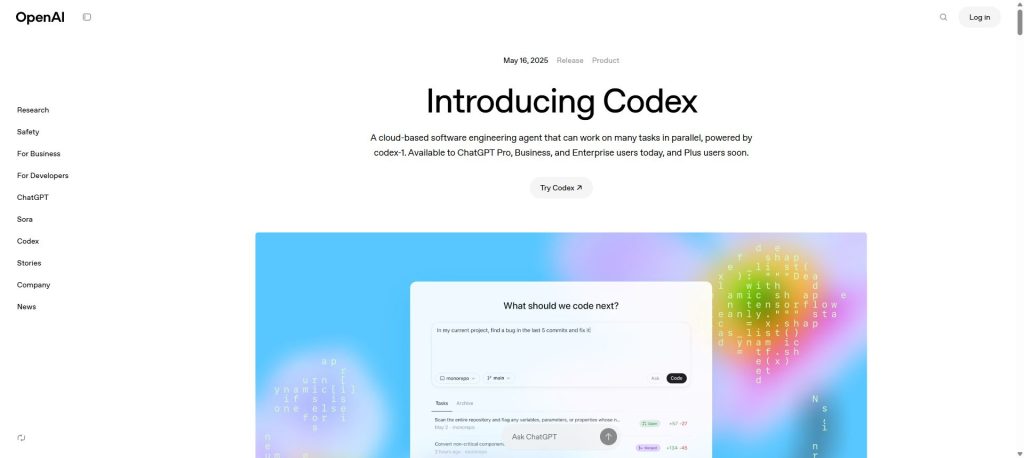
The OpenAI Codex App is a cloud-based software engineering agent that can work on multiple coding tasks simultaneously. Unlike traditional code completion tools that suggest the next line, Codex operates as a full-fledged coding agent — it reads your entire codebase, writes features, fixes bugs, runs tests, and can even open GitHub pull requests on your behalf.
Originally launched in May 2025 as a research preview powered by codex-1 (a version of OpenAI o3 optimized for software engineering), the platform has evolved rapidly. It’s now available across multiple surfaces:
- Codex App — A dedicated web application for managing coding agents
- Codex CLI — A terminal-based agent (currently at v0.98.0)
- IDE Extension — Integrates directly into your editor
- ChatGPT Sidebar — Accessible within the main ChatGPT interface
The key differentiator? Each task runs in its own isolated cloud sandbox preloaded with your repository. You can fire off five different coding tasks and they all execute in parallel — something no other AI coding tool currently matches at this scale.
What’s New With GPT-5.3-Codex?
Released on February 5, 2026, GPT-5.3-Codex represents a significant leap forward. Here’s what changed:
Self-Improving AI
This is the headline feature that makes GPT-5.3-Codex genuinely unique: it’s the first model that was instrumental in creating itself. The Codex team used early versions of GPT-5.3-Codex to debug its own training, manage its own deployment, and diagnose test results. OpenAI’s team reported being “blown away” by how much Codex accelerated its own development.
That’s not marketing fluff — it’s a concrete demonstration of the model’s capability. If it can improve its own training pipeline, it can certainly handle your React components.
Frontier Benchmark Performance
GPT-5.3-Codex sets new industry highs on multiple benchmarks:
- SWE-Bench Pro — State-of-the-art performance on real-world software engineering across four programming languages (not just Python like the older SWE-Bench Verified)
- Terminal-Bench 2.0 — Far exceeds previous state-of-the-art for terminal skills, and does so with fewer tokens than any prior model
- OSWorld — Dramatically stronger computer-use capabilities than previous GPT models
- GDPval — Matches GPT-5.2 on professional knowledge work across 44 occupations
25% Faster Execution
Speed matters when you’re waiting for an agent to complete tasks. GPT-5.3-Codex runs 25% faster than GPT-5.2-Codex while delivering better results. Tasks that previously took 10 minutes now finish in roughly 7-8 minutes.
Mid-Turn Steering
This is a significant for practical use. Previously, once you kicked off a Codex task, you had to wait for it to finish before providing feedback. Now you can interact with the agent in real time — ask questions, redirect its approach, or provide additional context while it’s actively working. It’s like pair programming with a colleague who actually listens.
Improved Design Aesthetics
GPT-5.3-Codex produces better-looking front-end code out of the box. Simple prompts now generate sites with more functionality and sensible defaults. OpenAI showed examples where GPT-5.3-Codex automatically created a testimonial carousel with three quotes and displayed yearly pricing as a discounted monthly rate — details that GPT-5.2-Codex missed entirely.
Beyond Code: Full Software Lifecycle
GPT-5.3-Codex isn’t just a code generator anymore. It handles the entire software lifecycle:
- Debugging and deploying
- Monitoring systems
- Writing PRDs (Product Requirements Documents)
- Editing copy and user research
- Creating tests and tracking metrics
- Building slide decks and analyzing spreadsheets
How the OpenAI Codex App Works
Using Codex is straightforward, but the underlying architecture is sophisticated:
- Connect your GitHub account — Codex needs access to your repositories
- Choose a task type — Click “Code” to assign a coding task, or “Ask” to query your codebase
- Each task gets its own sandbox — An isolated cloud environment preloaded with your repo
- Codex works autonomously — It reads files, edits code, runs tests, linters, and type checkers
- Review and merge — Check the results, request revisions, or open a PR directly
Task completion typically takes 1-30 minutes depending on complexity. You can monitor progress in real time and, with GPT-5.3-Codex, steer the agent mid-task.
AGENTS.md: Your Custom Instructions
One of Codex’s smartest features is AGENTS.md support. Drop a text file in your repository that tells Codex how to navigate your codebase, which commands to run for testing, and your project’s conventions. Think of it as onboarding documentation for your AI developer.
Skills System
The Codex App includes a Skills system that goes beyond writing code. Skills let Codex contribute to the work that turns pull requests into products — code understanding, prototyping, documentation, and more — all aligned with your team’s standards.
Automations
With Automations, Codex works unprompted. It can handle routine tasks like issue triage, alert monitoring, and CI/CD management in the background, so you stay focused on the work that matters.
OpenAI Codex App Pricing (February 2026)
Codex is bundled with ChatGPT plans — you don’t pay separately for the coding agent. Here’s the current pricing structure:
| Plan | Monthly Price | Codex Access | Local Messages / 5h | Cloud Tasks / 5h | Code Reviews / Week |
|---|---|---|---|---|---|
| Free | $0 | Limited (promo) | — | — | — |
| Go | — | Limited (promo) | — | — | — |
| Plus | $20/mo | Full (GPT-5.3-Codex) | 45–225 | 10–60 | 10–25 |
| Pro | $200/mo | Priority Speed | 300–1,500 | 50–400 | 100–250 |
| Business | $30/user/mo | Full + Larger VMs | 45–225 | 10–60 | 10–25 |
| Enterprise | Custom | Full + Priority | Credit-based | Credit-based | Credit-based |
For a limited time, OpenAI is offering Free and Go users access to try Codex, and Plus/Pro/Business/Enterprise subscribers get 2x rate limits.
Credits system: When you hit your usage limit, you can purchase additional credits. A single local GPT-5.3-Codex message costs ~5 credits, while cloud tasks run ~25 credits each. The lighter GPT-5.1-Codex-Mini model costs only ~1 credit per local message, giving you 4x more usage for simpler tasks.
API pricing: For developers using the API directly, codex-mini-latest is priced at $1.50 per 1M input tokens and $6 per 1M output tokens, with a 75% prompt caching discount.
For a broader look at how these prices stack up, check out our best AI marketing tools.
OpenAI Codex vs GitHub Copilot vs Claude Code: Head-to-Head Comparison
The AI coding tool landscape in 2026 is a three-horse race. Here’s how they compare:
| Feature | OpenAI Codex (GPT-5.3) | GitHub Copilot (Pro+) | Claude Code (Opus 4) |
|---|---|---|---|
| Model | GPT-5.3-Codex | Multi-model (Claude, GPT, Gemini) | Claude Opus 4 |
| Agent Type | Cloud sandbox agent | IDE + coding agent | Terminal-based agent |
| Parallel Tasks | ✅ Multiple simultaneous | ✅ Via coding agent | ❌ Single thread |
| GitHub Integration | ✅ PRs, issues, reviews | ✅ Native (it’s GitHub) | ⚠️ Via MCP/manual |
| Mid-Task Steering | ✅ Real-time | ⚠️ Limited | ✅ Interactive terminal |
| Code Reviews | ✅ Automatic | ✅ Automatic | ❌ Not built-in |
| Automations | ✅ Issue triage, CI/CD | ✅ Via agents | ❌ Manual only |
| IDE Support | ✅ Extension + CLI | ✅ VS Code, JetBrains, Neovim | ✅ Terminal (any IDE) |
| Internet Access | ✅ Configurable | ✅ Yes | ✅ Yes |
| Starting Price | $0 (limited) / $20/mo | $0 (free) / $10/mo | $20/mo (API credits) |
| Best For | Parallel task delegation | IDE-first workflows | Deep codebase reasoning |
When to Choose OpenAI Codex
Choose Codex if you want to delegate and parallelize. The ability to spin up multiple agents working on different tasks simultaneously is unmatched. If your workflow involves triaging issues, managing multiple features, or offloading repetitive refactoring, Codex is the clear winner. The new Automations feature also makes it ideal for teams that want AI handling routine background work.
When to Choose GitHub Copilot
Choose Copilot if you’re IDE-centric. Copilot’s code completions remain the smoothest in-editor experience, and Pro+ ($39/mo) gives you access to multiple models including Claude and OpenAI’s own models. The coding agent feature now lets you assign issues to agents that work in the background, similar to Codex.
When to Choose Claude Code
Choose Claude Code if you want deep reasoning in your terminal. Claude’s Opus 4 model excels at understanding complex codebases and providing thoughtful, well-reasoned code changes. It’s particularly strong for architecture decisions and refactoring where you want a partner who thinks deeply about your code. Check our ChatGPT vs Claude comparison for more on how these models differ.
Real-World Performance: What I Actually Experienced
Theory is great, but how does GPT-5.3-Codex perform in practice? Here’s what I found across several days of testing:
The Good
Parallel task execution is transformative. I kicked off three tasks at once: refactoring a utility module, writing tests for an API endpoint, and fixing a CSS layout bug. All three completed within 15 minutes, and two of them were merge-ready on the first try. That’s easily 2-3 hours of work compressed into 15 minutes of review time.
Mid-turn steering actually works. During a feature implementation, I noticed the agent heading in the wrong direction with a state management approach. I sent a message redirecting it to use a different pattern, and it pivoted immediately without losing context. This alone justifies the upgrade from GPT-5.2-Codex.
Code quality is noticeably better. The generated code follows conventions more consistently, includes sensible error handling by default, and the test coverage it writes is comprehensive rather than superficial.
The Skills system is powerful. Once I configured Skills for our project’s documentation standards and testing patterns, every subsequent task adhered to them automatically.
The Not-So-Good
Usage limits feel restrictive on Plus. With 45-225 local messages per 5-hour window (depending on complexity), heavy users will hit the ceiling fast. If you’re using Codex as your primary development tool, you’ll likely need the Pro plan at $200/month.
Complex multi-file refactoring can still stumble. While GPT-5.3-Codex handles most tasks well, extremely large refactoring jobs across dozens of files occasionally produce inconsistencies that require manual cleanup.
Initial setup has friction. Configuring your environment, writing AGENTS.md files, and setting up Skills takes time upfront. The payoff is worth it, but expect to invest an afternoon getting everything tuned.
Who Should Use OpenAI Codex in 2026?
Ideal Users
- Professional developers who want to parallelize their workload and offload repetitive tasks
- Engineering teams looking for automated code review, issue triage, and CI/CD management
- Solo developers / indie hackers who need to move fast across multiple projects
- Product managers who want to contribute lightweight code changes without pulling in an engineer
- Non-coders who want to build functional web apps, games, and tools from scratch
Not Ideal For
- Students learning to code — You need to understand fundamentals before delegating to AI
- Security-critical applications — Always review AI-generated code thoroughly
- Offline development — Codex requires cloud connectivity
- Budget-constrained developers — Free tier is too limited for serious use; the $20/mo Plus plan is the real starting point
Security and Safety
OpenAI has put significant thought into Codex security:
- Isolated containers — Each task runs in its own secure sandbox
- Configurable internet access — You control whether agents can reach external services
- Verifiable actions — Terminal logs, test outputs, and citations let you trace every step
- Malware resistance — Trained to refuse malicious code generation while supporting legitimate low-level work
- High cybersecurity classification — GPT-5.3-Codex is the first model classified as “High capability” for cybersecurity under OpenAI’s Preparedness Framework
That said, OpenAI still emphasizes that users must manually review and validate all agent-generated code before integration. This is non-negotiable regardless of which AI tool you use.
What’s Coming Next
OpenAI has outlined several upcoming features for Codex:
- API access for GPT-5.3-Codex — Currently only available through ChatGPT plans; API support is rolling out soon
- Deeper integrations — Issue trackers, CI systems, Slack, and more
- More interactive workflows — Proactive progress updates and collaborative implementation strategies
- Cross-surface continuity — Start a task in the CLI, continue in the IDE, review in the app
The long-term vision is clear: Codex wants to be the always-on AI colleague that handles everything you don’t want to do yourself.
Frequently Asked Questions
Is OpenAI Codex free?
For a limited time, yes — Free and Go ChatGPT users can try Codex with limited access. For meaningful usage, you’ll need at least the ChatGPT Plus plan ($20/month), which includes GPT-5.3-Codex access, 45-225 local messages per 5-hour window, and 10-60 cloud tasks. The Pro plan ($200/month) provides 6x higher limits and priority processing for full-time development use.
What’s the difference between GPT-5.3-Codex and GPT-5.2-Codex?
GPT-5.3-Codex combines the coding performance of GPT-5.2-Codex with stronger reasoning and professional knowledge capabilities. It runs 25% faster, supports real-time mid-turn steering, provides more frequent progress updates, and achieves state-of-the-art scores on SWE-Bench Pro and Terminal-Bench 2.0. It was also the first model that helped create itself during training.
Can OpenAI Codex replace a human developer?
Not entirely — at least not yet. Codex excels at well-scoped tasks like writing features, fixing bugs, refactoring code, writing tests, and handling routine engineering work. However, it still requires human oversight for architectural decisions, complex system design, and code review. Think of it as a highly capable junior-to-mid-level developer that works incredibly fast but still needs a senior engineer’s guidance.
Is Codex better than GitHub Copilot?
They serve different strengths. Codex excels at asynchronous task delegation and parallel execution — you assign tasks and review results. Copilot excels at real-time code completion and in-editor assistance. For teams that want to offload entire tasks to AI, Codex is superior. For developers who want AI suggestions while they type, Copilot’s inline experience is smoother. Many developers use both. See our full best AI coding assistants roundup for detailed comparisons.
What programming languages does Codex support?
Codex supports virtually all major programming languages. Its SWE-Bench Pro evaluation covers four languages specifically, but in practice it works with Python, JavaScript/TypeScript, Java, C/C++, Go, Rust, Ruby, PHP, and many more. It also handles frontend frameworks (React, Vue, Angular), infrastructure-as-code, and configuration files.
If you’re exploring AI coding tools, also check out our Qodo 2.1 review — it takes a unique approach to AI-powered code review and quality assurance.
Verdict: 9.2/10
GPT-5.3-Codex isn’t just an iterative improvement — it’s a major change in how developers interact with AI. The combination of parallel task execution, real-time steering, automated code reviews, and background automations creates a workflow that genuinely feels like having a team of capable developers at your disposal.
The model’s self-improving nature, benchmark dominance, and 25% speed improvement over its predecessor make it the clear frontrunner in the AI coding agent space as of February 2026. The fact that it can handle everything from code generation to slide decks to spreadsheet analysis means it’s not just a coding tool — it’s becoming a general-purpose engineering agent.
Where it falls short: Usage limits on the Plus plan feel tight for power users, the $200/month Pro plan is expensive for individuals, and complex multi-file refactoring still occasionally needs human cleanup. The initial setup time for AGENTS.md and Skills configuration is also a barrier to entry.
Bottom line: If you’re a developer or engineering team looking for the most capable AI coding agent available today, OpenAI Codex with GPT-5.3-Codex is the one to beat. The parallel agent workflow it pioneered is quickly becoming the way professional software gets built.
Score: 9.2 out of 10
For more AI tool reviews, check out our coverage of Kilo Code, Perplexity AI, and our complete guide to the best AI writing tools.
Related: See our Cursor review and Windsurf review for alternative AI coding editors.
Frequently Asked Questions
What is the OpenAI Codex App and how does it work?
The OpenAI Codex App is a cloud-based AI coding agent that can handle multiple coding tasks at once. Unlike traditional tools that suggest code lines, Codex reads your entire codebase, writes features, fixes bugs, and even manages GitHub pull requests autonomously.
What are the main features of GPT-5.3-Codex?
GPT-5.3-Codex introduces self-improvement capabilities, allowing it to enhance its own training and deployment processes. It can operate in parallel across multiple tasks, making it a powerful tool for developers facing tight deadlines.
How does GPT-5.3-Codex differ from previous versions?
Released on February 5, 2026, GPT-5.3-Codex is a significant upgrade that includes self-improving AI capabilities. This version can debug and manage its own training, showcasing a level of autonomy and efficiency that previous versions lacked.
Can I use OpenAI Codex App with my existing coding tools?
Yes, the OpenAI Codex App offers various integrations, including a dedicated web application, a terminal-based agent, an IDE extension, and a ChatGPT sidebar. This flexibility allows you to incorporate it seamlessly into your existing workflow.
Is the OpenAI Codex App suitable for beginners in coding?
While the OpenAI Codex App is designed to assist developers of all levels, beginners may find it particularly helpful for learning. It can provide real-time code suggestions and explanations, making it easier to understand complex coding concepts.
What kind of programming languages does GPT-5.3-Codex support?
GPT-5.3-Codex supports a wide range of programming languages, enabling it to assist with various coding tasks. Whether you’re working with Python, JavaScript, or other popular languages, Codex can help streamline your development process.
How does the pricing for OpenAI Codex App work?
The pricing details for the OpenAI Codex App are typically provided on the official website. As it is a cloud-based service, costs may vary based on usage, features, and subscription plans, so it’s best to check for the most current information.


