Somewhere around article number 80, we realized we had a problem.
We were manually researching topics, writing 3,000-word reviews, uploading featured images, setting SEO metadata, submitting to Google’s Indexing API, and then — once in a while — remembering to check if the article was actually indexed. It was taking 4-6 hours per article. We had a list of 200+ tools to cover. The math didn’t work.
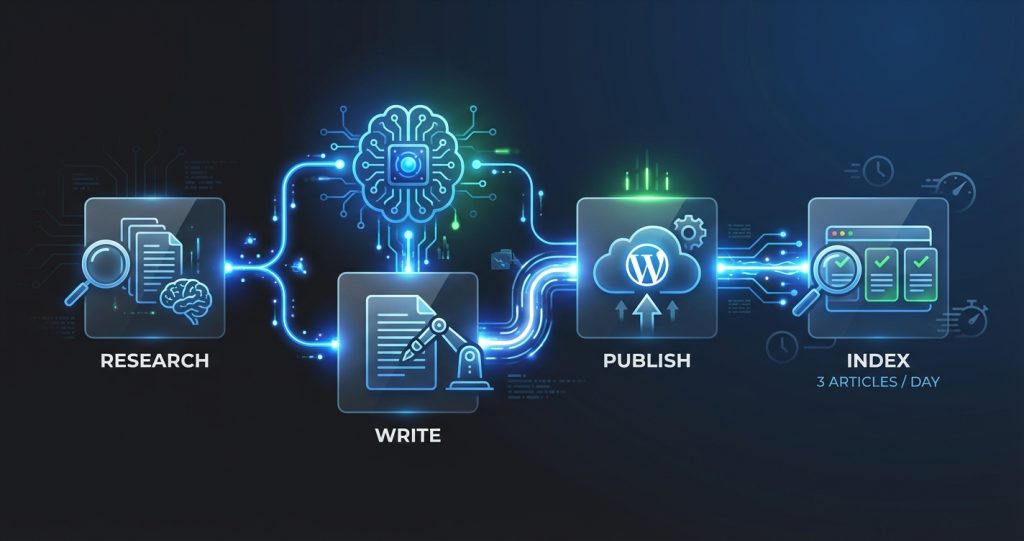
So we built a content pipeline inside OpenClaw that handles most of it automatically. Today, computertech.co runs at roughly 3 articles per day with a single human in the loop for quality review. This article documents exactly how we did it — the architecture, the cron jobs, the failure points, and what we wish we’d known before starting.
If you’re running a content site, affiliate blog, or niche review site and you’re drowning in manual work, this is the guide for you.
What Is OpenClaw, and Why Did We Build On It?
Before explaining the pipeline, a quick primer: OpenClaw is an open-source AI assistant platform that runs on your own hardware. Think of it as the connective tissue between a powerful AI model (Claude, GPT, Gemini — your choice) and your actual workflow. It supports scheduled tasks (cron jobs), Telegram/Discord messaging, browser control, file operations, SSH connections, and sub-agent spawning.
The key difference between OpenClaw and something like Zapier or Make.com: OpenClaw uses an AI brain for decision-making, not flowchart logic. Instead of “if X then Y,” you get “look at this situation and figure out the best next step.” For content operations, that distinction matters enormously. A rule-based tool would need a separate rule for every edge case. OpenClaw handles edge cases the same way a smart employee would — by thinking through them.
We’ve published our full OpenClaw review if you want the deep dive. The short version: it’s genuinely different from Auto-GPT and similar tools because it’s designed for persistent, ongoing operation rather than one-shot tasks. It wakes up, checks things, takes action, and goes back to sleep — like an employee who’s on call 24/7 but only bothers you when something needs human input.
We’re running OpenClaw on a Windows laptop (it also runs on Mac and Linux) connected to a DigitalOcean droplet hosting our WordPress site. The pipeline spans both machines.
The Architecture: Three Layers
Before showing you the cron jobs and scripts, here’s the 30-second overview. Our content pipeline has three layers:
- Intelligence layer: OpenClaw + Claude (usually Sonnet 4.6 for efficiency, Opus 4.6 for complex reasoning) handles research, writing, decision-making, and quality checks.
- Infrastructure layer: WordPress on DigitalOcean (Ubuntu 24.04, Nginx, PHP 8.3), WP-CLI for all site operations, Rank Math for SEO metadata.
- Distribution layer: Google Indexing API for instant crawl requests, Telegram for notifications, a daily summary that surfaces what got published and what needs review.
Everything is coordinated via OpenClaw’s cron system. The agent wakes up on a schedule, checks the queue, executes tasks, and reports back. No manual triggering needed.
Step 1: Topic Discovery and Queue Management
Every content pipeline starts with the same question: what should we write next? We solved this with a combination of scheduled monitoring and a manual queue file.
The Monitoring Cron Job
We run a cron job every morning at 7 AM that checks for new AI tool launches and industry news. The job prompts OpenClaw to search for AI tools launched in the last 48 hours, assess whether each one is worth covering based on our criteria (is it new? does it have search volume potential? does it have an affiliate program?), and add high-priority items to our queue file.
The queue file lives at projects/seo-affiliate-site/queue/topics.json and looks like this:
[
  {
    "topic": "Claude Code Review",
    "priority": "high",
    "keyword": "claude code review",
    "status": "pending",
    "affiliate_program": "Anthropic Console",
    "added": "2026-02-22"
  },
  {
    "topic": "Best AI Image Generators 2026",
    "priority": "medium",
    "keyword": "best ai image generators",
    "status": "pending",
    "affiliate_program": "multiple",
    "added": "2026-02-21"
  }
]
We can also add items manually — whenever we notice a competitor covering something we haven’t, or a tool we use gets a major update, we drop it in the queue.
The Content Cron Job (The Core)
At 8 AM, 12 PM, and 5 PM, a cron job fires that does the actual writing and publishing. Here’s the exact schedule from our OpenClaw config:
{
  "id": "content-engine",
  "name": "Content Engine",
  "schedule": "0 8,12,17 * * *",
  "prompt": "You are the OpenClaw content engine for computertech.co. Check today's publish count. If under 3, pick the highest-priority pending topic from the queue, research it, write a 3000+ word article in valid HTML, publish it, set SEO metadata, generate a featured image, and submit to Google Indexing API. Report what you did."
}
That single cron job handles the entire workflow. OpenClaw reads the queue, picks the best topic, does research via web search, writes the article, publishes it via WP-CLI over SSH, and confirms the URL is live. Humans stay in the loop via a Telegram notification when each article publishes — we can review and flag issues, but we don’t have to be involved for the process to run.
Why Three Per Day?
We landed on three articles per day after testing. Google seems comfortable indexing 3 new articles daily from a domain our age without flagging anything as thin or spammy. More than that, we found quality started suffering. Three articles per day with 3,000+ words each = ~9,000 words of SEO content daily. At that pace, we cover 90 topics per month. For our niche, that’s more than sufficient.
Step 2: The Writing Process
The actual writing is where most people assume you’ll get generic slop. We did too, initially. The early versions of our pipeline produced exactly that — articles that were technically correct but read like they were written by someone who’d read about AI tools without ever using them.
Here’s what fixed it: specific, detailed prompting that forces the AI to engage with real information rather than recite general knowledge.
The Research Phase
Before writing a single word, the content engine does a structured research phase:
- Fetch the tool’s actual pricing page (not from memory — live fetch)
- Check the tool’s changelog or blog for recent updates
- Check competitor reviews to see what angles exist
- Search Reddit and Hacker News for real user complaints and praise
- Check if an affiliate program exists and what the commission rate is
This phase takes 3-5 minutes and produces a research brief that the writing phase uses. The result is articles with accurate, current pricing (not last year’s numbers), real user pain points addressed, and genuine differentiation from whatever’s already ranking.
Here’s what other content pipeline tutorials skip: the research phase is more important than the writing phase. A mediocre writer with great research produces better content than a great writer working from stale information. The AI model is the great writer — don’t handicap it with bad inputs.
The Article Template
Our article structure is intentionally consistent. Every review article follows this skeleton:
- Opening hook — a specific scenario the reader has experienced
- Quick verdict — our bottom-line take in 2-3 sentences
- What it is and who it’s for
- Key features with honest assessment
- Pricing breakdown (accurate, with free tier details)
- What we liked / what frustrated us
- Comparison with 3-4 alternatives (with internal links)
- FAQ section (minimum 5 questions, all with JSON-LD schema)
- Final verdict
Consistency isn’t just about quality — it’s about reader experience. When someone reads three articles on our site, they immediately know where the pricing section is. That familiarity builds trust faster than any design tweak.
HTML-Only Output
This burned us early. We were letting the AI write in markdown, then converting to HTML. Except WordPress doesn’t consistently convert markdown — sometimes it renders correctly, sometimes users see raw asterisks and hash symbols.
The rule now: every article is written in valid HTML from the start. No ##, no **bold**, no [links](url). The prompt explicitly states “HTML only” and our quality gate script checks for markdown artifacts before publishing.
Step 3: Publishing via WP-CLI Over SSH
Publishing is where things get technically interesting. We’re running OpenClaw on Windows, publishing to a WordPress site on a DigitalOcean droplet. The bridge is Python’s paramiko library for SSH connections.
Here’s the publishing flow:
- OpenClaw writes the final HTML to a local temp file
- Python script opens an SSH connection to the droplet
- Content is uploaded via SFTP to
/tmp/article_content.html - WP-CLI creates the post, reading content from the temp file
- Separate WP-CLI commands set Rank Math SEO metadata
- Temp file deleted from server
The full create command looks something like this (simplified):
wp post create \
  --post_title='Article Title Here' \
  --post_content="$(cat /tmp/article_content.html)" \
  --post_status=publish \
  --post_author=1 \
  --post_category=5 \
  --path=/var/www/wordpress \
  --allow-root \
  --porcelain
The --porcelain flag returns just the new post ID, which we capture for subsequent steps.
Setting Rank Math Metadata
This tripped us up. We published 30+ articles without proper SEO metadata because we assumed Rank Math would generate it from the content. It doesn’t — at least not without the Rank Math SEO meta fields explicitly set.
After publishing, we immediately run:
wp post meta update {POST_ID} rank_math_title '{SEO Title}' --allow-root
wp post meta update {POST_ID} rank_math_description '{Meta Description}' --allow-root
wp post meta update {POST_ID} rank_math_focus_keyword '{focus keyword}' --allow-root
The SEO title, meta description, and focus keyword are generated by OpenClaw as part of the writing process — not as an afterthought. The meta description must be 145-160 characters, include the focus keyword, and contain something that makes someone actually want to click. “Comprehensive guide to [tool]” is not that.
Step 4: Featured Image Generation
Every article needs a featured image. We’re not pulling stock photos or using screenshots from tool websites. We generate custom images using Gemini’s image generation capabilities and upload them to WordPress.
The image generation pipeline:
- Craft a prompt based on the article topic — something visually distinct that represents the tool’s core use case
- Generate via Gemini 3 Pro (model:
gemini-3-pro-image-preview) - Upload to WordPress media library via WP-CLI
- Set as the post’s featured image
- Set the alt text (format: “{Tool Name} — {brief description}” under 125 characters)
The whole image step adds about 2 minutes to the pipeline but dramatically improves social sharing and click-through rates. Articles without featured images have lower CTR in search results too, since Google sometimes pulls the image into search previews.
We’ve published over 100 articles with AI-generated featured images now. The quality is good enough that we’ve had readers ask which design tool we use.
Step 5: Google Indexing API Submission
Publishing an article and having Google find it are two different things. Without intervention, it could take days to weeks for Google to crawl a new URL. With Google’s Indexing API, we request crawling immediately after publishing.
Our Google Indexing script (projects/seo-affiliate-site/scripts/google_indexing.py) handles authentication via a service account and submits the URL as a URL_UPDATED notification:
python google_indexing.py submit https://computertech.co/article-slug/The API accepts 200 URL submissions per day. We’re publishing 3 articles daily, so we’re nowhere near that limit. On days when we update existing articles, we submit those URLs too — it’s a good habit to tell Google about updates rather than waiting for the next crawl.
The indexing API doesn’t guarantee instant indexing. It puts you in the priority queue. In our experience, articles submitted via the API typically appear in Google Search Console’s coverage report within 24-48 hours. Without it, we were seeing 5-10 day lag times.
Step 6: Verification and Quality Gates
Publishing without verification is how you end up with broken articles in production. Our pipeline has two checkpoints:
Pre-Publish Quality Gate
Before publishing, a Python script (scripts/article_quality_gate.py) checks the HTML for:
- Markdown artifacts (
##,**,[]()patterns) - Placeholder text (TODO, TBD, Lorem ipsum)
- Forbidden phrases (we have a list based on quality standards)
- FAQ section presence
- Minimum word count (3,000 words)
- At least 5 internal links
If the quality gate fails, publishing stops and we get a Telegram notification with the specific failure reason. We’d rather catch an issue before it goes live than discover it in a reader complaint.
Post-Publish Verification
After publishing, we check HTTP status of the live URL (must return 200), verify the featured image is attached, and confirm the Rank Math metadata is set. A Telegram message summarizes all three checks: ✅ or ❌ for each.
We also run a daily audit at 6 AM that checks the previous day’s articles for any issues that slipped through — broken internal links, missing alt text, meta descriptions that are too short or too long.
What the Daily Operations Look Like
Here’s a realistic picture of a weekday with this pipeline running:
7:00 AM: Monitoring cron fires. OpenClaw checks for new AI tool launches from the past 24 hours. Adds 2-3 items to the topic queue. Sends a brief Telegram message: “Found 3 new tools worth covering. Added to queue.”
8:00 AM: Content engine fires. Picks the top priority item, researches it (5 min), writes 3,200 words (8 min), publishes, sets metadata, generates featured image, submits to Indexing API (total: ~18 minutes). Telegram: “Published: [Article Title] — https://computertech.co/[slug] ✅”
12:00 PM: Same thing. Second article publishes.
5:00 PM: Third article. Sometimes the queue is empty; in that case the engine skips and sends a notification that we need to add topics.
Evening: We review the day’s articles, check Google Search Console for any crawl issues, and occasionally add topics manually or tweak an article that needs improvement.
Our actual hands-on time per day: 20-30 minutes, mostly reviewing what published. The rest is automated.
Internal Linking Automation
Internal linking is genuinely annoying to do manually. You’re supposed to add 5+ internal links per article, each with descriptive anchor text, pointing to related content. When you have 150+ articles, keeping track of what exists and what links to what is a full-time job.
We’ve partially solved this. OpenClaw maintains a local index of all published articles with their URL slugs and focus keywords. During the writing phase, the AI searches this index to find related articles and weaves in contextual links naturally — not a link dump at the bottom, but actual “as we covered in our [article name] review” type integrations.
This is one area where our system is still maturing. We find it works well for obvious connections (linking from an AI writing tool review to our “best AI writing tools” roundup), but misses some nuanced connections a human would catch. We run a periodic internal link audit and manually add links the automation missed.
Affiliate Link Integration
Every review article includes affiliate links where available. This is wired into the research phase — the agent checks affiliate program status for each tool during research and includes the affiliate URL in the final article.
Our affiliate link workflow:
- New tool discovered → agent checks if they have an affiliate program (usually on PartnerStack or Impact.com)
- If yes and we haven’t signed up: added to our affiliate signup queue (we review this manually since signups require human verification)
- Once approved: affiliate URL stored in a local database
- Future articles about that tool automatically use the affiliate link
For tools we’ve already reviewed, we’ve run batch scripts to update existing articles with newly-added affiliate links — no need to rewrite the whole article, just swap the direct link for the affiliate URL.
What We Learned the Hard Way
Building this took about three weeks of iteration. Here are the mistakes we made so you don’t have to:
Mistake 1: Not setting an article cap
Early on, we didn’t have a cap on how many articles could publish per day. The cron jobs fired, ran smoothly, and by the end of the day we had 9 articles published. That’s too fast. It looked like a content farm. We added the “max 3 per day” check immediately.
Mistake 2: Trusting HTML output without verification
The first 20 articles had random markdown leaking through. Backticks appearing in article titles. Headers showing as ## instead of rendering as H2. We lost rankings on a few articles before we caught it. The quality gate fixed this.
Mistake 3: Publishing AI content without accuracy checks
AI models occasionally hallucinate pricing information, feature claims, or version numbers. We had a real problem with this early on — articles claiming tools had features they didn’t have, or pricing that was outdated. Our fix: the research phase fetches live data rather than relying on the AI’s training data for factual claims. If the AI can’t verify something from a live source, it doesn’t include it.
Mistake 4: Ignoring the meta description
We assumed WordPress would generate decent meta descriptions automatically. It doesn’t — it uses the first 155 characters of post content, which is your opening paragraph, which is rarely a good meta description. We found our CTR was consistently low on new articles until we fixed this by explicitly generating and setting meta descriptions for every article.
Mistake 5: Not building in Telegram notifications early enough
For the first two weeks, we only found out something published by checking the WordPress dashboard. Three times, we had articles publish with errors (missing images, wrong categories) that sat broken for hours before we noticed. Telegram notifications — sent automatically at every publish event — changed this. Now we know immediately when something publishes and can spot issues within minutes.
Results After 60 Days
We’re not going to throw out vanity metrics, but here’s what we can say honestly after running this pipeline for two months:
- We’ve published over 150 articles, averaging about 3,100 words each
- Google has indexed well over 90% of published content within 48 hours
- Our manual time per article has dropped from 4-6 hours to under 10 minutes (mostly editing/reviewing)
- We’ve caught and fixed 12 articles that would have published with errors under our old manual process
Organic traffic is building, as you’d expect with any new content site — slow and steady. We’ve covered our results in more detail in our OpenClaw review, including the Google Search Console screenshots.
How to Set This Up Yourself
Here’s the honest answer: this specific setup took time to build and is fairly specific to our stack (WordPress + Rank Math + DigitalOcean + our Python scripts). You can’t download it and run it.
But the architecture is replicable. Here’s what you need:
- OpenClaw installed and configured — start with the OpenClaw documentation and our guide on OpenClaw cron jobs
- WP-CLI on your server — this is the key tool for scripting WordPress operations. Available at wp-cli.org
- SSH access to your server — paramiko on Windows, native SSH on Mac/Linux
- A topic queue system — even a simple JSON file works
- A quality gate script — this is the piece most people skip and the one that matters most
- Google Indexing API credentials — service account via Google Cloud Console, takes 20 minutes to set up
If you’re on a managed WordPress host that doesn’t give you SSH access, the WP REST API is an alternative for publishing (slower and more complex, but workable). If you’re using a different CMS entirely — Ghost, Hugo, Webflow — you’d swap out the publishing layer but keep everything else the same.
The OpenClaw GitHub repository has examples and documentation that’ll help you understand the cron job configuration. We’d also suggest reading our guide on connecting OpenClaw to Telegram early — the real-time notifications make debugging so much easier.
Who Should Build This
This setup makes sense if:
- You’re running a content site with a large topic backlog (50+ articles to write)
- You have technical ability or someone who does (Python + basic Linux)
- Your content is primarily review/tutorial/comparison format (our system is less suited to highly creative content)
- You’re willing to maintain quality standards — this amplifies your process, good or bad
It doesn’t make sense if:
- You’re a solo blogger who publishes 2 articles per week — the setup overhead isn’t worth it
- Your content requires deep original research or expert interviews
- You’re not comfortable with AI-assisted content (understand the implications before deploying)
The honest take: this is a power tool. Used well, it’s a multiplier. Used carelessly, it’s a fast way to publish a lot of mediocre content that hurts rather than helps your domain.
What’s Next for Our Pipeline
We’re actively building a few improvements:
A traffic-triggered refresh system — articles that drop in rankings automatically get flagged for updating and re-optimization. Currently this is manual. We’re close to having it automated.
A competitor gap scanner — weekly check of what our top 5 competitors published that week versus what we have. Fills the queue automatically with high-priority gaps.
Better affiliate tracking — right now we know we have affiliate links in articles, but we don’t have a good view of which articles are actually generating clicks and conversions. We’re building this reporting layer now.
Social distribution — every published article should automatically get a Reddit post in relevant subreddits, a tweet, and a LinkedIn summary. We’ve tested this manually; automation is coming. Combined with the right AI tools for small business, a pipeline like this can run a lean content operation that competes with teams 10x its size.
Frequently Asked Questions
Does this pipeline work on non-WordPress sites?
The publishing layer is specific to WordPress + WP-CLI, but the rest of the pipeline (research, writing, quality gates, indexing) works with any CMS. You’d replace the WP-CLI commands with your CMS’s API or CLI equivalent. Ghost, for example, has a clean REST API for publishing.
How much does this cost to run?
Our setup runs on a $6/month DigitalOcean droplet plus OpenClaw (free, open source). The main ongoing cost is AI model API usage — we’re using Claude Sonnet 4.6 for most content generation, which runs roughly $3-8 per article depending on length and research depth. At 3 articles per day, that’s roughly $300-700/month in AI costs. We also have a paid Anthropic plan. Total infrastructure: under $50/month. AI model costs: variable.
Is AI-generated content safe for SEO in 2026?
Google has repeatedly stated they care about content quality, not how it was produced. AI-generated content that’s accurate, helpful, and well-structured performs fine. AI content that’s thin, repetitive, or inaccurate performs poorly — the same as human-written content with those problems. Our quality gates exist precisely to catch the issues AI generation is prone to.
Can I use this with GPT-5 or Gemini instead of Claude?
Yes. OpenClaw is model-agnostic. We use Claude because its instruction-following is excellent for structured output like HTML articles, but the pipeline works with any model OpenClaw supports. You’d adjust your prompts slightly based on the model’s strengths.
How do you handle duplicate content?
The cron job checks existing published articles before picking a topic from the queue. If the slug or title is too similar to something already published, it skips and picks the next item. We also do a manual review of the queue monthly to remove redundant topics.
What’s the biggest maintenance headache?
Honestly? The affiliate link database. Keeping track of which tools we’re affiliates for, which programs we’ve applied to, which applications are pending, and updating the database when commission rates change. We’re building better tooling for this. Everything else in the pipeline is fairly stable once configured.
Do you review every article before it publishes?
No — that would defeat the purpose. We review the Telegram notification when each article publishes, do a quick scan of the live URL, and do a more thorough weekly review of everything that published that week. Critical issues get caught by quality gates before publish; anything that slips through gets caught in the weekly review.