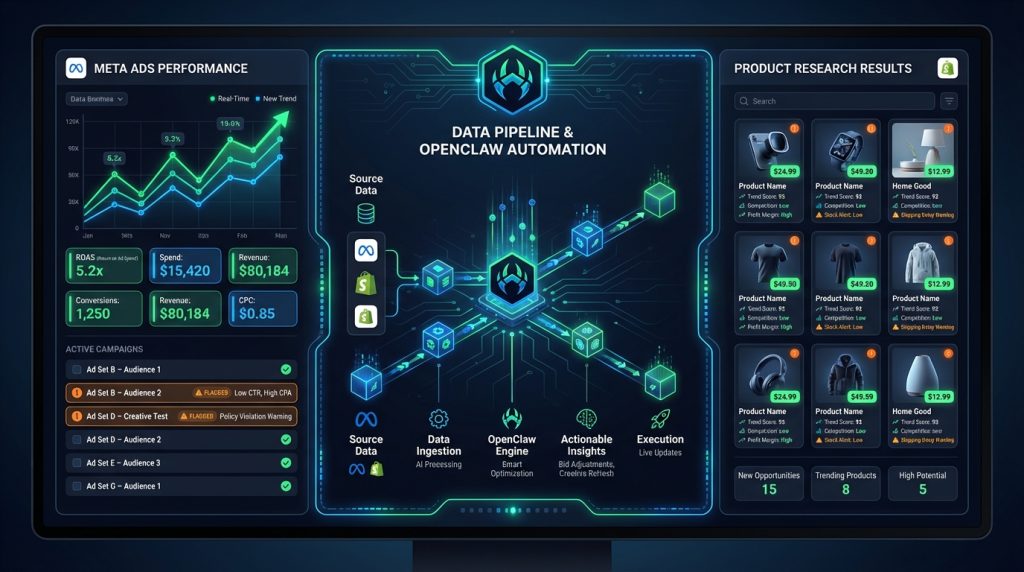
You’re running a dropshipping store. You’ve got product research to do, ad accounts to monitor, competitor prices to track, supplier stock to check, and a content machine to keep fed — all while your ads are burning money at 3 AM and nobody’s watching. That’s not a business. That’s a second job with worse hours.
This is exactly the problem we were staring at when we started running OpenClaw for our e-commerce operations. Not because we were looking for an AI toy to play with — because we needed something that would actually work while we weren’t.
What we got was an AI that monitors our ad spend, flags losing products before they drain the budget, finds winning products on demand, and drafts our ad copy — without us having to babysit it. Here’s the exact setup, including the commands, cron jobs, and workflows we actually use.
What Is OpenClaw (And Why It’s Different from Every Other “AI Automation” Tool)
Most AI automation tools are glorified IFTTT with a ChatGPT wrapper. They’re rigid, brittle, and break the second your workflow doesn’t fit their template. OpenClaw is different in one critical way: it’s an always-on AI agent that understands context, executes multi-step tasks, remembers decisions, and can spawn sub-agents to work in parallel.
Think of it like this: hiring an employee versus setting up an autoresponder. The autoresponder can send emails. The employee can figure out who to email, what to say, when to send it, and follow up when they don’t hear back. OpenClaw is the employee.
For e-commerce — and specifically for Meta Ads-driven dropshipping — this matters enormously. Your competitive advantage isn’t your product, it’s your speed. Who finds the winning product first, tests it fastest, scales it hardest, and kills it cleanest. Every manual step in that loop is money left on the table.
We’ve written extensively about OpenClaw’s core capabilities in our OpenClaw Review 2026, so we won’t rehash the basics. This article is specifically about the e-commerce and paid ads workflow we’ve built on top of it.
The Core Problem: E-Commerce Never Sleeps But You Do
Here’s what a typical dropshipping day looks like without automation:
- Wake up, check ad account — ads ran overnight, ROAS looks bad, but you don’t know if it’s a product problem, a creative problem, or an audience problem
- Manually check competitor prices on AliExpress/CJ Dropshipping — did your supplier raise prices while you were sleeping?
- Scroll TikTok, Facebook feeds looking for trending products — hoping something jumps out
- Write ad copy — from scratch, every time
- Check your Shopify dashboard — which products are actually selling vs. which ones you’re paying to advertise for nothing
That loop takes 2-3 hours a day. Every day. And most of it is pattern recognition that a machine can do faster, cheaper, and without taking a sick day.
Here’s what our day looks like with OpenClaw running:
- Wake up to a briefing that has already analyzed the overnight ad data, flagged the underperformers, and suggested next steps
- OpenClaw has already checked supplier pricing on any products with margin changes above a set threshold
- The product research cron ran at 2 AM and surfaced three potential winners with context on why
- Ad copy drafts for the top product are waiting for review — not for writing
That’s the delta. And it compounds daily.
Setting Up OpenClaw for E-Commerce: The Foundation
If you haven’t installed OpenClaw yet, start with the Windows setup guide or the Mac/Linux guide. Once it’s running, the e-commerce configuration starts in your workspace files.
Step 1: Configure Your SOUL.md and USER.md for E-Commerce Context
OpenClaw’s SOUL.md file defines your agent’s operating mode. For e-commerce, add explicit context about your business so it always reasons from the right frame:
## Business Context
Primary revenue: Meta Ads / Dropshipping
Current focus: Product testing, ad creative iteration, margin defense
Decision framework: Speed of learning over perfection. Kill losers fast. Scale winners hard.
Metrics that matter: ROAS (target 2.5x+), CPP, hook rate, hold rate
Current ad spend: [your daily budget]
Supplier: [AliExpress / CJ Dropshipping / Zendrop / etc.]
This isn’t fluff. When OpenClaw drafts ad copy or evaluates a product, it pulls from this context to make recommendations that actually fit your business — not generic e-commerce advice.
Step 2: Set Up the Meta Ads Monitoring Skill
OpenClaw’s custom skills system lets you package tools into reusable modules. Create a meta-ads-monitor skill that wraps the Meta Graph API:
## meta-ads-monitor/SKILL.md

Use this skill when monitoring Meta ad performance, flagging underperformers,
or compiling daily ad reports.

### API Setup
- Access token: stored in memory/credentials.md
- Ad Account ID: act_XXXXXXXXXX
- Default lookback: yesterday (date_preset=yesterday)

### Trigger Conditions
Flag an ad set for review when:
- ROAS < 1.5x after $30+ spend
- CPM > 3x account average
- Hook rate < 20% after 500+ impressions
- Daily spend > 120% of budget

### Output Format
Return a structured report: ad set name, spend, ROAS, CPP,
flagged issue, and recommended action (pause / reduce budget /
test new creative / leave it).
The skill file tells OpenClaw what data to pull and how to interpret it. You’re not writing code — you’re writing instructions like you would for a smart analyst.
Step 3: Connect Meta Graph API
OpenClaw can make HTTP requests natively. Store your access token securely in memory/credentials.md and reference it in skills:
## Meta Ads API
- Graph API endpoint: https://graph.facebook.com/v22.0/
- Access Token: [stored — reference as meta_ads_token]
- Ad Account: act_XXXXXXXXXX
When OpenClaw needs ad data, it fetches it directly from the Meta Graph API — no third-party integration required, no monthly SaaS fee.
The Daily Ad Monitoring Cron: What Runs Every Morning
This is the most valuable single automation we run. Every morning at 6 AM, OpenClaw runs a full ad account review and delivers a structured briefing. Here’s how it’s set up:
// cron configuration (set via OpenClaw cron interface)
{
  "name": "Daily Meta Ads Briefing",
  "schedule": { "kind": "cron", "expr": "0 6 * * *", "tz": "America/Edmonton" },
  "payload": {
    "kind": "agentTurn",
    "message": "Run meta-ads-monitor skill. Pull yesterday's performance for all active ad sets. Flag any sets meeting trigger conditions. Then check if any flagged products need creative refresh (look at hold rate and hook rate). Output a structured morning briefing: (1) account summary, (2) flagged ad sets with specific actions, (3) any budget adjustments needed, (4) one creative recommendation. Send to Telegram when done."
  }
}
The result: we wake up to a message like this:
Meta Ads Briefing — March 25
Total Spend: $287 | ROAS: 2.3x | CPP: $24.80⚠️ FLAGGED: “Teeth Whitening — Interest Stack A” — $41 spend, 1.1x ROAS. Hook rate 18%. Recommend pausing and testing new hook angles.
✅ SCALING: “Kitchen Gadget — LLA 3%” — $89 spend, 3.8x ROAS. CPP $18. Recommend 20% budget increase.
Creative rec: The kitchen gadget winner is riding on a transformation hook. Test a “before/after cooking frustration” angle for the bedding set — same emotional structure, different product.
That brief took zero minutes of our time to produce. And it’s actionable — not a data dump, an actual recommendation with reasoning.
For a deeper look at OpenClaw’s cron system, see our OpenClaw Cron Jobs guide.
Product Research on Autopilot
Product research is the most time-consuming part of dropshipping and also the most systematizable. There are only so many signals that indicate a winning product — demand, margin, uniqueness, wow factor, low perceived value vs. high actual utility. OpenClaw can be trained to look for exactly those signals.
The 2 AM Product Research Cron
{
  "name": "Nightly Product Research",
  "schedule": { "kind": "cron", "expr": "0 2 * * *", "tz": "America/Edmonton" },
  "payload": {
    "kind": "agentTurn",
    "message": "Run product research session. Search for trending products on TikTok ads library, Meta ads library, and AliExpress trending. Focus on: (1) products with high video engagement and relatively few sellers, (2) items solving a specific pain point, (3) price point $20-$60 retail with 3x+ margin potential. Output top 3 candidates with: product description, estimated margin, why it could win, suggested hook angle, and a link. Save to memory/product-candidates.md."
  }
}
Every morning there’s a fresh list of researched candidates waiting. We review the list in five minutes instead of spending an hour scrolling ad libraries.
On-Demand Deep Dives
When a product looks promising, we can ask OpenClaw to go deeper without setting up another cron:
User: Deep dive on [product]. Pull current AliExpress pricing,
check CJ Dropshipping availability, find top 3 Meta/TikTok ads
for it, analyze what hooks they're using, check if there's
saturation in the niche, and give me a go/no-go with reasoning.
OpenClaw runs this as a multi-step sub-agent task — spawning parallel research threads, synthesizing them, and returning a structured brief. What used to take an hour of manual research comes back in minutes.
Ad Copy Generation: From Brief to Draft in Minutes
Here’s what other reviews won’t tell you about using AI for ad copy: the output quality is directly proportional to how much context you feed it. Generic prompt = generic copy. Structured brief = copy that actually converts.
We’ve built a skill that encodes our ad copy framework:
## ad-copy-gen/SKILL.md

Generate Meta and TikTok ad copy for dropshipping products.

### Framework
Hook options (rotate through):
- Pain agitation: "Tired of [problem]? This changes everything."
- Social proof: "3.2 million people can't be wrong about this."
- Curiosity gap: "This [product] just broke the internet and here's why."
- Transformation: "Before: [state]. After: [state]."

Body: Problem → Agitate → Solution → Proof → CTA
CTA: Shop now | Get yours | Limited stock | Order today

### Output Format
For each product, generate:
- 3 hook variations (different angles)
- 1 body copy (150 words max)
- 3 CTA variations
- Suggested visual description for the creative team
- Primary emotion this ad should trigger (urgency / curiosity / desire / relief)
When we have a new product to test:
User: Generate ad copy for [product name]. Target: women 35-55,
interested in home organization. Key benefit: [benefit].
Price point: $39. Use ad-copy-gen skill.
Three hook variants, body copy, CTAs, and a creative brief come back ready for review. We’re not writing from scratch. We’re editing, which is 5x faster.
Competitor and Supplier Price Monitoring
Margin erosion kills more dropshipping stores than bad products do. Supplier raises prices 30%, you don’t notice for two weeks, and you’ve been selling at a loss while running ads. Or your competitor undercuts you by $5 and your conversion rate tanks.
OpenClaw monitors both:
{
  "name": "Price Monitor",
  "schedule": { "kind": "cron", "expr": "0 8 * * *", "tz": "America/Edmonton" },
  "payload": {
    "kind": "agentTurn",
    "message": "Check pricing on all active products in memory/active-products.md. For each: (1) fetch current AliExpress/CJ price and compare to last recorded, (2) fetch top 3 competitor Shopify prices via web search, (3) flag any margin drops below 35% or competitor price changes > 10%. Send Telegram alert only if flags exist. Update memory/price-history.md."
  }
}
If nothing changes, we hear nothing. If something changes, we get an alert with the delta and a recommendation — raise price, find new supplier, or kill the product.
Shopify Performance Reports
We connect OpenClaw to Shopify via the Shopify Admin REST API. The setup is straightforward — store your API credentials in memory/credentials.md, and OpenClaw can pull any data you need:
## Shopify API
- Store URL: yourstore.myshopify.com
- API version: 2024-04
- Admin API token: [stored as shopify_admin_token]
Weekly we run a product performance audit:
{
  "name": "Weekly Shopify Audit",
  "schedule": { "kind": "cron", "expr": "0 7 * * 1", "tz": "America/Edmonton" },
  "payload": {
    "kind": "agentTurn",
    "message": "Pull last 7 days of Shopify data. Report: (1) top 5 products by revenue, (2) products with add-to-cart but no purchase (conversion issues), (3) products with zero sales — flag for review. Cross-reference with Meta ad spend to calculate true product-level ROAS. Flag any product where ad spend exceeds revenue by 20%+. Format as a clean weekly report, save to memory/weekly-reports/, send summary to Telegram."
  }
}
This catches the expensive problem: products we’re actively advertising that have stopped converting, sometimes because of a page issue, sometimes because the product is dead. Either way, we catch it in a week, not a month.
The Memory System: How OpenClaw Learns Your Business
This is the part that actually separates OpenClaw from running prompts in ChatGPT. OpenClaw’s persistent memory system means it accumulates context over time.
After two months of running our e-commerce crons, OpenClaw knows:
- Which product categories we’ve tested and their outcomes
- Our supplier relationships and which ones have had reliability issues
- Our ad account’s baseline metrics (what “normal” looks like for us)
- What hooks have worked vs. flopped for our audience
- Our seasonal patterns and how they affect ROAS
When it makes a recommendation now, it’s informed by that history. “You tested a similar kitchen gadget in December — it had a 1.4x ROAS and you killed it after $80 spend. This one has a different angle (solution-focused vs. feature-focused) — worth testing but flag it if ROAS is below 1.8x after $40.”
That’s not generic AI advice. That’s a collaborator who knows your history.
Building a Creative Brief Automation
One of the highest-leverage automations we’ve built is the creative brief generator. Once a product passes our research filter, OpenClaw automatically generates a complete creative brief for testing:
User: Product approved: [product name]. Generate a complete
test creative brief. Include: product hook angles (3),
target audiences to test (3), ad formats recommended
(static/video/carousel), suggested UGC style guide,
competitor ad analysis, and a test budget recommendation
based on our current account spend level.
The output is a document our creative process can run with immediately — no brief meeting, no alignment call, no wasted time figuring out what to test. OpenClaw has already thought through the testing strategy.
What OpenClaw Doesn’t Do (Honest Take)
Here’s what other OpenClaw articles skip: it’s not magic, and it’s not zero setup.
The first two weeks are investment, not payoff. You’re writing skill files, tuning cron jobs, building the memory files that give OpenClaw context. If you expect to install it and have it immediately running your business, you’ll be disappointed.
The monitoring crons are only as good as your API access. If your Meta access token expires and you don’t notice, the crons run but return errors. You need to build in error handling — which OpenClaw can actually do, but you have to think to ask for it.
It also doesn’t replace judgment on creative strategy. It can generate ad copy variations, but it can’t tell you that your product photography is the real problem, or that your landing page is killing conversions after the click. Those still need a human eye.
Think of it as a very capable analyst, not a CEO. It does the work of monitoring, researching, drafting, and synthesizing. The final call is still yours — and it should be.
Comparing OpenClaw to Paid E-Commerce AI Tools
| Tool | Monthly Cost | Ad Monitoring | Product Research | Custom Workflows | Memory/Context |
|---|---|---|---|---|---|
| OpenClaw | $0 (+ LLM API) | ✅ Custom | ✅ Custom | ✅ Unlimited | ✅ Persistent |
| Birch (fka Revealbot) | $49+/mo | ✅ Native | ❌ | ⚠️ Rule-based | ❌ |
| Madgicx | $99+/mo | ✅ Native | ⚠️ Limited | ⚠️ Limited | ❌ |
| Dropispy | $29+/mo | ❌ | ✅ Native | ❌ | ❌ |
| Minea | $49+/mo | ❌ | ✅ Native | ❌ | ❌ |
The honest comparison: paid tools like Birch (formerly Revealbot) have cleaner native Meta integrations — you’re not writing API calls yourself. But they’re rigid. They automate rules, not thinking. OpenClaw automates judgment — which is a fundamentally different capability.
At $200/month for a typical paid e-commerce tool stack (ad monitor + product research + copywriting AI), OpenClaw pays for itself in setup hours within the first month if you’re running any real ad spend.
How This Fits Into a Full Content and Revenue Stack
We use OpenClaw across our entire operation — not just e-commerce. On the content side, the OpenClaw content pipeline handles article drafting, scheduling, and SEO optimization. The affiliate marketing automation setup handles link management and commission tracking.
The e-commerce layer sits on top of that same infrastructure. Same cron system, same memory architecture, same Telegram delivery. One platform, multiple revenue streams, all running on the same always-on agent.
That’s the actual pitch for OpenClaw at scale: it’s not a tool for one workflow, it’s an operating system for a multi-stream business. The solopreneur stack article gets into how the full architecture hangs together.
Who Is This For?
OpenClaw for e-commerce isn’t for everyone. Here’s the honest breakdown:
This setup is built for you if:
- You’re running or actively building a Meta Ads-driven dropshipping store
- You’re comfortable with basic command-line tools and reading API docs (no coding required, but zero tech tolerance won’t fly)
- You want automation that thinks, not just automation that triggers — you need a system that can flag why your ROAS is dropping, not just that it dropped
- You’re spending at least $30-50/day on ads and drowning in manual monitoring tasks
- You’re a solopreneur or small team that can’t afford a full-time analyst but needs analyst-level output
This probably isn’t for you if:
- You’re just starting out with $5/day test budgets — the ROI on setup time won’t be there yet
- You want a point-and-click solution with zero configuration — tools like Birch or Madgicx will serve you better
- You need enterprise-grade SOC 2 compliance or team permission systems — OpenClaw is self-hosted and built for individual operators
The sweet spot: a solo operator or two-person team running $100-500/day in ad spend who needs the leverage of a five-person team without the payroll.
Getting Started: The Minimum Viable E-Commerce Setup
If you’re just getting started, don’t try to build everything at once. Here’s the order that gives you the fastest ROI:
- Day 1: Install OpenClaw, configure
SOUL.mdandUSER.mdwith your business context - Day 2: Set up the Meta Ads API connection, build the morning briefing cron
- Day 3: Write the ad-copy-gen skill, test it on your current products
- Week 2: Add product research cron, price monitoring cron
- Week 3: Add Shopify integration, build weekly performance audit
- Month 2+: Tune based on what’s working, add new crons as bottlenecks appear
Each step is additive. You start getting value on Day 2 with the morning briefing, long before you’ve built the full stack.
Frequently Asked Questions
Does OpenClaw integrate directly with Meta Ads Manager?
OpenClaw connects to Meta Ads through the Meta Graph API using an access token you generate in Meta Business Manager. It’s not a pre-built native integration — you configure the API credentials in your workspace and OpenClaw makes authenticated calls directly. This gives you more flexibility than any pre-built integration but requires initial setup. Full setup takes about 30 minutes once you have your API credentials.
Can OpenClaw automatically pause or adjust Meta ad campaigns?
Yes, with the right permissions on your access token (requires Advertiser or higher role). OpenClaw can make POST requests to pause ad sets, adjust budgets, or modify bids via the Graph API. We recommend starting with monitoring-only (read permissions) and adding write permissions only once you’ve validated the monitoring logic — you don’t want an AI pausing your winning ads due to a misconfigured threshold.
How much does running OpenClaw for e-commerce cost?
OpenClaw itself is free and open source. Your main cost is LLM API usage — Claude Sonnet runs roughly $3-8 per million tokens. For typical e-commerce crons (daily briefing, product research, price checks), expect $15-40/month in API costs depending on how verbose your outputs are. Compare that to $150-300/month for equivalent paid tool stacks.
Is OpenClaw safe to connect to my Shopify store?
Yes, with standard API security practices. Use a custom app with minimum required scopes (read_products, read_orders, read_analytics — don’t grant write access unless you need it). Store credentials in memory/credentials.md, which lives in your local workspace and is never sent to external services. OpenClaw reads credentials at runtime and passes them in API headers — they’re not stored in the LLM context window.
Can OpenClaw do product research on AliExpress automatically?
OpenClaw can fetch and analyze public web data including AliExpress product pages and pricing. For structured product research, it uses web search and web fetch capabilities to pull data from product pages, ad libraries, and competitor stores. It can’t access real-time AliExpress “trending” data that requires login — for that, you’d need to run searches manually and paste results for analysis, or connect a scraping tool to your OpenClaw workspace.
How does OpenClaw compare to Birch (formerly Revealbot) for Meta Ads monitoring?
Birch (which rebranded from Revealbot in 2024) has a cleaner out-of-box Meta Ads integration and requires zero setup for standard automation rules. OpenClaw requires more initial configuration but gives you AI-powered analysis and recommendations instead of rule-based triggers. Birch will pause an ad when ROAS drops below a threshold; OpenClaw will tell you why the ROAS dropped, what the historical pattern looks like, and what you should test next. Birch starts at $49/month (Essential) or $99/month (Pro with automation rules). For teams who want plug-and-play, Birch wins. For operators who want compounding intelligence, OpenClaw wins.
Do I need coding experience to set up OpenClaw for e-commerce?
No coding required for the core setup. You’ll need to be comfortable with the command line (running npm install commands, editing text files) and reading API documentation to get your access tokens. The actual “programming” in OpenClaw is writing skill files in plain English — natural language instructions, not code. If you can write a detailed email to an employee explaining what you want them to do, you can write an OpenClaw skill.
What’s the biggest mistake people make when setting up OpenClaw for e-commerce?
Building too many crons too fast and then not reading the outputs. We’ve seen people set up eight automated reports and then start ignoring them within a week because there’s too much noise. Start with one cron — the morning ad briefing — and actually act on what it tells you for two weeks before adding more. The system is only as valuable as the decisions you make from it. More data without more action is just more distraction.


