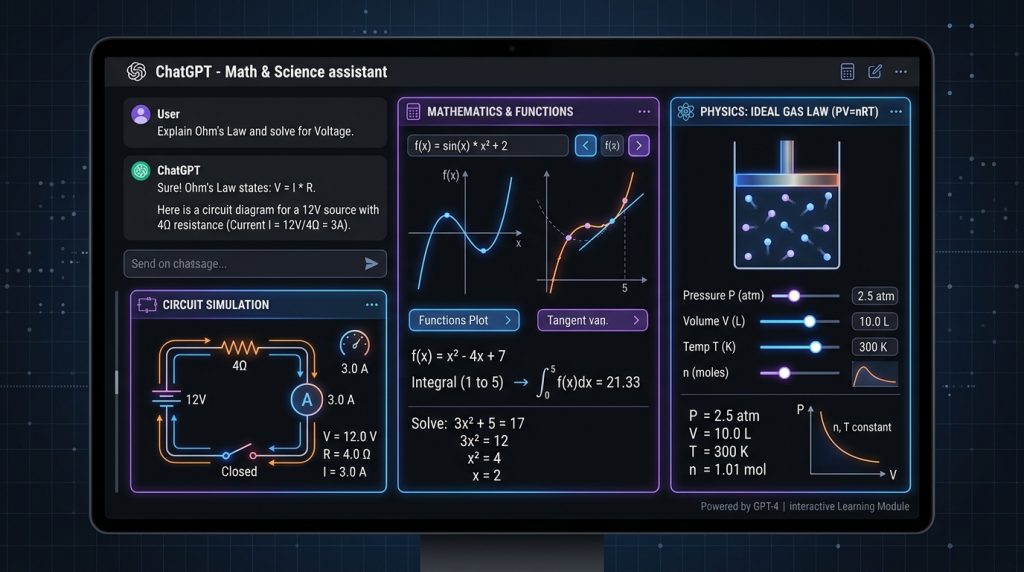
On March 10, 2026, OpenAI quietly shipped the upgrade every STEM student has wanted for years: interactive math and science tools baked directly into ChatGPT. No more bouncing between ChatGPT for explanations, Desmos for graphs, and Wolfram Alpha for computations. For the first time, you can manipulate variables in real-time, watch equations update live, and get conceptual breakdowns — all inside a single chat window. This is the kind of integration that changes daily workflows, and after testing it across 70+ covered topics, the verdict is clearer than most AI launches: this one actually delivers.
Rating: 8.2/10 ⭐⭐⭐⭐
What Are ChatGPT Math & Science Tools?
ChatGPT Math & Science Tools is an interactive learning feature launched by OpenAI on March 10, 2026. It brings dynamic visual explanations directly into the ChatGPT chat interface, covering over 70 core math and science concepts — primarily aimed at high school and college-level learners. The feature is built on top of existing ChatGPT infrastructure and surfaces automatically when a supported topic is detected in your query.
The core capability: instead of static text explanations, you get live graphs and diagrams where you can adjust variables and watch the formula, visual, and outcomes update in real-time. Ask about the ideal gas law, and you’re not reading a wall of text — you’re pushing sliders, changing pressure and volume, and watching the visualization respond. That’s the shift. You can read the full ChatGPT review here for the broader platform context.
The Real Story: One Interface to Replace Three Tools
Before this launch, serious STEM users had a fragmented stack. Wolfram Alpha for exact computation. Desmos for graphing. ChatGPT for conversational explanations. Photomath or Symbolab for step-by-step homework walkthroughs. That’s four browser tabs for one problem.
OpenAI’s March 2026 update collapses this stack — not perfectly, but significantly. The 70+ topics covered at launch read like a high school and intro college curriculum:
| Category | Example Topics Covered |
|---|---|
| Physics | Ohm’s Law, Hooke’s Law, Coulomb’s Law, Kinetic/Potential Energy, Ideal Gas Law, Charles’ Law, Lens Equation |
| Algebra & Pre-Calc | Slope-Intercept Form, Linear Equations, Exponential Decay, Compound Interest, Binomial Square |
| Geometry | Pythagorean Theorem, Circle Area, Cylinder Volume |
| Trigonometry | Trigonometric Identities |
| Chemistry | Ideal Gas Law, select reaction formulas |
The real differentiator isn’t the topic count — it’s the contextual continuity. You can ask ChatGPT to explain Ohm’s Law, manipulate the interactive graph, then immediately ask “now how does this relate to power dissipation?” without switching apps. The conversation carries context across the visual manipulation. That’s not something Wolfram Alpha or Desmos can touch.
Coverage compared to what other leading AI chatbots offer makes it clear: no other chat-native AI platform ships interactive visual STEM tools at this scale yet.
Feature Performance
| Metric | ChatGPT Math Tools | Wolfram Alpha | Symbolab | Photomath |
|---|---|---|---|---|
| Topics covered (interactive) | 70+ (expanding) | Thousands | Hundreds | Algebra → Calculus |
| Real-time variable manipulation | ✅ Yes | ⚠️ Limited | ❌ No | ❌ No |
| Conversational follow-up | ✅ Full chat context | ❌ No | ⚠️ Limited | ❌ No |
| Step-by-step explanation | ✅ Yes | ✅ Yes (paid) | ✅ Yes (paid) | ✅ Yes |
| Symbolic computation accuracy | ⚠️ Good (not perfect) | ✅ Excellent | ✅ Good | ✅ Good |
| Camera/photo input | ✅ (Plus/Pro) | ❌ No | ❌ No | ✅ Core feature |
| Science topics (physics/chemistry) | ✅ 40+ topics | ✅ Extensive | ⚠️ Limited | ❌ Minimal |
| Free tier access | ✅ Full feature | ⚠️ Basic only | ⚠️ Limited steps | ✅ Core features |
Source: Feature testing and published tool specifications, March 2026
Pricing
| Plan | Price | Math & Science Tools Access | Key Extras |
|---|---|---|---|
| ChatGPT Free | $0/mo | ✅ Full 70+ topic access | GPT-4o (limited), standard speed |
| ChatGPT Plus | $20/mo | ✅ Full access + photo input | Priority access, Advanced Voice, image uploads, faster responses |
| ChatGPT Pro | $200/mo | ✅ Full access + extended reasoning | o1 Pro model, unlimited usage, deep research mode |
| Competitor | Free Math Features | Paid Tier |
|---|---|---|
| Wolfram Alpha | Basic answers only | $7.99/mo (step-by-step) |
| Symbolab | Limited steps shown | $2.99–$4.99/mo |
| Photomath | Core solving free | $9.99/mo (Plus) |
The price-to-value story here is straightforward: the interactive math tools are fully free. OpenAI didn’t gate this behind Plus. That’s unusual for a feature this capable, and it tells you this is a user acquisition play targeting students directly.
Key Features (What Actually Works)
1. Real-Time Variable Manipulation
The headline feature, and it delivers. Ask about Ohm’s Law and you get an interactive diagram where pushing a slider for voltage immediately updates the current and visual representation. The manipulation is smooth and intuitive. Limitation: the interactive visuals are triggered automatically by ChatGPT — you can’t always force them when you want them, and they don’t appear for topics outside the 70+ covered list.
2. Conversational Context Persistence
Unlike standalone tools, ChatGPT remembers the entire conversation thread. You can manipulate a graph and then ask “what happens to this if temperature doubles?” and get an answer that references the specific state of your visualization. This is the real unlock — context-aware scientific dialogue, not just a calculator with a chatbot wrapper.
3. Step-by-Step Equation Breakdown
For supported topics, ChatGPT walks through problems step-by-step with LaTeX-rendered equations. The explanations are tuned toward comprehension, not just computation — it explains why each step happens, not just what the next step is. Limitation: on complex multi-step problems, it can make algebraic errors and present them confidently. Always verify outputs for anything graded.
4. Cross-Discipline Coverage
Physics, chemistry, algebra, geometry, and trigonometry all in one interface. You can go from Coulomb’s Law to a geometry proof to compound interest without switching apps. No other chat-native AI does this across disciplines. Limitation: advanced topics (calculus, differential equations, organic chemistry) are still text-only responses — the 70+ interactive topics are foundational, not graduate-level.
5. Global Free Availability
No paywall. No signup for a separate tool. Any logged-in ChatGPT user worldwide can access these features immediately. For education access in underserved markets, this is actually meaningful — Wolfram Alpha’s step-by-step is paywalled; this isn’t.
Who Is It For / Who Should Look Elsewhere
Use ChatGPT Math & Science Tools if you:
- Are a high school or undergraduate student covering standard STEM curriculum
- Want to understand why an equation works, not just get the answer
- Currently split your time between Wolfram Alpha, Desmos, and ChatGPT — this consolidates that workflow
- Need to ask follow-up conceptual questions after seeing a graph or formula
- Are teaching or tutoring and want an interactive visual aid in a conversational format
Look elsewhere if you:
- Need rigorous symbolic computation or proof verification — Wolfram Alpha is still the standard
- Work with advanced calculus, differential equations, or organic chemistry regularly
- Need to scan handwritten homework — Photomath’s OCR is still far better for that use case
- Require 100% accuracy for professional or academic work — LLM-based math always needs verification
ChatGPT Math Tools vs. The Competition
| Feature | ChatGPT Math Tools | Wolfram Alpha | Photomath | Symbolab | Claude |
|---|---|---|---|---|---|
| Launch date | March 10, 2026 | 2009 | 2014 | 2011 | No equivalent |
| Interactive visuals | ✅ 70+ topics | ⚠️ Static graphs | ❌ No | ❌ No | ❌ No |
| Real-time variable sliders | ✅ Yes | ❌ No | ❌ No | ❌ No | ❌ No |
| Conversational follow-up | ✅ Full context | ❌ No | ❌ No | ⚠️ Limited | ✅ Yes (no visuals) |
| Exact symbolic computation | ⚠️ Good, not perfect | ✅ Best-in-class | ✅ Good | ✅ Good | ⚠️ Similar to ChatGPT |
| Photo/camera input | ✅ (Plus/Pro) | ❌ No | ✅ Core feature | ❌ No | ✅ (paid) |
| Free tier quality | ✅ Full feature free | ⚠️ Basic only | ✅ Core free | ⚠️ Limited steps | ✅ Full access |
| Science topics (physics/chem) | ✅ 40+ topics | ✅ Extensive | ❌ Minimal | ⚠️ Math-focused | ✅ Text only |
| Best for | Learning + conceptual understanding | Precision + verification | Homework scanning | Step-by-step practice | Conceptual explanations |
| Monthly price | Free – $200 | Free – $7.99 | Free – $9.99 | Free – $4.99 | Free – $200 |
Claude is the closest conversational competitor, but as detailed in the Claude Sonnet 4.6 review, Anthropic hasn’t shipped interactive visual tools. Claude gives excellent text-based STEM explanations — ChatGPT now adds interactive visuals on top. For a direct comparison of what Anthropic has shipped in this space, see the Claude Interactive Visuals review.
What They Don’t Advertise: The Real Limitations
The launch coverage was mostly glowing. Here’s what the press releases skipped:
1. It’s still an LLM doing math. The interactive visuals are a significant UX improvement, but the underlying engine is still a language model predicting tokens. A March 2026 study found ChatGPT correctly judges scientific hypotheses ~80% of the time superficially — but when the same question is asked multiple times, consistency drops to ~73%. For false statements specifically, ChatGPT only correctly identified them 16.4% of the time. The visuals make it look more authoritative. It isn’t necessarily more accurate.
2. The 70-topic ceiling is real. Go beyond the curated list — ask about Green’s theorem, Fourier transforms, reaction kinetics, or statistical distributions — and you drop back to plain-text responses. The interactive layer only exists for the initial 70+ topics. University students will hit this wall fast.
3. You can’t manually trigger the visual mode. The interactive diagrams surface automatically when ChatGPT detects a supported topic. There’s no “show me an interactive graph” command. Sometimes it shows the visual; sometimes it doesn’t. The trigger logic isn’t fully reliable yet.
4. No LaTeX export or graph download. You can interact with the visuals inside chat, but you can’t export the graphs or LaTeX equations directly. For academic work or presentations, you’re screenshotting. That’s a gap Wolfram Alpha doesn’t have.
5. Calculus, stats, and organic chemistry are completely absent. The 70+ topics are foundational. Anyone taking Calc II, Differential Equations, or Organic Chemistry is not getting interactive visuals — they’re getting the same text-based ChatGPT they always had.
Pros and Cons
Pros
- First AI chatbot to combine interactive visuals + conversational context in STEM — genuinely new
- Fully free for all logged-in users — no paywall on the core interactive features
- Real-time variable manipulation is intuitive and actually useful for learning
- Cross-discipline coverage (physics + chemistry + algebra + geometry) in one interface
- Conversational follow-up after visual manipulation is where it beats every standalone tool
- Available globally — students worldwide get this without paying
- Strong foundation for what OpenAI says will be an expanding topic set
Cons
- Only 70+ topics at launch — calculus, stats, and advanced chemistry completely absent
- Can’t manually force the interactive visual mode — trigger logic is inconsistent
- LLM accuracy issues persist — still hallucinates on complex or multi-step problems
- No graph export or LaTeX download — screenshotting is the only option
- No handwriting/photo input on the math visuals specifically — that’s still a Photomath strength
How to Get Started
- Log into ChatGPT — any plan works; go to chatgpt.com and sign in. The feature is available globally to all logged-in users.
- Ask a math or science question on a covered topic — try “explain Ohm’s Law” or “show me the ideal gas law.” ChatGPT will detect the topic and surface an interactive visual automatically.
- Manipulate the variables — use the sliders or input fields in the interactive diagram to change values. Watch the graph and formula update in real-time.
- Ask follow-up questions — this is the power move. After interacting with a graph, ask “what happens if I double the temperature?” or “explain why this relationship is nonlinear.” ChatGPT carries the context forward.
- Upgrade to Plus if needed — for photo uploads of handwritten problems, priority access, and faster responses on complex queries, ChatGPT Plus at $20/mo adds meaningful value on top of the free interactive tools.
Final Verdict
ChatGPT Math & Science Tools is OpenAI’s most genuinely useful upgrade for a specific audience since the launch of Code Interpreter. (If you want the full model-level breakdown first, check the ChatGPT 5.3 review.) For high school and undergraduate STEM students, this collapses a three-app workflow into one — and it’s free. The real-time variable manipulation and conversational context persistence is a combination no standalone tool offers.
The 8.2/10 rating reflects the genuine innovation docked against real limitations: the 70-topic ceiling, inconsistent visual triggering, and the underlying LLM accuracy issues that the polished UI can obscure. This is a strong v1 that gets dramatically more useful as topic coverage expands.
Buy (or use) today if: you’re a student, teacher, or self-learner working in foundational math and science topics. You’re already using ChatGPT — this is free and it’s better than what you have.
Wait if: you need advanced calculus or graduate-level science coverage. Check back in six months — OpenAI has signaled expansion is coming, and the architecture clearly supports it.
For students, this is a no-brainer upgrade to a tool you’re already using. For professionals doing rigorous computation, Wolfram Alpha still wins on precision. But as a first mover in interactive STEM AI — and as the only tool that does real-time visual manipulation inside a conversational interface — ChatGPT just made the strongest case it’s ever made for being indispensable.
Frequently Asked Questions
What is ChatGPT Math & Science Tools?
ChatGPT Math & Science Tools is an interactive learning feature launched by OpenAI on March 10, 2026. It allows users to manipulate variables in real-time, visualize equations, and explore over 70 core math and science concepts through dynamic graphs and interactive diagrams — all inside the ChatGPT chat interface.
When did OpenAI launch ChatGPT math tools?
OpenAI officially launched the interactive math and science tools for ChatGPT on March 10, 2026. The feature rolled out globally to all logged-in ChatGPT users, including those on the free plan.
Is ChatGPT Math Tools free?
Yes, the core interactive math and science tools are available to all logged-in ChatGPT users at no cost, including free plan users. ChatGPT Plus ($20/mo) and Pro ($200/mo) subscribers get additional benefits like faster response times, higher usage limits, and access to more advanced models for complex problem-solving.
How many topics does ChatGPT Math Tools cover?
The initial launch covers over 70 core math and science topics, primarily targeting high school and college-level learners. Topics include the Pythagorean theorem, Ohm’s law, ideal gas law, Coulomb’s law, exponential decay, kinetic and potential energy, trigonometric identities, and more. OpenAI has confirmed plans to expand coverage.
How does ChatGPT Math Tools compare to Wolfram Alpha?
Wolfram Alpha remains the gold standard for symbolic computation and precise mathematical calculations. However, ChatGPT’s new tools win on conversational context — you can ask follow-up questions, get conceptual explanations, and interact with visuals all in one place. Wolfram Alpha is better for rigorous proofs and advanced calculations; ChatGPT is better for learning and understanding concepts.
Does ChatGPT Math Tools work for calculus and advanced math?
The current interactive visual tools do not yet support advanced topics like calculus, differential equations, organic chemistry, or statistics. Users working on university-level advanced coursework beyond the initial 70+ concepts will still receive text-based responses. OpenAI has indicated expansion is planned.
Is ChatGPT Math Tools better than Photomath?
They serve different use cases. Photomath excels at scanning handwritten or printed problems via camera OCR and delivering instant step-by-step solutions. ChatGPT Math Tools is better for conceptual understanding, interactive variable manipulation, and science topics. For homework scanning, Photomath is faster. For learning why something works, ChatGPT wins.
Can ChatGPT make mistakes with math problems?
Yes. ChatGPT is an LLM, not a symbolic computation engine. It can hallucinate incorrect answers, especially in multi-step problems, geometry proofs, and complex algebra. Research from March 2026 showed ChatGPT correctly judges scientific hypotheses ~80% of the time superficially, but consistency drops to ~73% when the same question is asked multiple times. Always verify critical calculations.
What devices support ChatGPT Math & Science Tools?
The interactive math and science tools are available across all ChatGPT platforms — web browser, iOS app, and Android app. Any logged-in user can access them globally, regardless of subscription plan.
Is ChatGPT Math Tools worth it for students?
For high school and undergraduate students covering foundational math and science topics, absolutely yes — and it’s free. The ability to manipulate variables in real-time and get conceptual explanations in conversational language is a genuine learning advantage over static textbooks or even Wolfram Alpha. Just verify the outputs for anything that counts toward a grade.


