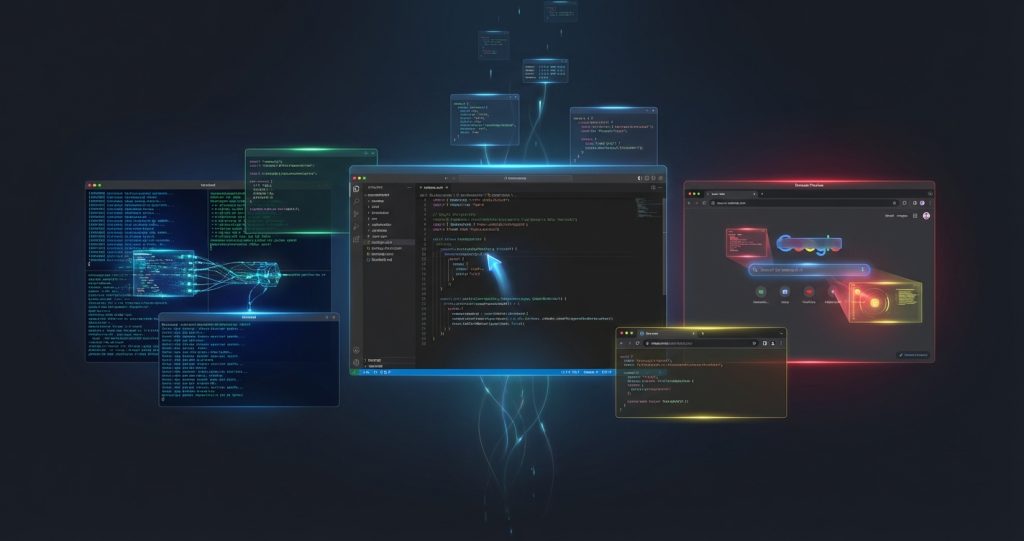
You ask your IDE to “build a full-stack task manager with real-time sync and auth.” You hit Enter. And then you watch – genuinely watch – as an AI agent writes the files, runs the terminal commands, opens a Chrome window, tests the app, and hands you a video recording of the whole thing as proof it worked.
That’s not a demo. That’s Google Antigravity in its best moments. And it launched in late 2025, available to download right now for free.
But here’s what most reviews won’t tell you: the developer community is deeply divided on this tool. Half of them call it the future of coding. The other half are posting on Reddit about their “$20 paperweight.” Both camps have a point.
This review covers what Antigravity actually does, where it genuinely impresses, where it falls flat, how pricing works (it’s more complicated than “free”), and who should download it today versus who should wait.
What Is Google Antigravity?
Google Antigravity is an agent-first IDE – a code editor where AI agents don’t just suggest code, they execute it. Think of it as the difference between a GPS giving you turn-by-turn directions and a self-driving car. Traditional AI coding tools like GitHub Copilot sit in the passenger seat and whisper suggestions. Antigravity takes the wheel.
Launched in public preview on November 18, 2025, Antigravity is built on Visual Studio Code’s foundation and powered by Gemini 3 Pro as its primary model. It also supports Claude Sonnet 4.5 and GPT-OSS 120B as alternatives. According to Google’s documentation, Gemini 3 Pro scores 76.2% on SWE-bench Verified – a benchmark that measures how accurately AI models can fix real-world GitHub issues.
The download is free at antigravity.google, and it runs on Windows, macOS, and Linux.
The Core Idea: Agents That Act, Not Just Suggest
Antigravity gives AI agents direct access to three “surfaces” in your development environment:
- The editor – Agents read and write code files across your entire project
- The terminal – Agents run commands, install packages, and execute scripts
- The browser – Via a Chrome extension, agents open your app, click around, and record what they see
This combination is what makes Antigravity genuinely different. When an agent builds a feature, it can immediately test that feature in a real browser, catch the errors, fix them, and send you a video artifact showing the workflow. It’s not just code generation – it’s code generation plus verification.
Key Features (Verified from Official Documentation)
Two Working Modes: Editor View and Manager View
Antigravity ships with two distinct ways to work, and choosing the right one matters more than most users realize initially.
Editor View looks and feels like VS Code with an enhanced AI panel. You write code, the agent assists with specific tasks – refactoring, generating boilerplate, explaining legacy code. If you’re a developer who likes to stay in control of what gets written, this is your mode. It’s familiar, it’s fast, and it keeps you in a coding flow state rather than a supervision state.
Manager View is where Antigravity gets genuinely strange and genuinely exciting. Here, you give high-level instructions – “build a React dashboard that pulls from this API” – and multiple agents run in parallel across separate workspaces. One builds the frontend components. Another implements the backend endpoints. A third writes integration tests. You watch from a “mission control” perspective, reviewing Artifacts as they come in.
The honest take: Manager View is impressive to demo and genuinely useful for greenfield projects. But as XDA-Developers found in their January 2026 hands-on, “being a manager is often more exhausting than just doing the work yourself.” You spend time reviewing agent decisions rather than coding. Whether that trade-off works for you depends heavily on your project complexity and your patience for oversight.
The Artifact System: Proof That Work Actually Happened
This is one of Antigravity’s genuinely clever innovations. Instead of dumping a wall of code diffs on you, agents produce “Artifacts” – structured documents containing:
- Implementation plans (created before coding starts, editable by you)
- Task lists showing what was completed
- Screenshots of the running application
- Video recordings of browser-based testing sessions
You can annotate Artifacts with Google Docs-style comments to redirect agents mid-task without stopping their execution. It’s a clever system that treats AI-generated work like deliverables from a team member – complete with evidence of completion.
Multi-Agent Parallel Execution
Traditional AI assistants run one task at a time. You ask a question, you get an answer, you ask the next question. Antigravity’s parallel architecture lets multiple agents tackle different parts of a problem simultaneously – frontend and backend simultaneously, code and tests simultaneously.
According to performance testing reported by AdwaitX shortly after launch, Antigravity resolved queries across large codebases (100,000+ lines) 40% faster than Cursor 2.0 in direct comparison, and achieved 94% accuracy on multi-file refactoring versus Cursor’s 78%. These figures come from third-party testing and haven’t been independently verified by our team, but they’re consistent with what developers report anecdotally for straightforward, well-scoped projects.
Model Selection Within the IDE
Antigravity isn’t locked to Gemini. According to the official documentation at antigravity.google/docs, you can switch between:
- Gemini 3 Pro (High) – Best for complex reasoning tasks
- Gemini 3 Pro (Low) – Faster responses for simpler tasks
- Claude Sonnet 4.5 – Alternative reasoning model
- Claude Sonnet 4.5 (Thinking) – Enhanced chain-of-thought for harder problems
- GPT-OSS 120B (Medium) – Open-weight option
The ability to swap models mid-session is legitimately useful, especially as each model has different strengths for different tasks. For teams that need the generated code to stay in sync with Figma design files, the OpenAI Figma MCP integration handles the bidirectional design-to-code workflow that Antigravity doesn’t natively cover.
VS Code Compatibility
Building on VS Code’s foundation means your existing extensions, keybindings, and muscle memory all transfer directly. This dramatically reduces the adoption friction that typically kills new IDE experiments. If you’ve spent years customizing VS Code, you don’t lose that investment when you download Antigravity.
Pricing: The “Free” That Isn’t Quite Free
This is where it gets complicated – and where some developers feel burned.
Current Preview Pricing
According to Google’s official pricing page, the Individual plan is $0/month during the public preview phase. This includes:
- Access to Gemini 3 Pro, Claude Sonnet 4.5, and GPT-OSS models
- Unlimited tab completions
- Unlimited command requests
- “Generous” rate limits (quotas that refresh every 5 hours, exact limits not publicly specified)
Google AI Pro Tier ($19.99/month)
If you’re already a Google AI Pro subscriber (Google’s rebrand of what was previously Google One AI Premium), Antigravity access is bundled in. Based on 9to5Google’s updated February 2026 feature breakdown, AI Pro subscribers get “Higher” agent request limits in Antigravity – meaning significantly more autonomous coding capacity than the free tier.
The $19.99/month AI Pro plan also includes: 2TB of Google One storage, Gemini Advanced access, Jules (AI code reviewer), Gemini Code Assist, and Gemini CLI – so Antigravity is one component of a broader bundle, not a standalone product you’re paying specifically for.
The Rate Limit Reality
Here’s what every other review glosses over: “generous rate limits” is doing heavy lifting in Google’s marketing copy. The actual limits aren’t publicly documented. Heavy users – developers running Manager View to build complex features – report hitting them mid-session, which forces a 5-hour wait.
For casual experimentation, the free tier is genuinely usable. For production development workflows, plan for interruptions or factor in the AI Pro subscription cost.
A Note on the Controversy
In late January 2026, a significant portion of the Antigravity user community (particularly on r/GeminiAI and Reddit’s developer communities) reported that performance degraded compared to the initial launch period. The specific complaints: shorter effective context windows, higher hallucination rates, and a subscription syncing bug where paying AI Pro users were incorrectly treated as free-tier users within the Antigravity client.
This is a real issue, not just internet noise. The subscription sync bug has been particularly frustrating for users in certain regions. Google acknowledged the issues but hasn’t published an official resolution timeline as of this writing. If you’re planning to pay for AI Pro specifically to unlock higher Antigravity limits, verify the subscription is registering correctly in the desktop client before committing.
Real-World Use Cases
Where Antigravity Actually Shines
Greenfield web app prototyping. Give Antigravity a clear, well-scoped prompt – “Build a Pomodoro timer with React/Vite/Tailwind, dark theme, 25-minute focus sessions, 5-minute breaks, browser notification on completion” – and it will scaffold the entire app, write the component logic, run it in a dev server, and open Chrome to show you the working product. For this use case, it’s genuinely impressive and saves significant setup time.
Large codebase navigation. Gemini 3’s 1 million-token context window means Antigravity can ingest an entire monorepo without truncation. Ask it to find where a specific pattern is used across 50 files, and it will. This is where the tool earns its edge over tools with smaller context windows.
Documentation generation. Antigravity agents are strong at reading existing code and generating comprehensive documentation – README files, API docs, inline comments. It’s the kind of task developers perpetually delay, and Antigravity handles it autonomously.
Learning a new codebase. Dropped into an unfamiliar project? Ask Antigravity to explain the architecture, trace a data flow, or map the component structure. The multimodal context means it can cross-reference code, terminal output, and browser behavior simultaneously.
Where Antigravity Struggles
Complex debugging. This is the tool’s clearest current weakness. XDA’s hands-on testing found that when logic gets tangled – race conditions, complex async flows, framework-specific quirks – Antigravity’s agents can get stuck in circular loops. A manual debugger with breakpoints often resolves the issue faster than watching an AI agent spin on it for 10 minutes.
The micro-decision fatigue problem. Antigravity is “autonomous” but it asks for approval constantly. Refactor a module and you’ll face five or six Accept/Reject buttons in a row. Some developers report spending more time validating agent choices than they would have spent writing the code themselves – especially for tasks they know well.
Stability in preview. As XDA noted, “the performance comes with a catch: it’s unpredictable.” Agent termination errors happen. When they occur mid-complex-task, recovering your state requires starting over. VS Code with Copilot simply doesn’t crash in this way.
Non-Google ecosystem integration. If your stack is AWS or Azure-heavy, Antigravity’s native integration advantages are mostly irrelevant. Its deep connections to Google Cloud, Firebase, and Chrome give it edges that disappear outside the Google ecosystem.
Google Antigravity vs. Competitors
Google Antigravity vs. Cursor
Our full Cursor Review covers this in detail, but the short version: Cursor is the polished, stable daily driver. Antigravity is the experimental powerhouse with higher highs and lower lows.
Cursor charges $20/month for Pro (no annual discount is currently available) and offers a predictable, reliable experience for professional development. Antigravity is free during preview and faster for complex multi-file operations – but less stable. Most developers testing both in early 2026 have kept Cursor as their primary IDE and use Antigravity for ambitious greenfield tasks where its autonomous capabilities shine.
Google Antigravity vs. Windsurf
Windsurf (reviewed in our Windsurf Review) occupies a middle ground – more autonomous than Cursor’s chat-based approach but less “agent-first” than Antigravity. At $15/month, Windsurf is the cheapest of the premium trio. It’s a strong option for developers who want more automation than Cursor offers without Antigravity’s instability risks.
Google Antigravity vs. GitHub Copilot
Copilot is a fundamentally different product, as covered in our GitHub Copilot Review. It’s a code completion assistant that integrates into your existing editor – not a standalone IDE. Copilot is the choice if you want to stay in VS Code or JetBrains while getting AI suggestions inline. Antigravity is the choice if you want to hand off entire features to autonomous agents.
Google Antigravity vs. Kilo Code
Kilo Code (see our Kilo Code Review) is the open-source alternative – entirely free, extensible, and privacy-forward since you connect your own API keys. If the idea of Google having access to your codebase bothers you, Kilo Code is worth exploring. It lacks Antigravity’s polished browser integration and artifact system, but it’s infinitely customizable.
Comparison Table
| Tool | Price | Autonomy Level | Stability | Best For |
|---|---|---|---|---|
| Google Antigravity | Free (preview) / $19.99/mo bundle | Very High (agent-first) | Preview-quality | Greenfield projects, large codebases |
| Cursor | $20/mo Pro | Medium-High | Excellent | Daily professional development |
| Windsurf | $15/mo Pro | Medium | Good | Balanced automation + stability |
| GitHub Copilot | $10/mo Individual | Low (completion-focused) | Excellent | In-editor AI suggestions |
| Kilo Code | Free (BYOK) | High (agent-capable) | Good | Privacy-focused, open-source |
Who Should Use Google Antigravity?
Antigravity is the right tool for you if:
- You’re building something new from scratch – greenfield projects where you can give agents clear scope play to Antigravity’s strengths
- You work with massive codebases – the 1M token context window genuinely changes what’s possible when navigating large repositories. (For document-heavy research workflows outside of coding, NotebookLM uses that same Gemini context advantage for source-grounded research.)
- You’re curious about where agentic coding is headed. (Broader multi-agent systems like Perplexity Computer are taking this same orchestration logic beyond code into full business workflows.) – even with its rough edges, Antigravity gives you a working preview of how development will look in 2-3 years
- You already pay for Google AI Pro – in which case Antigravity is bundled at no extra cost, making it a zero-risk experiment
- You’re a “vibe coder” or non-technical founder – Antigravity’s Manager View was specifically designed to let people without deep coding knowledge describe what they want and watch it get built. If you want an AI that goes further and delivers complete finished outputs autonomously, see our Manus AI review
Antigravity is not the right tool if:
- You need rock-solid stability for production work today – the preview instability is real
- You primarily do maintenance, debugging, or incremental work on existing codebases – the agent overhead doesn’t pay off for small, well-understood tasks
- You work exclusively outside the Google Cloud ecosystem – the native integrations that give Antigravity its edge don’t apply
Honest Pros and Cons
Pros
- Genuinely free during preview – no credit card, no expiring trial, just download and use it
- Agent-first architecture is real, not marketing – the autonomy is deeper than anything Cursor or Copilot offers
- Artifact system is cleverly designed – video proofs of work are genuinely useful, not just a gimmick
- Multiple model support – Gemini 3 Pro, Claude Sonnet 4.5, and GPT-OSS give flexibility for different task types
- VS Code foundation means zero learning curve – your existing setup largely transfers
- 1M token context window – handles entire monorepos that other tools can’t hold in memory
- Parallel agent execution – genuinely faster for complex multi-component tasks
Cons
- Preview-stage instability – “Agent terminated” errors happen at the worst possible times
- Rate limit opacity – “generous” limits aren’t documented, making it hard to plan production usage
- Micro-decision fatigue – frequent Accept/Reject prompts can slow you down more than they save time
- Subscription syncing bug – AI Pro users in some regions report being treated as free-tier users (as of Feb 2026, unresolved)
- Debugging weakness – complex logic errors often take longer with agents than with manual debugging tools
- Google ecosystem bias – native integration advantages only apply if you use Google Cloud/Firebase
- Controversial post-launch performance – community reports of degraded Gemini 3 Pro capabilities vs. the honeymoon period
How to Get Started
If you want to try Antigravity today, here’s the quickest path to a working setup:
- Download the installer from antigravity.google/download (Windows users: install to C: drive to avoid known login issues)
- Set Chrome as your default browser before launching – the authentication flow and browser agent both require it
- Sign in with a Google account
- Start in Editor View first – it’s familiar and lets you build intuition for how agents work before going full Manager mode
- Test with a well-scoped, self-contained project – “build a React countdown timer” is a better first prompt than “help me fix my authentication bug”
System requirements are modest: 64-bit Windows 10 or later, macOS Monterey or later (Apple Silicon only), or Ubuntu 20.04+ on Linux. 8GB RAM minimum, 16GB recommended for heavy multi-agent workflows.
Frequently Asked Questions
Is Google Antigravity really free?
Yes – during public preview, the Individual plan is $0/month with no credit card required. This includes access to Gemini 3 Pro, Claude Sonnet 4.5, and GPT-OSS models with “generous” rate limits. However, Google has signaled that the free preview arrangement is temporary, and heavy production usage will likely require a paid tier when general availability launches. If you already subscribe to Google AI Pro ($19.99/month), you get higher Antigravity limits bundled in.
How does Google Antigravity compare to Cursor?
Antigravity offers higher autonomy – agents execute entire features independently rather than suggesting code line-by-line. Cursor is significantly more stable and polished for everyday professional use. In practice, many developers use Cursor as their primary daily driver and Antigravity for ambitious greenfield tasks. Antigravity is free (during preview); Cursor Pro is $20/month.
What is the “agent terminated” error in Google Antigravity?
This is the most common stability complaint from early users. Agent termination errors occur when the autonomous agent encounters an unexpected state mid-task and cannot recover. The result is a crash that may require you to restart the task from scratch. It’s a known issue with the preview release and one of the primary reasons developers hesitate to rely on Antigravity for production work until stability improves.
Does Google Antigravity work with non-Google cloud providers?
Yes – Antigravity is VS Code-based and language-agnostic, so it works with any cloud infrastructure. However, its native integrations are optimized for Google Cloud and Firebase. Developers primarily working with AWS or Azure won’t benefit from those native advantages, though the core coding agent capabilities work regardless of your cloud provider.
Is my code safe in Google Antigravity?
Google processes your code through its servers to power the AI agents, which is standard for cloud-based AI tools. If you’re working on proprietary or sensitive codebases, review Google’s data usage terms for the Antigravity preview. For maximum code privacy, open-source alternatives like Kilo Code (which uses your own API keys) may be more appropriate.
Can beginners use Google Antigravity?
Yes – and it was partly designed for “vibe coders” and non-technical founders who want to build applications through natural language. Manager View lets you describe what you want in plain English and watch agents build it. That said, understanding basic software concepts helps you write better prompts and catch agent mistakes. Complete beginners may find the feedback loop challenging without knowing when the AI has made an error.
What programming languages does Google Antigravity support?
Because it’s built on VS Code, Antigravity supports every language VS Code handles – JavaScript, TypeScript, Python, Go, Java, Rust, C#, Ruby, PHP, and many more. There’s no language restriction. However, the agents perform best with JavaScript/TypeScript web projects, likely due to the heavy representation of those stacks in the training data.
The Verdict: Download It, But Keep a Backup
Google Antigravity is the most ambitious AI IDE available right now. The agent-first architecture, the Artifact system, the multi-model flexibility, the 1M token context window – these aren’t incremental improvements on existing tools. They represent a genuinely different theory of how coding should work.
It also has very real problems: preview instability, rate limit opacity, a subscription sync bug that’s frustrated paying users, and a tendency to create “manager fatigue” on tasks where just typing faster would have been faster.
The balanced take: download it today (it’s free, there’s no risk) and spend a weekend building something greenfield. You’ll likely see moments that feel like they’re from five years in the future. You’ll also hit frustrating walls. Both experiences are useful – they’ll tell you exactly how much of your workflow Antigravity can absorb right now versus how much it needs to mature.
If you’re a professional developer who can’t afford workflow disruptions: keep Cursor or Windsurf as your primary IDE and use Antigravity for experiments. If you’re a founder prototyping a new product or a developer who’s comfortable living on the bleeding edge: make this your main tool. Just save your work frequently.
For a broader look at all your options in this space, our Best AI Coding Assistants 2026 guide compares the full landscape. For organizations deploying AI coding workflows at enterprise scale – with governance, audit trails, and department-wide rollouts – our Anthropic Claude Enterprise review covers the infrastructure layer that connects development tools to the broader organization.
{“@context”:”https://schema.org”,”@type”:”FAQPage”,”mainEntity”:[
{“@type”:”Question”,”name”:”Is Google Antigravity really free?”,”acceptedAnswer”:{“@type”:”Answer”,”text”:”Yes – during public preview, the Individual plan is $0/month with no credit card required. This includes access to Gemini 3 Pro, Claude Sonnet 4.5, and GPT-OSS models with generous rate limits. Google has signaled the free preview is temporary. Google AI Pro subscribers ($19.99/month) get higher limits bundled in.”}},
{“@type”:”Question”,”name”:”How does Google Antigravity compare to Cursor?”,”acceptedAnswer”:{“@type”:”Answer”,”text”:”Antigravity offers higher autonomy – agents execute entire features independently. Cursor is significantly more stable for everyday professional use. Many developers use Cursor as their daily driver and Antigravity for ambitious greenfield tasks. Antigravity is free during preview; Cursor Pro is $20/month.”}},
{“@type”:”Question”,”name”:”What is the agent terminated error in Google Antigravity?”,”acceptedAnswer”:{“@type”:”Answer”,”text”:”Agent termination errors occur when the autonomous agent encounters an unexpected state mid-task and cannot recover, requiring you to restart the task. It’s a known preview-stage stability issue and the primary reason developers hesitate to rely on Antigravity for production work.”}},
{“@type”:”Question”,”name”:”Does Google Antigravity work with non-Google cloud providers?”,”acceptedAnswer”:{“@type”:”Answer”,”text”:”Yes – it’s VS Code-based and language-agnostic, working with any cloud infrastructure. However, its native integrations are optimized for Google Cloud and Firebase. Developers using AWS or Azure won’t benefit from those native advantages.”}},
{“@type”:”Question”,”name”:”Is my code safe in Google Antigravity?”,”acceptedAnswer”:{“@type”:”Answer”,”text”:”Google processes your code through its servers to power the AI agents. For proprietary or sensitive codebases, review Google’s data usage terms for the preview. For maximum code privacy, open-source alternatives like Kilo Code (which uses your own API keys) may be more appropriate.”}},
{“@type”:”Question”,”name”:”Can beginners use Google Antigravity?”,”acceptedAnswer”:{“@type”:”Answer”,”text”:”Yes – Manager View lets you describe what you want in plain English and watch agents build it. It was partly designed for non-technical founders. Complete beginners may struggle without knowing when the AI has made an error, as some software fundamentals help you write better prompts.”}},
{“@type”:”Question”,”name”:”What programming languages does Google Antigravity support?”,”acceptedAnswer”:{“@type”:”Answer”,”text”:”Built on VS Code, Antigravity supports every language VS Code handles – JavaScript, TypeScript, Python, Go, Java, Rust, C#, Ruby, PHP, and more. Agents perform best with JavaScript/TypeScript web projects.”}}
]}