This Perplexity Computer review covers everything you need to know about the multi-agent AI system that launched on February 25, 2026 – what it actually does, how much it costs, who it’s built for, and whether $200 a month is a justifiable spend. We’ll skip the hype and give you the straight breakdown.
Perplexity AI has built a reputation on search. Perplexity Computer is a different play entirely – it’s not a search engine, it’s closer to a digital employee that can build apps, write reports, generate datasets, and run tasks autonomously for hours or even months without hand-holding. That’s a significant claim. Let’s see if it holds up.
What Is Perplexity Computer?
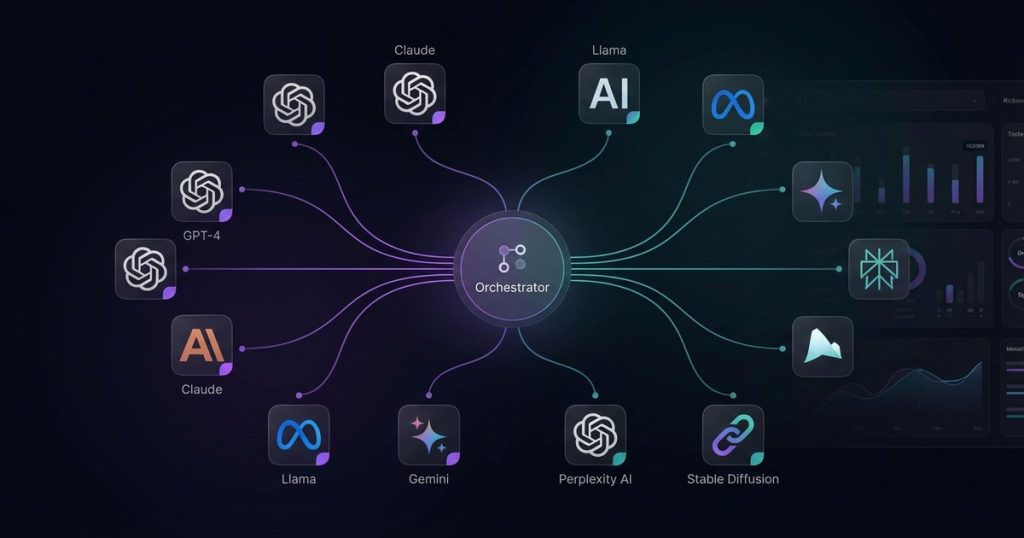
Perplexity Computer is a multiagent orchestration system – what Perplexity calls a “general-purpose digital worker.” The core idea is straightforward: instead of asking one AI model to do everything (what Perplexity’s CEO describes as using a butter knife for every job), Computer routes each subtask to the AI model best suited for it.
Think of it like a CEO with a specialized team. You describe what you want – “build me an app that shows live snow conditions at ski resorts” – and Computer acts as the executive. It breaks the goal into subtasks, figures out which model is best at each one, delegates, monitors progress, and delivers the finished result. You’re not managing the models. You’re managing the outcome.
This is meaningfully different from chatting with Claude or GPT and manually copy-pasting between tools. Computer handles the orchestration layer that most power users are currently doing by hand. That’s the value proposition in a sentence.
Development moved fast. Perplexity’s Chief Business Officer Dmitry Shevelenko confirmed the system started as an internal experiment in January 2026 – just weeks before launch. He credited AI itself for compressing development timelines, with models doing weeks of engineering work overnight. Take that with appropriate skepticism, but the speed is real: concept to public launch in under 60 days.
How It Works: The Multi-Model Stack
Computer doesn’t run on a single model. It uses 12+ frontier AI models simultaneously, each assigned to the tasks they’re best at. Perplexity is explicit that this lineup will change as better models emerge – so consider this a snapshot of launch day, February 25, 2026.
- Core reasoning engine: Claude Opus 4.6 (Anthropic) – handles complex planning, logic, and orchestration decisions
- Image generation: Google Nano Banana – visual assets, graphics, design outputs
- Video generation: Google Veo 3.1 – video content creation and animation
- Deep research: Gemini (Google) – long-form research, synthesis, and fact-finding
- Lightweight/quick tasks: Grok (xAI) – fast-turnaround tasks where speed matters more than depth
- Long-context recall + wide web search: GPT-5.2 (OpenAI) – tasks requiring large context windows and broad web coverage
The remaining models in the 12+ stack aren’t publicly disclosed at launch. Perplexity’s position is that users shouldn’t need to care which model runs which task – the orchestration layer handles that automatically. That’s a clean user experience, but it does mean you’re trusting Perplexity’s judgment on model selection rather than making those calls yourself.
The system architecture here is genuinely interesting. Claude Opus 4.6 as the reasoning core makes sense – it’s one of the strongest models for complex multi-step planning. Routing video to Veo 3.1 and images to Nano Banana, while using Gemini for deep research and GPT-5.2 for wide-net web tasks, reflects a pragmatic “use the best tool” approach rather than vendor loyalty. Whether that routing is always optimal in practice is a question that’ll take months of real-world use to answer.
What Can Perplexity Computer Actually Do?
Perplexity’s capability claims are broad. Here’s what they’re promising at launch – and what that looks like in practice:
App and Dashboard Building
Computer can build web-based dashboards and apps from a plain-language description. The ski resort snow conditions app example Perplexity demoed is representative: you describe the end product, and Computer plans the architecture, writes the code, pulls in data sources, and delivers something functional. This isn’t a prototype generator – Perplexity is positioning it as capable of production-ready web apps.
The key caveat: these are web-based outputs. Computer is cloud-native and doesn’t interact with your local file system or installed software. Whatever it builds lives in the cloud or gets delivered as a downloadable file. Google Antigravity covers an agent-first IDE alternative if you need local development integration.
Research and Reports
Full report generation is a strong use case. Gemini handles the deep research leg, GPT-5.2 covers broad web search, and Claude Opus 4.6 synthesizes and writes. For business intelligence reports, competitive analyses, or technical writeups, this pipeline is genuinely powerful. The output should be substantially better than any single model doing the same job, because each model is doing what it’s best at. For research workflows that need to stay grounded in specific source documents you provide (rather than open web research), our NotebookLM review covers a complementary tool that handles the document-grounded side of that equation.
Presentations and Decks
Computer can generate PowerPoint-compatible presentations from scratch. Give it a topic, a structure, or existing research, and it produces a slide deck. For teams that regularly need to translate research or data into presentation format, this alone could justify significant time savings.
Data and Datasets
Dataset generation and manipulation is listed as a core capability. This covers generating synthetic data, cleaning and restructuring existing datasets, and producing formatted outputs for analysis. For data-heavy workflows, this is a meaningful addition to the capability stack.
Visual Content
Animated GIFs, static images, and video content via Nano Banana and Veo 3.1. The visual quality will depend heavily on how well the orchestration layer translates your brief into model prompts. Perplexity hasn’t published benchmarks here – this is an area to watch as user examples emerge.
Long-Running Autonomous Tasks
This is the most ambitious claim. Perplexity says Computer can run autonomously for hours or even months on complex tasks. That puts it in agentic territory where the system is making decisions and executing steps without human checkpoints. Whether that actually works reliably for multi-month tasks is a claim that requires a lot more real-world evidence than a launch-day press release.
For tasks running hours: plausible and consistent with what we’ve seen from other agentic systems. For tasks running months: skepticism warranted until proven.
Perplexity Computer vs OpenClaw vs Manus AI
Perplexity Computer isn’t the only multi-agent system on the market. Here’s how it stacks up against the two most relevant competitors (read our full Manus AI review for a deeper dive on that side):
| Feature | Perplexity Computer | OpenClaw | Manus AI |
|---|---|---|---|
| Architecture | Cloud-only, multiagent orchestration | Local, open-source agent framework | Cloud-based, multiagent (Meta-backed) |
| Model count | 12+ frontier models | User-configured (connect your own models) | Multiple (exact count undisclosed) |
| Local file access | No – cloud walled garden | Yes – full local system access | No |
| Security posture | Strong – no local data exposure | Risk – local files, API keys exposed to agent | Strong – cloud isolated |
| Local integration | Weak – web outputs only | Strong – direct OS/file/app access | Limited |
| Pricing | $200/month (Max plan) | Free / open-source (API costs separate) | Varies (enterprise focus) — see our Claude Enterprise review |
| Open source | No | Yes | No |
| Best for | Business users, content/research/app creation | Developers, power users needing local control | Enterprise teams, structured workflows |
| Autonomous runtime | Hours to months (claimed) | Session-based | Task-duration autonomous |
The local vs. cloud divide is the fundamental split here. OpenClaw gives you deep local system integration – the agent can touch your files, run scripts, and interact with installed software. That’s powerful, but it means the agent has access to sensitive local data and API keys. If the model or configuration is compromised, the blast radius is significant.
Perplexity Computer runs entirely in the cloud. It can’t see your local files. It can’t read your SSH keys or access your database credentials. That’s a genuine security advantage for users who want powerful AI automation without the risk of exposing local infrastructure. The tradeoff is that anything requiring local integration won’t work.
Manus AI (Meta-backed) takes a similar cloud-first approach with multi-agent orchestration. It’s the closest structural competitor to Computer, though it skews more toward enterprise deployment and doesn’t have the same breadth of frontier model integrations at launch. [LINK: Manus AI review] for the full breakdown.
Pricing: Is $200/Month Worth It?
Let’s not sugarcoat it: $200/month is steep. That’s $2,400/year, or $2,000 if you pay annually. For context, that’s 10x the cost of a standard Claude Pro subscription and 10x the cost of ChatGPT Plus.
Here’s the current pricing structure:
- Max plan: $200/month or $2,000/year – includes Computer access (metered usage), unlimited Pro searches, and access to advanced models
- Pro plan: $20/month – Computer not yet available; rolling out in coming weeks
- Enterprise: Starting at $40/user/month – Computer coming soon
- Free plan: No Computer access
The “metered usage” caveat on the Max plan is worth flagging. You’re paying $200/month for access, but heavy Computer usage may still hit limits. Perplexity hasn’t published specific caps, so the actual cost-per-task at scale isn’t clear yet.
Who can justify $200/month? The math works if:
- You’re billing clients for deliverables Computer produces (reports, apps, decks)
- You’re saving 10+ hours per month that would otherwise go to manual research, writing, or development
- Your time is worth $20+/hour and Computer saves you at least 10 hours – the break-even is roughly there
- You’re a team lead or agency that can spread the cost across multiple projects
Who can’t justify $200/month:
- Casual users or hobbyists experimenting with AI
- Anyone already getting value from $20/month tools (wait for the Pro rollout)
- Teams that primarily need local system integration – Computer won’t solve that problem
The Pro plan rollout will be the real test. At $20/month with Computer access, the value proposition shifts dramatically for a much larger user base. If Perplexity delivers that without crippling the feature set, it’ll be competitive. Until then, $200/month is a power-user or business spend.
Security: The Cloud Advantage (and the Crawling Controversy)
Perplexity explicitly positions Computer’s cloud-only architecture as a security feature, and they’re not wrong to. Local AI agents – like OpenClaw – operate with access to your file system, environment variables, API keys, and installed software. That’s necessary for local integration, but it means you’re extending trust to an AI agent in a way that has real security implications.
Computer sidesteps this entirely. It runs in Perplexity’s cloud environment, isolated from your local machine. Your files, credentials, and sensitive data are never in scope. For business users handling client data, proprietary research, or regulated information, that isolation is genuinely valuable.
That said, Perplexity has a credibility problem on the data ethics front.
In August 2025, Cloudflare confirmed that Perplexity had been evading web crawling directives – specifically, ignoring robots.txt no-crawl rules to index web content it wasn’t supposed to access. This isn’t a minor issue. It means Perplexity was deliberately circumventing protections that website owners rely on to control how their content is used. Cloudflare had to implement specific blocks to stop it.
The irony is obvious: Perplexity is selling you on security and data protection while simultaneously having been caught ignoring other people’s data protections. That’s not a deal-breaker – most large AI companies have had similar controversies – but it’s context worth having when you’re deciding how much to trust them with your workflows.
For practical purposes: your local files are safe because Computer doesn’t touch them. Your data inputted into Computer’s cloud environment is subject to Perplexity’s privacy policy, which you should read before using it for anything sensitive.
Who Should Use Perplexity Computer?
Be honest with yourself about which category you fall into before spending $200/month.
Good fit:
- Consultants and agencies who produce research reports, decks, and web deliverables for clients at volume. Computer compresses timelines meaningfully if the use cases align.
- Business analysts and researchers who regularly need deep research synthesized into formatted outputs. The Gemini + GPT-5.2 + Claude Opus 4.6 research pipeline is genuinely stronger than any single model.
- Non-technical founders who want to build web apps or dashboards without hiring developers. The natural language to functional app pipeline, if it delivers on the demo, is a real capability gap filler.
- Content teams producing high-volume content that benefits from research + writing + visual generation in one workflow.
- Enterprise teams (once the Enterprise rollout lands) where the per-seat cost amortizes across a team and the security isolation is a compliance requirement.
Poor fit:
- Developers needing local integration. If your work requires touching local files, running local scripts, or interfacing with installed software, Computer can’t help. OpenClaw or local agent frameworks are the right tool.
- Casual or occasional AI users. $200/month is only justifiable if you’re using it heavily and the output translates to real value. Light users should wait for the Pro rollout.
- Anyone on a tight budget. This is a premium product at a premium price. There’s no trial period mentioned, so you’re committing $200 upfront.
- Teams with strict data residency requirements. Cloud-only means your data lives in Perplexity’s infrastructure. If your compliance requirements don’t allow that, Computer isn’t viable regardless of features.
Final Thoughts
Perplexity Computer is a genuinely interesting product – probably the most sophisticated publicly available multi-agent orchestration system at launch. The model routing approach is smart. Using Claude Opus 4.6 for core reasoning, Gemini for research, Veo 3.1 for video, and GPT-5.2 for broad web context is a pragmatic, best-tool-for-each-job architecture that single-model approaches can’t match.
The questions that remain unanswered: how well does the orchestration actually work in practice, what are the real usage limits on the Max plan, and how long until the Pro rollout makes this accessible to a broader user base? Launched 24 hours ago, there isn’t enough real-world data yet to answer any of those definitively.
What we can say: the concept is sound, the model stack is credible, and the cloud-only architecture is a genuine security advantage for the right user. The $200/month price keeps it in a narrow market segment for now. The Pro rollout – whenever it lands – will be the moment to watch.
For now: if you’re a power user or business with clear use cases that match Computer’s capabilities, and $200/month doesn’t make you flinch, it’s worth trying. Everyone else should bookmark this and wait for the Pro tier. [LINK: best AI productivity tools 2026]
Verdict
Rating: 7.5/10
Best for: Power users who want multi-model task execution without touching local files
Not for: Casual users, anyone on a budget, or anyone needing deep local system integration
Bottom line: Perplexity Computer is the most ambitious multi-agent system available today – but $200/month keeps it out of reach for most. Watch for the Pro rollout.
Frequently Asked Questions
What exactly is Perplexity Computer and how does it work?
Perplexity Computer is a multi-agent orchestration system designed to function as a general-purpose digital worker. It breaks down tasks into subtasks, assigns them to the most suitable AI models, and manages the entire process to deliver the final outcome without requiring user intervention.
Is the $200 monthly subscription for Perplexity Computer worth it?
The value of the $200/month subscription depends on your needs. If you require a digital assistant that can autonomously build apps, write reports, and manage tasks without constant oversight, it could be a worthwhile investment.
Who is Perplexity Computer designed for?
Perplexity Computer is built for users who need advanced task management and automation capabilities, such as businesses or individuals looking to streamline their workflows. It’s particularly beneficial for power users who manage multiple AI tools and want a more efficient solution.
How does Perplexity Computer differ from traditional AI chatbots?
Unlike traditional AI chatbots that focus on conversational interactions, Perplexity Computer acts as a digital employee that orchestrates various AI models to complete complex tasks. It manages the entire process, allowing users to focus on the outcome rather than the individual steps.
What types of tasks can I delegate to Perplexity Computer?
You can delegate a wide range of tasks to Perplexity Computer, including app development, report writing, dataset generation, and more. It can handle these tasks autonomously, effectively acting as a specialized team working under your direction.
How quickly can I expect results from Perplexity Computer?
Perplexity Computer is designed to deliver results efficiently, often completing tasks in a fraction of the time it would take a human. The system’s rapid development capabilities suggest that it can produce outcomes quickly, depending on the complexity of the task.
What are the main advantages of using Perplexity Computer?
The main advantages of using Perplexity Computer include its ability to automate complex workflows, reduce the need for manual task management, and leverage multiple AI models for optimal performance. This can significantly enhance productivity and efficiency for users.