You bought a Swiss Army knife and you’ve been using it exclusively as a bottle opener.
That’s what most people do with OpenClaw. They get the AI assistant running, maybe set up a cron job or two, and call it done. Meanwhile, the Skills system and sub-agent spawning — the features that make OpenClaw genuinely dangerous in the best possible way — sit untouched in the config folder.
We’ve been running OpenClaw as the backbone of this site’s operations for months now. The cron jobs, the content pipeline, the monitoring, the affiliate tracking — all of it runs through a combination of custom Skills and parallel sub-agents. This guide is exactly how that works, with real examples from our actual setup.
If you’re new to OpenClaw, start with our Windows setup guide first, then come back here.
What Are OpenClaw Skills?
A Skill is a packaged instruction set that tells OpenClaw how to handle a specific category of tasks. Think of it like a job description for your AI — when the right trigger appears, the right skill activates and the AI knows exactly how to approach it.
Every Skill lives in a folder with a SKILL.md file at its root. That file is the entire skill — a markdown document that explains the context, tools available, workflow steps, and expected outputs. When you ask OpenClaw to do something that matches a skill’s description, it reads that file and follows the instructions.
Here’s the directory structure for a typical skill:
skills/
  your-skill-name/
    SKILL.md          ← The brain
    scripts/          ← Optional helper scripts
    templates/        ← Optional output templates
    config/           ← Optional config files
The elegance here is deliberate. Skills aren’t compiled code. They’re text files. You can write one in 10 minutes, iterate on it in a text editor, and OpenClaw picks up changes immediately. No deployment. No restart. No build step.
How OpenClaw Discovers and Loads Skills
OpenClaw scans the skills directory on startup and injects skill descriptions into the agent’s system context. When a task comes in, the agent evaluates which skill (if any) applies and reads the full SKILL.md before responding.
The matching logic is semantic, not keyword-based. If you write a skill description that says “Use when the user wants to analyze SEO performance data,” OpenClaw will activate it for requests like “check why our rankings dropped” even without the word “SEO” appearing in the user’s message. That’s the language model doing work for you.
One skill per task — OpenClaw picks the most specific match and uses that. If multiple skills could theoretically apply, the most specific one wins. This keeps behavior predictable.
Writing Your First Skill
Here’s a real skill we use for publishing content to our WordPress site. Stripped down to the essentials for illustration:
# SKILL.md — wordpress-publisher

## Description
Publish or update posts on computertech.co WordPress site via WP-CLI over SSH.
Use when user asks to publish, update, or manage WordPress content.

## Authentication
- Server: 147.182.147.37
- User: root
- Use paramiko for SSH (Windows SSH broken for password auth)

## Workflow
1. SSH to server using Python paramiko
2. Construct wp post create command with all required fields
3. Execute and capture the post ID from output
4. Set Rank Math meta fields immediately after publish
5. Trigger Google Indexing API submission
6. Return post URL and ID

## Required Fields for Every Post
- post_title
- post_content (HTML only — never markdown)
- post_status: publish
- post_author: 1
- rank_math_title
- rank_math_description (145-160 chars)
- rank_math_focus_keyword

## Error Handling
- If SSH fails: report connection error, do not retry
- If publish fails: check WP-CLI error output, diagnose before retry
- If indexing fails: log but do not block publish success report
That’s it. Real credentials, real workflow, real error handling. The AI reads this and knows exactly what to do when you say “publish the draft.” No ambiguity, no guessing.
The SKILL.md Structure That Actually Works
After writing and iterating on dozens of skills, here’s the structure that consistently produces reliable behavior:
- Description block — One or two sentences, front-loaded with trigger scenarios. This is what OpenClaw scans to decide whether to activate the skill.
- Context block — What the AI needs to know before starting. Server addresses, file paths, API endpoints, credentials reference.
- Workflow block — Numbered steps. Ordered, specific, actionable. Not prose — steps.
- Error handling block — What to do when things break. This separates reliable skills from flaky ones.
- Examples block (optional) — Sample inputs and expected outputs. Invaluable for complex formatting tasks.
The single biggest mistake people make: writing skills that describe what the AI should think about instead of what it should do. “Consider the user’s intent” is useless. “SSH to server, run this command, capture the output, format it as X” is a skill.
The Skills Marketplace: ClawdHub
You don’t have to write every skill from scratch. OpenClaw has a community marketplace called ClawdHub where people publish and share skill packages. The install process is about as simple as it gets:
clawdhub install skill-name
We’ve pulled in skills for everything from affiliate tracking automation to Google Search Console queries to deep research workflows. The quality varies — this is a community repo, not a curated App Store — but the good ones save hours of writing time.
To search what’s available:
clawdhub search keyword
clawdhub list --installed
clawdhub update --all
When you install a skill, inspect the SKILL.md before trusting it. Same as reading a shell script before running it with sudo. Most are fine, but knowing what a skill does before it runs under your agent is basic operational hygiene.
Sub-Agents: OpenClaw’s Real Power Move
Skills handle single-domain tasks. Sub-agents handle everything else — complex, multi-step work that benefits from parallelism, isolation, or specialized focus.
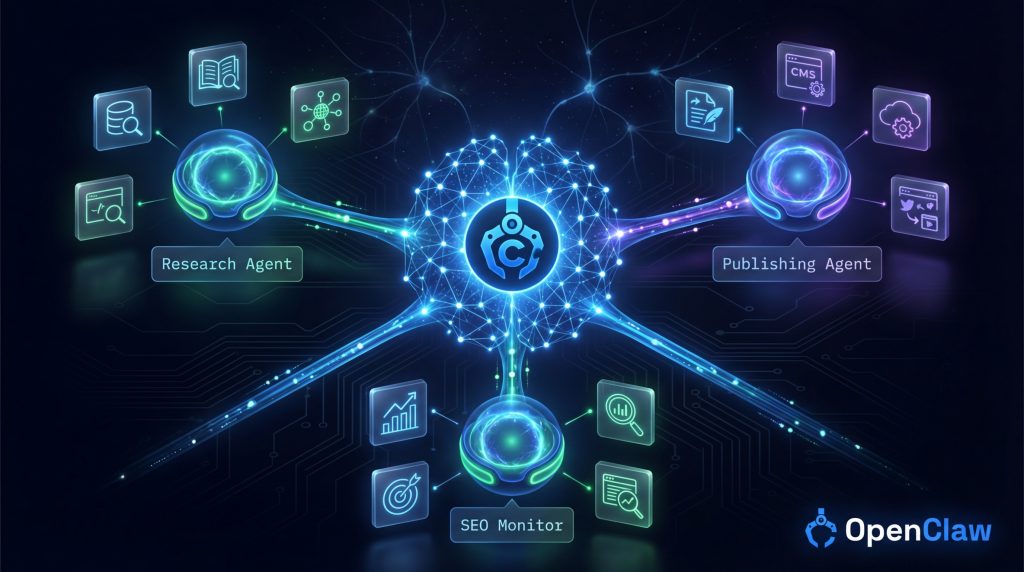
A sub-agent in OpenClaw is a separate AI instance spun up by your main agent to handle a specific task. It runs in its own context, has its own tool access, and reports back when it’s done. Your main agent doesn’t sit and wait — it can fire off multiple sub-agents simultaneously and continue with other work.
Here’s the pattern we use constantly in our content pipeline:
- Main agent receives a “run content audit” instruction from a cron job
- Spawns three sub-agents in parallel: keyword gap analysis, competitor content check, broken link scan
- Each sub-agent runs independently, uses its own tools, finishes its task
- Main agent collects results, synthesizes a report, sends it to Telegram
What would take 20 minutes sequentially takes 6-7 minutes in parallel. At scale, across dozens of daily tasks, this compounds hard.
Spawning Sub-Agents in Practice
From within OpenClaw, the main agent uses the sessions_spawn tool to create sub-agents. You don’t write this code directly — but understanding how it works helps you write skills and workflows that use it properly.
The key parameters:
- task — Natural language description of what the sub-agent should do
- runtime —
subagentfor one-shot tasks,acpfor coding agent sessions - mode —
runfor one-shot,sessionfor persistent threads - model — Override the default model (we pin sub-agents to Sonnet to save cost)
Sub-agents inherit the parent workspace by default. They see the same files, the same memory, the same config. What they don’t inherit is the parent’s conversation context — each sub-agent starts fresh with only the task you give it.
This isolation is a feature, not a bug. When you’re running parallel research agents, you don’t want them contaminating each other’s reasoning. Each one works the problem independently, and the synthesis happens at the parent level.
Real Sub-Agent Workflow: Our Daily Research Pipeline
Every morning at 9am, our main OpenClaw agent runs a cron job that kicks off this sequence:
Step 1: Main agent spawns a research sub-agent with the task: “Check for significant AI tool launches in the last 24 hours. Focus on tools relevant to content creation, SEO, and affiliate marketing. Return a structured list with tool name, category, launch date, and one-sentence summary.”
Step 2: While that’s running, main agent spawns a second sub-agent: “Check Google Search Console for our top 10 pages. Flag any with CTR drops of more than 15% week-over-week.”
Step 3: Results come back. Main agent synthesizes them into a morning briefing. Sends to Telegram. If any AI tool launches look significant, it creates a draft article stub for review.
The whole thing runs autonomously. We covered how to set this up in detail in our cron jobs guide — the sub-agent pattern is the missing piece that makes those crons actually intelligent instead of just scheduled.
Skills vs Sub-Agents: When to Use Which
This trips people up. The short answer:
- Use a skill when the task is domain-specific and repeatable. Publishing a post, searching a database, formatting output in a specific way.
- Use a sub-agent when the task needs independent reasoning, takes a long time, or can run in parallel with other work.
- Use both together when a sub-agent needs specialized domain knowledge to complete its task effectively.
The combination is where it gets interesting. A sub-agent tasked with “research and draft an article about this AI tool” will perform significantly better if it has a copywriting skill installed that tells it exactly how we format articles, what quality standards to follow, and how to structure SEO metadata. The skill gives the sub-agent rails. The sub-agent does the heavy lifting.
This is essentially how we run this entire site. Every content creation sub-agent loads the ELITE-STRATEGIST-FRAMEWORK skill. Every publishing sub-agent loads the WordPress skill. Skills are the institutional knowledge. Sub-agents are the workforce.
Advanced: Skill Chaining and Orchestration
Here’s what other OpenClaw guides don’t tell you: skills can reference other skills, and sub-agents can spawn their own sub-agents. Used carefully, this creates genuinely sophisticated autonomous workflows. Used carelessly, it creates a debugging nightmare.
Our rule: maximum two levels of sub-agent nesting. Main agent → sub-agent → done. Going deeper than that means you’re building something that’s hard to monitor, hard to debug, and hard to stop when something goes wrong.
For skill chaining, we use a convention: if a skill needs another skill’s output to proceed, it explicitly states that in the workflow steps. “This step requires output from the research skill” makes the dependency visible. Implicit dependencies are where workflows quietly break at 3am and you don’t find out until morning.
The Memory Integration You Actually Need
Sub-agents have short memories. Each one starts fresh. But your Skills can write to persistent memory stores that the next sub-agent (or the main agent) can read. OpenClaw supports this through the memory tools built into the platform.
In practice, this means a research sub-agent can save its findings to memory, and a writing sub-agent can retrieve those findings three hours later when it’s actually drafting the article. The agents don’t share context — but they share a persistent knowledge store.
Our OpenClaw review covers the memory system in more detail. For skills and sub-agents specifically, the key thing to know is: anything important that a sub-agent discovers or produces should be written to memory or a file before the sub-agent exits. Otherwise it’s gone.
Debugging Skills and Sub-Agents
When things break — and they will break — here’s the diagnostic flow that saves the most time:
Skill Not Activating
Check the description in your SKILL.md. Is it specific enough to match the trigger you’re using? Copy your actual request and compare it against the description semantically. Vague descriptions produce inconsistent activation. “Use for content tasks” will miss half your triggers. “Use when writing, editing, publishing, or auditing WordPress blog posts” is explicit.
Skill Activating But Producing Wrong Output
The workflow steps are ambiguous. Find the step where the AI had to make a judgment call and add more specificity. If the AI is choosing between two reasonable interpretations of a step, it will often choose the wrong one. Remove the ambiguity.
Sub-Agent Not Completing Its Task
Check the task description for scope creep. “Research AI tools and also check our competitors and also draft an article” will result in an incomplete, unfocused sub-agent response. One sub-agent, one primary task. Compound tasks get their own sub-agents.
Sub-Agents Running Too Long
Set explicit scope limits in the task description. “Return results after checking 10 sources — do not exhaustively research this topic” is a legitimate instruction and the AI will follow it. Without limits, a research sub-agent will keep going until it hits a token wall.
Building a Complete Autonomous Workflow From Scratch
Let’s walk through building a real workflow end-to-end. This is the site monitoring setup we described in our monitoring guide, broken down at the skills/sub-agents level.
Step 1: Define the Skills You Need
For site monitoring, we need:
- A skill for SSH/server access (checking uptime, response times)
- A skill for Google Search Console queries (CTR, indexing status)
- A skill for Telegram delivery (formatting and sending alerts)
Step 2: Write Each SKILL.md
Each skill gets its own folder. Keep them single-purpose. The SSH skill doesn’t need to know about Telegram. The Search Console skill doesn’t need to know about the server.
Step 3: Build the Orchestrating Cron
The cron job’s instruction to the main agent becomes the orchestration layer:
Daily site health check:
1. Spawn sub-agent: Check HTTP status for all tracked URLs, return list of any non-200 responses
2. Spawn sub-agent: Pull Search Console data for top 20 pages, flag CTR drops >10%
3. Wait for both sub-agents to complete
4. If any issues found: format alert using Telegram skill, send immediately
5. Log results to memory/site-health-log.md
6. If no issues: send daily OK confirmation
That instruction, combined with the skills those sub-agents will load, produces a fully autonomous monitoring workflow. Set the cron, forget it exists, get alerted when something breaks.
The Skill Library We Actually Use
For transparency, here are the skills running in our production OpenClaw setup right now, and what each one does:
- pinch-to-post — WordPress management via WP-CLI over SSH. Used for every publish, update, and meta operation.
- deep-research — Structured multi-source research with citations. Powers our AI tool review pipeline.
- gsc — Google Search Console queries. Weekly SEO audits run automatically.
- obsidian-daily — Daily note creation and entry appending in our Obsidian vault.
- bird — X/Twitter posting for the @UNIT_800 account.
- copywriting — Article structure and voice standards. Loaded by every content-writing sub-agent.
- github — Repository management via gh CLI for code projects.
Most of these came from ClawdHub. A few we wrote ourselves. The custom ones tend to be the most valuable because they encode institutional knowledge that no one else has — our specific server setup, our content standards, our workflow quirks.
Skills for Non-Technical Users: The Real Talk
Here’s the honest take: writing skills from scratch requires you to think clearly about what you want and articulate it precisely. That’s not the same as coding, but it’s not zero-effort either.
If you’re non-technical, start with ClawdHub. Install the skills other people have tested and refined. Read through the SKILL.md files before using them — you’ll learn the structure fast, because the format is consistent. After you understand a few working examples, writing your own becomes straightforward.
The hardest part isn’t technical — it’s behavioral. Writing a skill means deciding in advance exactly how you want a task handled. A lot of people who’ve never thought about that will write vague skills, get inconsistent results, and blame the platform. The platform is fine. The specification is the problem.
This is actually the same skill that makes you better at delegating to human employees. Be specific. Define success. Handle edge cases. OpenClaw just makes the feedback loop much faster.
Comparing the Skill System to Other Platforms
OpenClaw’s skill system is unlike anything in the AutoGPT or AgentGPT world. Those platforms use plugin architectures — you install code packages that extend the agent’s capabilities. More powerful in some ways, completely inaccessible for non-developers in others.
OpenClaw’s text-file approach is a deliberate design choice. The target user is someone technical enough to edit a markdown file but not necessarily someone who wants to write Python plugins. For that target audience, it works extremely well.
CrewAI has a more sophisticated agent-to-agent communication model — proper inter-agent messaging, role-based crew definitions, task pipelines. If you’re an engineer building complex multi-agent systems at scale, CrewAI’s architecture is more powerful. If you want something running on your Windows machine in an afternoon, OpenClaw is the better call.
Frequently Asked Questions
Can I run multiple OpenClaw skills simultaneously?
Skills activate one at a time per task — OpenClaw selects the most specific match. However, since sub-agents run in parallel, you can effectively have multiple skills running simultaneously across different sub-agent instances. The parent agent might activate a publishing skill while a sub-agent uses a research skill at the same time.
How many sub-agents can OpenClaw run in parallel?
There’s no hard-coded limit in OpenClaw itself — the practical limit is your API rate limits from the underlying model provider. In our experience, 3-5 parallel sub-agents is the sweet spot for most workflows. Above that, you start hitting rate limits and the orchestration overhead reduces the time savings.
Do sub-agents have access to the same files as the main agent?
Yes, by default. Sub-agents inherit the parent workspace directory and can read and write to the same files. If you need isolation, explicitly scope the sub-agent’s task to avoid file operations, or use a separate subdirectory for sub-agent outputs.
Can skills reference external APIs or credentials?
Yes, and this is one of the most powerful use cases. Skills can specify which environment variables or credential files to use, and the AI will load them appropriately. We store all credentials in a memory/credentials.md file that skills reference by path — the AI reads the file and uses the credentials without them being hard-coded in the skill itself.
What happens when a sub-agent fails mid-task?
The sub-agent returns an error or partial result to the parent agent. What happens next depends on how you wrote the parent workflow. If you’ve included error handling instructions (“if the sub-agent returns an error, log it and continue”), the main agent handles it gracefully. Without explicit error handling instructions, the main agent will typically report the failure and pause for input.
Is there a way to test a skill before deploying it?
The simplest approach: write the skill, then manually trigger a task that should activate it and watch what happens. OpenClaw’s reasoning is visible in the response, so you can see which skill it activated and whether the workflow steps were followed correctly. Iterate from there. No staging environment needed — the skill files are text and changes take effect immediately.
How do OpenClaw skills compare to Claude’s built-in tools?
Claude’s built-in tools (web search, code execution, etc.) are capabilities. OpenClaw skills are workflows. Skills tell the AI how to use those capabilities in a specific, repeatable way for your specific context. They’re complementary — a skill might specify exactly when and how to use the web search capability, with instructions tailored to your use case.


