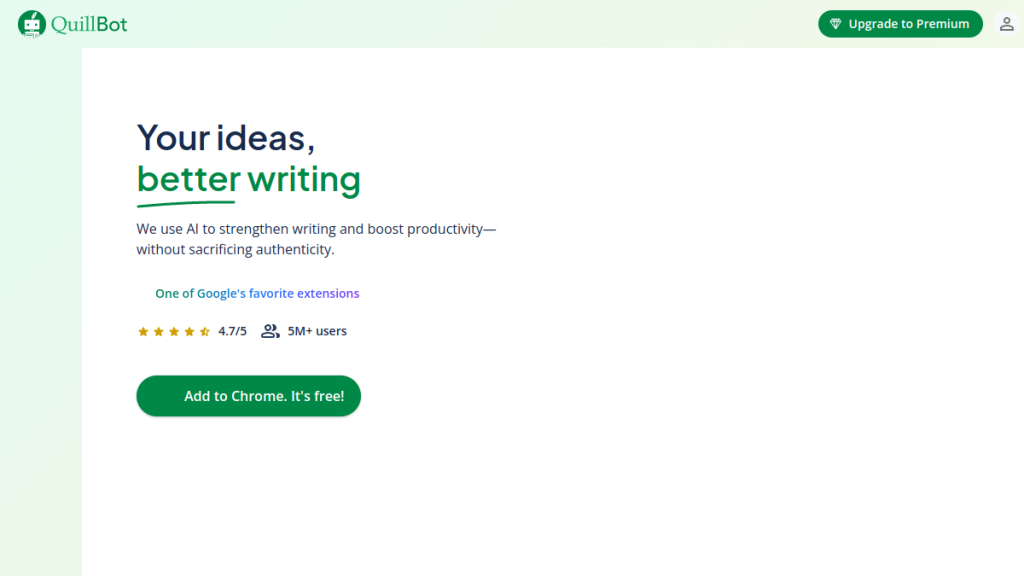
Your writing sounds robotic, repetitive, or just plain awkward—but hiring an editor for every piece would bankrupt your content budget. QuillBot has quietly built a 35-million-user base by focusing on one thing: making bad writing sound human.
Quick Verdict
| Our Rating | 4.2 / 5 |
| Best For | Students, academics, ESL writers, and content editors |
| Pricing | Free plan available; Premium from $8.33/mo (annual) |
| Free Trial | Free plan available |
| Verdict | The best paraphrasing and editing tool on the market — ideal for polishing existing text, but not a replacement for full AI content generation. |
QuillBot has quietly become one of the most popular AI writing tools on the planet, with over 35 million users relying on it to polish their prose. But in a world where ChatGPT and Grammarly dominate the conversation, does QuillBot still deserve a spot in your toolkit?
After extensive hands-on testing, we’ve put together this comprehensive QuillBot review covering everything from its paraphrasing prowess to its pricing structure. Whether you’re a student trying to avoid accidental plagiarism, a content marketer rephrasing briefs, or a professional cleaning up business communications — this review will help you decide if QuillBot is right for you.
Quick Verdict
⭐ Rating: 4.2/5
💰 Pricing: Free plan available; Premium from $8.33/mo (billed annually)
✅ Best For: Students, academics, content editors, ESL writers, anyone who needs to rephrase or polish existing text
❌ Skip If: You need AI to generate original content from scratch, or you’re looking for a full SEO content platform
| Category | Score |
|---|---|
| Features | 4.5/5 |
| Ease of Use | 4.5/5 |
| Value for Money | 4.0/5 |
| Accuracy | 4.0/5 |
| Support | 3.5/5 |
| Overall | 4.2/5 |
Table of Contents
- What is QuillBot?
- Key Features
- Pricing Plans
- Pros and Cons
- Who Should Use QuillBot?
- QuillBot vs Alternatives
- FAQs
- Final Verdict
What is QuillBot?
QuillBot is an AI-powered writing assistant that specializes in paraphrasing, grammar checking, and text refinement. Unlike content generation tools like Jasper or ChatGPT, QuillBot focuses on improving existing text rather than creating new content from scratch.
Founded in 2017, QuillBot was acquired by Course Hero in 2021 and has since expanded from a simple paraphrasing tool into a comprehensive writing suite. The platform now includes eight core tools:
- Paraphraser — Rewrites text while preserving meaning
- Grammar Checker — Catches errors in spelling, punctuation, and grammar
- Plagiarism Checker — Scans text against billions of sources
- Summarizer — Condenses long-form content
- AI Detector — Identifies AI-generated text
- AI Humanizer — Makes AI-written content sound more natural
- Translator — Translates between 45+ languages
- Citation Generator — Creates citations in APA, MLA, Chicago formats
What sets QuillBot apart is its focus on academic and professional writing. It’s particularly popular among students, researchers, and non-native English speakers who need to refine their writing without starting from a blank page.
Key Features
1. Paraphraser — The Core Engine
The paraphraser is QuillBot’s flagship feature and what most users come for. It rewrites sentences and paragraphs while maintaining the original meaning.
Premium unlocks 9+ paraphrasing modes:
| Mode | Best For |
|---|---|
| Standard | General rewriting with balanced changes |
| Fluency | Making text flow naturally |
| Formal | Academic and professional documents |
| Simple | Simplifying complex sentences |
| Creative | Adding variety and flair |
| Shorten | Condensing wordy passages |
| Expand | Adding detail and elaboration |
| Academic | Scholarly writing conventions |
| Custom | Your personalized settings |
Free plan limitation: Only Standard and Fluency modes available, with a 125-word limit per use.
Our take: The paraphraser genuinely works well. It doesn’t just swap synonyms — it restructures sentences intelligently. The “Compare Modes” feature in Premium lets you see how different modes transform the same text, which is incredibly useful for finding the right tone.
2. Grammar Checker
QuillBot’s grammar checker competes directly with Grammarly, catching:
- Spelling mistakes
- Punctuation errors
- Subject-verb agreement
- Comma splices
- Run-on sentences
- Word choice issues
The interface highlights errors inline with color-coded suggestions. One click applies the fix.
How it compares: In our testing, QuillBot caught about 85% of the errors Grammarly found, with slightly fewer stylistic suggestions. It’s not quite as polished as Grammarly Premium, but it’s more than adequate for most users — especially when bundled with the paraphraser.
3. Plagiarism Checker
The plagiarism checker scans your text against billions of web sources to identify potential matches.
Premium limits:
- 25,000 words per month
- Detailed similarity reports
- Source identification
Important note: The plagiarism checker is not included in the free plan. This is a significant limitation for students who need it most.
For context, 25,000 words is roughly 2-3 long-form articles or 5-6 shorter essays per month. Heavy users may find this limiting.
4. Summarizer
Need to condense a long article or research paper? The summarizer distills content to key points.
Modes:
- Key Sentences — Extracts the most important sentences
- Paragraph — Creates a condensed paragraph summary
Limits:
- Free: 1,200 words per use
- Premium: 6,000 words per use
The summarizer works well for research tasks but isn’t as sophisticated as dedicated tools like Scholarcy for academic papers.
5. AI Detector & AI Humanizer
These newer features address the post-ChatGPT landscape:
- AI Detector — Analyzes text to determine if it was likely AI-generated
- AI Humanizer — Rewrites AI content to sound more human
These tools are particularly relevant for students worried about AI detection and content marketers trying to blend AI-assisted drafts with human voice.
Our take: The AI detector is reasonably accurate but not foolproof (no AI detector is). The humanizer essentially applies heavy paraphrasing to AI text, which can help but doesn’t guarantee undetectability.
6. Translator
QuillBot now includes translation for 45+ languages with unlimited character limits on Premium.
Free limit: 5,000 characters per use
This isn’t as robust as dedicated translation tools like DeepL, but it’s a useful addition for multilingual users.
7. Citation Generator
Create properly formatted citations in:
- APA (7th edition)
- MLA (9th edition)
- Chicago/Turabian
- IEEE
- And more
You can generate citations from URLs, ISBNs, or manual entry. It’s basic but functional — a nice time-saver for academic work.
8. Browser Extensions & Integrations
QuillBot works where you write:
- Chrome extension — Works across websites, Gmail, etc.
- Google Docs add-on — Direct integration
- Microsoft Word add-in — Desktop integration
- macOS app — Native desktop experience
The Chrome extension is particularly useful, letting you paraphrase and grammar-check text anywhere online.
Pricing Plans
QuillBot offers a freemium model with three tiers.
Free Plan — $0/month
| Feature | Limit |
|---|---|
| Paraphraser | 125 words per use |
| Paraphrasing modes | 2 (Standard & Fluency) |
| Summarizer | 1,200 words per use |
| Grammar Checker | Full access |
| Plagiarism Checker | ❌ Not included |
| Translator | 5,000 characters |
| Processing speed | Normal |
Best for: Casual users, students with light needs, testing before upgrading.
Premium Plan — Starting at $8.33/month
| Billing Cycle | Price | Savings |
|---|---|---|
| Monthly | $19.95/month | — |
| Semi-Annual | $13.33/month ($79.95 total) | 33% |
| Annual | $8.33/month ($99.95 total) | 58% |
Premium includes:
- Unlimited paraphrasing words
- All 9+ paraphrasing modes
- 6,000-word summarizer limit
- 25,000 words/month plagiarism checking
- Unlimited translation
- Faster processing speed
- Paraphraser history
- Tone insights
- Compare modes feature
Money-back guarantee: 3 days, 100% refund
Team Plan — Starting at $2.91/user/month
For organizations with 2+ members:
| Team Size | Price per User (Annual) |
|---|---|
| 2-10 members | $3.75/month |
| 11-50 members | $3.33/month |
| 51+ members | $2.91/month |
Team features:
- Everything in Premium
- Centralized billing
- Admin dashboard
- User management
- Shared style guides
Is QuillBot Worth Paying For?
The value calculation:
If you’re a student or professional who regularly needs to:
- Rephrase content (reports, essays, emails)
- Check for plagiarism
- Clean up grammar
Then $99.95/year ($8.33/month) is a solid investment. That’s less than Grammarly Premium ($12/month) and includes paraphrasing, which Grammarly doesn’t offer.
However, if you only occasionally need to rephrase a sentence or two, the free plan may suffice — despite the 125-word limit.
Pros and Cons
✅ Pros
- Excellent paraphrasing quality — Genuinely rewrites text intelligently, not just synonym swapping
- Multiple paraphrasing modes — 9+ options let you match tone to purpose
- Affordable pricing — Cheaper than Grammarly Premium with more features
- Generous free tier — Useful even without paying
- All-in-one suite — Paraphrasing, grammar, plagiarism, summarizing in one place
- Great browser extension — Works seamlessly across websites
- Academic focus — Citation generator, plagiarism checker built for students
- No account required for free tier — Quick access without signup
❌ Cons
- 125-word free limit — Forces constant re-pasting for longer content
- Plagiarism checker not in free plan — Major limitation for students
- English only — Paraphraser doesn’t support other languages
- 25K word/month plagiarism cap — Can run out quickly with heavy use
- Not for content creation — Doesn’t generate original content from prompts
- AI humanizer results vary — Not a guarantee against AI detection
- No mobile app — Browser-based only (though mobile-responsive)
- Basic customer support — Limited to email and help articles
Who Should Use QuillBot?
Perfect For:
Students & Academics
- Rewriting research notes without plagiarizing
- Checking papers before submission
- Generating citations quickly
- Simplifying complex source material
Content Editors
- Cleaning up draft content
- Rephrasing for different audiences
- Condensing long-form content
- Grammar polishing at scale
ESL Writers
- Improving fluency in English text
- Learning alternative phrasings
- Catching grammar mistakes non-native speakers commonly make
Business Professionals
- Polishing emails and reports
- Rephrasing content for different stakeholders
- Ensuring professional tone
Skip If:
- You need original content generation (use Jasper, Copy.ai, or ChatGPT)
- You want SEO content optimization (use Surfer SEO, NeuronWriter)
- You need heavy plagiarism checking (25K words may not be enough)
- You write primarily in non-English languages
QuillBot vs Alternatives
QuillBot vs Grammarly
| Feature | QuillBot | Grammarly |
|---|---|---|
| Grammar checking | ✅ Good | ✅ Excellent |
| Paraphrasing | ✅ Excellent (core feature) | ❌ Not available |
| Plagiarism checker | ✅ 25K words/month | ✅ Unlimited (Premium) |
| Pricing | $8.33/mo (annual) | $12/mo (annual) |
| Tone detection | ✅ Basic | ✅ Advanced |
| Browser extension | ✅ Yes | ✅ Yes |
Verdict: Choose QuillBot if paraphrasing is important; choose Grammarly for superior grammar analysis and tone suggestions.
QuillBot vs Wordtune
| Feature | QuillBot | Wordtune |
|---|---|---|
| Paraphrasing | ✅ 9+ modes | ✅ Good quality |
| Grammar checker | ✅ Included | ❌ Limited |
| Plagiarism checker | ✅ Included | ❌ Not available |
| Free tier | ✅ Generous | ✅ Limited |
| Pricing | $8.33/mo | $9.99/mo |
Verdict: QuillBot offers more value with its broader toolset; Wordtune may have slightly more natural rewrites in some cases.
QuillBot vs ChatGPT
| Feature | QuillBot | ChatGPT |
|---|---|---|
| Paraphrasing | ✅ Specialized | ✅ Can do it |
| Original content | ❌ Not designed for | ✅ Core strength |
| Grammar checking | ✅ Dedicated tool | ❌ No dedicated feature |
| Plagiarism checker | ✅ Yes | ❌ No |
| Pricing | $8.33/mo | $20/mo (Plus) |
Verdict: They serve different purposes. Use QuillBot for editing existing text; use ChatGPT for generating new content.
FAQs
Is QuillBot free to use?
Yes, QuillBot offers a permanent free plan with no credit card required. However, the free tier has significant limitations: 125-word paraphrase limit, only 2 modes, and no plagiarism checker. For serious use, Premium is recommended.
Is QuillBot considered plagiarism?
Using QuillBot is not inherently plagiarism. However, paraphrasing someone else’s ideas without citation is still plagiarism even if the words are different. QuillBot should be used to improve your own writing or to properly paraphrase and cite sources.
Can QuillBot be detected?
QuillBot-paraphrased text is generally not detectable by AI detectors because it’s still fundamentally human-generated content that has been reworded. However, heavily paraphrased text that changes meaning could trigger plagiarism checkers if too similar to sources.
Is QuillBot better than Grammarly?
They excel at different things. QuillBot is better for paraphrasing and offers more value at a lower price. Grammarly is better for deep grammar analysis, tone suggestions, and writing style improvements. Many users benefit from using both.
Does QuillBot work with Google Docs?
Yes, QuillBot offers a Google Docs add-on that integrates directly into your document. You can paraphrase, check grammar, and access other features without leaving Google Docs.
Is there a QuillBot mobile app?
Currently, QuillBot doesn’t have a dedicated mobile app. However, the website is mobile-responsive, and you can use it through your mobile browser. The Chrome extension works on desktop browsers.
What languages does QuillBot support?
The paraphraser and grammar checker currently support English only. The translator supports 45+ languages for translation purposes, but you cannot paraphrase in other languages.
Final Verdict
🏆 Our Verdict
QuillBot earns a solid 4.2/5 as a specialized writing assistant that does one thing exceptionally well: paraphrasing.
The Bottom Line:
QuillBot isn’t trying to be everything — it’s not a content generator, SEO tool, or full writing suite. It’s a refinement tool that helps you take existing text and make it better, clearer, and more original.
For students, the combination of paraphrasing + plagiarism checking + citation generation makes it nearly essential — especially at $99.95/year.
For content professionals, it’s a useful addition to your toolkit for rephrasing drafts, cleaning up AI-generated content, or adjusting tone for different audiences.
For casual users, the free plan offers enough functionality to handle occasional paraphrasing needs, though the 125-word limit gets frustrating quickly.
Should You Get QuillBot Premium?
Yes, if you:
- Regularly need to rephrase content (3+ times per week)
- Are a student submitting papers
- Work with AI-generated drafts that need humanizing
- Want grammar + paraphrasing + plagiarism in one tool
No, if you:
- Only occasionally need to rephrase a sentence
- Already have Grammarly Premium and don’t need paraphrasing
- Need original content generation (get Jasper or ChatGPT instead)
Our Recommendation:
Start with the free plan to test the paraphrasing quality. If you find yourself hitting the 125-word limit constantly, upgrade to Premium annual ($99.95/year) for the best value. The 3-day money-back guarantee means there’s zero risk in trying it.
Try QuillBot
Ready to polish your writing?
👉 Try QuillBot Free — No credit card required
👉 Get QuillBot Premium — Starting at $8.33/month